
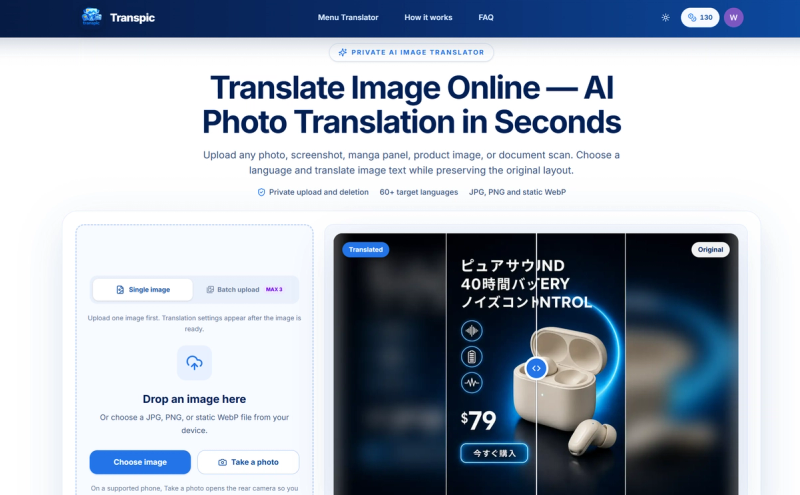
Transpic is a browser-based AI image translator that converts text inside photos, screenshots, manga pages, product graphics, and document scans into 60+ target languages while preserving the original layout. The tool runs entirely in the web browser, accepts JPG, PNG, and static WebP files, and outputs a downloadable translated image with editable text blocks. It is offered by Transpic (transpic.ai) with a freemium pricing model.
What is Transpic?
Transpic is a web-based image translation service that detects text in uploaded images and replaces it with translated text while keeping the visual context intact. It takes JPG, PNG, or static WebP files as input and produces translated images at the same dimensions, with optional editing before export. No desktop app is needed—everything happens in the browser.
Key Features
- Private image processing — Uploads use private storage and short-lived access URLs, so source images are not published as permanent public assets.
- Layout-aware text detection — The AI detects reusable text regions and their approximate positions, keeping each translated phrase connected to the sign, label, speech bubble, or callout it explains.
- Review-before-download editor — Open the translated image to correct wording, resize a text block, adjust color, or move text before exporting the final graphic.
- 60+ target languages — Supports widely used Asian, European, Middle Eastern, and African languages, including English, Chinese, Japanese, Korean, Spanish, French, German, Portuguese, Arabic, and Hindi.
- Dedicated modes for content types — Choose General, E-commerce, Manga, Document image, or Custom mode to match how text is arranged in the source.
- Batch processing — Upload multiple images at once, set language and mode, and translate the whole batch with live progress (limits depend on plan).
- Original-size export — Download the translated image at the uploaded dimensions, with watermark on the free plan and watermark-free export on paid tiers.







