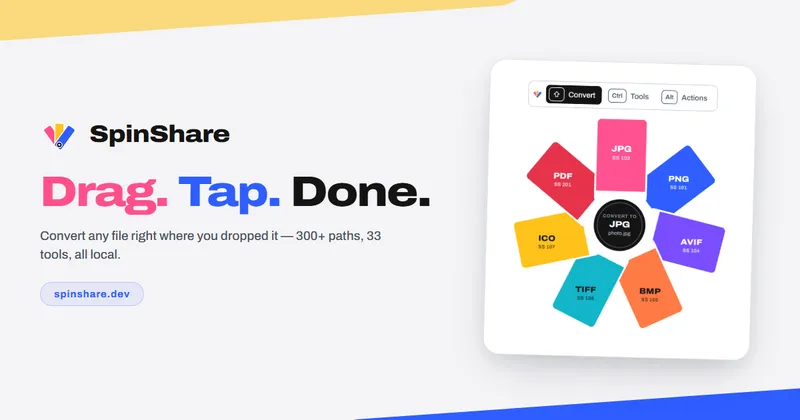
SpinShare is a desktop file converter for Windows 10/11 and macOS (beta) that converts images, video, audio, PDFs, documents, spreadsheets, archives, CAD files and subtitles locally, without uploading anything to a server.
What is SpinShare?
SpinShare is a local file conversion app that runs on Windows 10/11 and macOS (beta) and converts files between more than 300 supported format pairs without uploading them. Users drag a file onto the app, hold Shift to pick an output format, or hold Ctrl for file tools, then release on the chosen segment. It is distributed by SpinShare itself through the Microsoft Store, a direct .exe download, and Apple Silicon / Intel Mac builds.
What makes SpinShare stand out?
- Offline conversion engine — every conversion runs on the local machine, so files never leave the PC and the app works without an internet connection.
- 300+ conversion options — image inputs include HEIC, AVIF, SVG, ICO and TGA; video covers MP4, MOV, MKV, WEBM, AVI, WMV, MXF, VOB and more; audio covers MP3, FLAC, OPUS, ALAC, APE, AC3 and others.
- 35 built-in file tools on
Ctrl— crop, add background, compress, redact, resize, strip metadata, adjust, annotate, generate QR codes, tags, join images, and convert to PDF. - 6 file actions on
Alt— Copy, Copy path, Move to, Copy to, Terminal and Show, which work on folders and mixed selections and never consume conversion allowance. - Document and data conversions — PDF to DOCX/TXT/MD/HTML/EPUB/PPTX, DOCX to PDF, and CSV/TSV/XLSX/XLS/XLSB/ODS spreadsheets to MD, TXT, PDF or PPTX.
- Shift-key radial menu — formats, tools and actions are laid out on a fan deck or classic wheel triggered by modifier keys, with
Escto cancel and full keyboard navigation. - Local-only stats — conversion history is tracked strictly on the machine; the app does not count or report your files.
- Lifetime license across up to 3 PCs — one purchase covers three machines, with a separate license recovery page for buyers.
Who should use SpinShare?
- iPhone and camera owners: convert HEIC/HEIF photos to JPG for upload forms or older software, or resize and compress images before sending them.
- Office and admin workers: turn PDFs into editable DOCX, DOCX into shareable PDF, or a scanned PDF into per-page JPG images.
- Video and audio editors: pull MP3 audio out of an MP4 recording, convert MOV phone footage to MP4, or make a looping GIF from a short clip.
- Privacy-conscious users: convert confidential documents, invoices and screenshots without sending them to a web converter.
What can you do with SpinShare?
- Fixing rejected uploads: convert HEIC to JPG or a large PNG screenshot to JPG so a website will accept the file.
- Preparing documents for sharing: convert JPG to PDF, CSV exports to XLSX with real columns, or an SRT subtitle file to VTT.
- Trimming media: keep only the audio from a recording with MP4 to MP3 or M4A to MP3, or compress a photo by roughly 70% with the Compress tool.
- Batch image assembly: join three 1600×1200 images side by side into one PNG, or export a set of images into a single multi-page PDF in drop order.
How does SpinShare work?
Drag a file onto the app, then hold Shift to choose a conversion format, Ctrl to pick a file tool, or Alt to pick a file action such as Copy or Move to; releasing the mouse on a segment starts the job and Esc cancels. Keyboard users can focus a file, press Enter, pick with the arrow keys and press Enter again.
Pricing
SpinShare uses a one-time lifetime license rather than a subscription, and a free download/trial exists via the Microsoft Store and direct .exe. Spot-limited tiers run from a sold-out Founder Pass through Early Bird, Launch Special, Pro Pass and full price after launch; all tiers include the 300+ conversions, 35 tools and 6 file actions, with checkout handled by Stripe.
FAQ
Does SpinShare upload my files?
No. SpinShare states that every conversion runs on your machine and files stay local even without an internet connection. Conversion history is also stored locally, and the app does not report or count your files to a server.
Are all formats supported in both directions?
No. The page states that HEIC is input-only, XLSB can be read but not written, RAR can be unpacked but not repacked, and SVG output is traced vector art rather than a pixel copy of the original image.
Is there a free version?
A free download is available from the Microsoft Store and as a direct .exe, and the macOS beta includes a free trial. Unlocking all 300+ conversions, 35 tools and 6 file actions requires the paid lifetime license.
Which platforms does SpinShare run on?
Windows 10 and 11 are the primary targets, with a macOS build in beta offered as separate Apple Silicon and Intel downloads. The Mac beta is unsigned, so first launch requires allowing it in System Settings under Privacy & Security.
How many computers can use one license?
A single lifetime license covers up to three PCs, and the same license applies to both the Windows and macOS builds. Buyers who lose their key can retrieve it from the license recovery page.