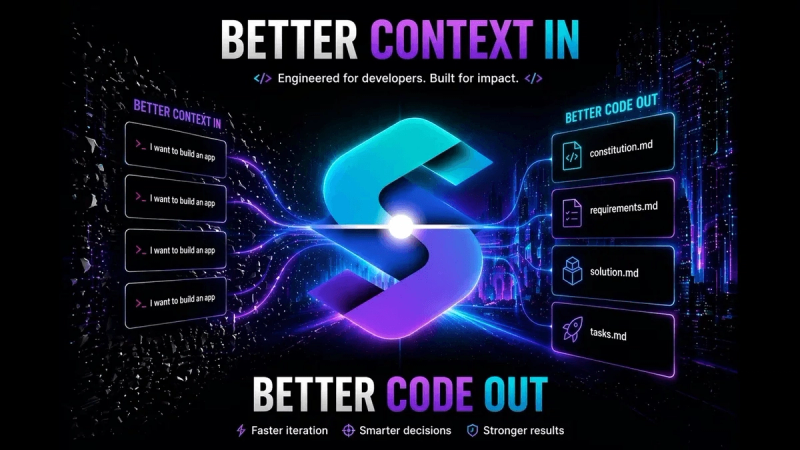
MySpec is a spec-driven development (SDD) web app that turns a messy product idea into a four-file markdown spec bundle — constitution.md, requirements.md, solution.md and tasks.md — that AI coding agents such as Cursor and Claude Code build from.
What is MySpec?
MySpec is a browser-based spec engine at app.myspec.dev that accepts a paragraph, a Slack thread or a voice note as input, runs a Socratic interview of 5–15 targeted questions, and outputs a structured four-file markdown bundle: constitution.md holds locked, non-negotiable invariants, requirements.md holds user stories and EARS+ acceptance criteria, solution.md holds Mermaid architecture diagrams, and tasks.md holds the build plan. The bundle exports as a ZIP you drop into a .specs/ folder, or streams to an IDE through the MySpec MCP server. The product is in open beta with an unlimited-AI free tier and no credit card required.
What makes MySpec stand out?
- Four-file bundle — constitution.md, requirements.md, solution.md and tasks.md form one versioned source of truth, each editable in plain English.
- EARS+ acceptance criteria — requirements.md expresses user stories as testable criteria, and the interview surfaces edge cases before code is written.
- Mermaid diagrams — solution.md renders architecture and flow diagrams live in the browser editor.
- MCP handoff — a stdio MCP server plus a hosted HTTP MCP server at mcp.myspec.dev stream constraints and requirements directly into agent prompts.
- Greenfield and brownfield — a Spec Kit-compatible greenfield workflow (spec.md, plan.md, tasks.md) and brownfield proposals with requirements deltas, OpenSpec-compatible.
- ZIP export with no lock-in — download the full bundle and commit it to Git or read it from any agent.
- Organizations and API tokens — invitations, shared projects and roles, and personal API tokens for unattended MCP runs.
- Public share links — up to 20 per month on the Free plan, with custom skills for hosted agents.
Who should use MySpec?
- Staff and lead architects: pin non-negotiables (such as guest checkout never requiring an account) into a locked constitution.md so agents stop rewriting auth logic after a dozen chat turns.
- Engineering leads and platform teams: give distributed developers shared projects, roles and one spec bundle that humans and agents both cite by requirement ID.
- Founders and solo builders: start from an idea paragraph instead of a blank page and get a scaffolded plan for a brand-new codebase.
- Teams maintaining existing services: use the brownfield workflow to produce a MySpec proposal and a requirements delta against a system already in production.
What can you do with MySpec?
- New project kickoff: paste a short idea description, answer the interview, and export a tasks.md plan plus Mermaid diagrams your agent can execute.
- Feature changes on a live codebase: generate a brownfield requirements delta so added scope is explicit rather than buried in a chat history.
- IDE agent wiring: connect the MySpec MCP server so Cursor or Claude Code pulls spec context over stdio or HTTP at build time.
- Design review: share a public link to the bundle so reviewers read acceptance criteria rather than a prompt thread.
How does MySpec work?
- Describe the idea — paste a paragraph, Slack thread or voice note; an Analyst agent extracts the problem shape, entities and integration boundaries.
- Answer the interview — 5–15 structured questions clarify scope, users, flows and edge cases.
- Specify the bundle — four markdown files render live with Mermaid diagrams and stay coherent as you refine them in chat.
- Export to your agent — download the bundle as a ZIP into
.specs/, or connect the MCP server for two-way access.
Pricing
MySpec is freemium: pricing kicks in at general availability, and the open beta free tier requires no credit card. Free covers 20 projects, 100 spec files and 20 public share links per month. Pro raises this to 100 projects with unlimited specs and 5x the Free AI usage limit. Team removes project and spec caps, gives 10x the Free AI limit per seat, requires two seats minimum, and adds shared projects, roles and centralized billing. GitHub and VS Code integrations are listed as shipping later.
FAQ
Is MySpec free to use?
Yes — the open beta free tier is live now and requires no credit card. It allows 20 projects, 100 spec files and 20 public share links per month, and you can export the full bundle as a ZIP at any time with no lock-in.
What files does MySpec produce?
It produces four markdown files: constitution.md for locked invariants, requirements.md for EARS+ user stories and acceptance criteria, solution.md for Mermaid diagrams, and tasks.md for the build plan. The greenfield workflow can also emit a Spec Kit-compatible spec.md, plan.md and tasks.md set.
Does MySpec work with Cursor and Claude Code?
Yes. You can download the bundle as a ZIP, drop it into a .specs/ directory, and point Cursor or Claude Code at it. Alternatively connect the MySpec MCP server — available as a stdio server and as a hosted HTTP server — for two-way spec access.
Can MySpec handle an existing codebase?
Yes. Brownfield workflows generate a MySpec proposal plus a requirements delta for existing systems, and the change format is OpenSpec-compatible. Spec Kit-compatible greenfield workflows cover projects starting from scratch.
What are the Free plan limits?
Free includes 20 projects and 100 spec files, 20 public share links per month, the markdown and Mermaid editor, ZIP export of the spec bundle, and community support. Pro and Team tiers raise the AI usage limit and remove the project and spec caps.