LaunchSoar is a lightweight, curated AI tools directory for builders, indie developers, and founders, featuring handpicked and tested AI products across dozens of categories to reduce experimentation time and amplify productivity.
What is LaunchSoar?
LaunchSoar is a curated AI directory that lists and categorizes AI tools for creators, indie developers, and founders. It takes AI products as input—submitted or discovered—and outputs a searchable, filterable directory with categories, tags, and descriptions. The platform runs as a web directory and is maintained by an independent team; it is sponsored by BrandMaker. As of the page data, the site attracts over 41,000 visitors in 30 days, indicating active community use.
Key Features
- Curated selection — Every listed tool is handpicked and tested, avoiding bloated or low-quality entries.
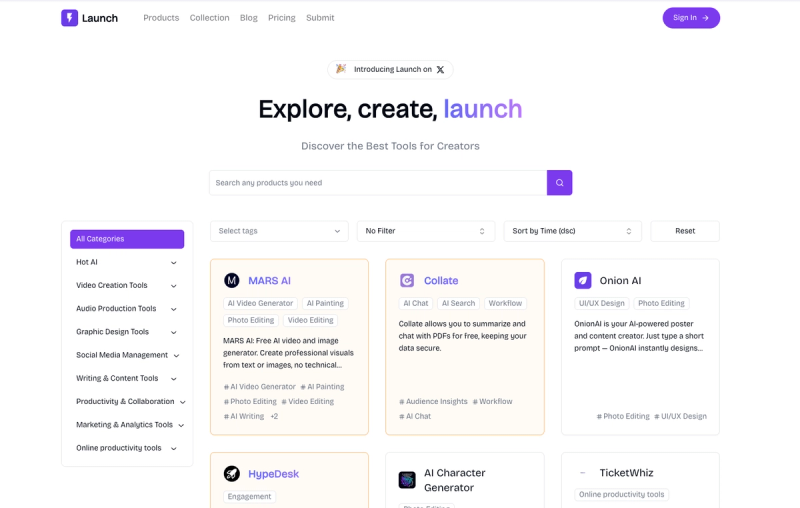
- Category and tag filters — Tools are organized into categories such as AI Assistant, Video Creation, Graphic Design, Writing & Content, Analytics, and more, with granular tags for precise filtering.
- Search and sort — Users can search by keyword, filter by tags, and sort by time (descending) to see the latest additions.
- Item detail pages — Each tool has a dedicated page with description, category, tags, and a link to the tool’s website.
- Newsletter — Visitors can subscribe to receive updates and new tool announcements.
- Sponsored placement — Brands can sponsor the directory (e.g., BrandMaker appears as a featured item).
Who is it for?
- Indie developers — Validate product ideas by discovering AI tools that solve specific problems.
- Founders — Find AI solutions to scale marketing, design, or operations without building from scratch.
- Content creators — Access AI writing, video, and design tools to streamline content production.
- AI early adopters — Stay updated on new and emerging AI products in a clutter-free environment.
What can you do with LaunchSoar?
- Discover tools for specific tasks — Use category filters to find AI video generators, audio production tools, or analytics platforms.
- Compare similar tools — Browse multiple entries in the same category (e.g., AI Assistants) to evaluate alternatives.
- Stay current — Sort by time to see the most recently added tools, ensuring you catch early-stage products.
- Share and bookmark — Each item has a unique URL for sharing or revisiting later.
How does LaunchSoar work?
Users land on the directory homepage, where they can search by keyword, choose a category (e.g., “Video Creation Tools”), apply tags, or sort by newest. Clicking a tool’s card opens a detailed page with description, categories, tags, and a direct link to the tool. There is no sign-up required to browse; a newsletter form is available for optional updates.
Pricing
LaunchSoar is free to browse and list tools. Submission details are not disclosed on the page, but the directory appears to be free for users.