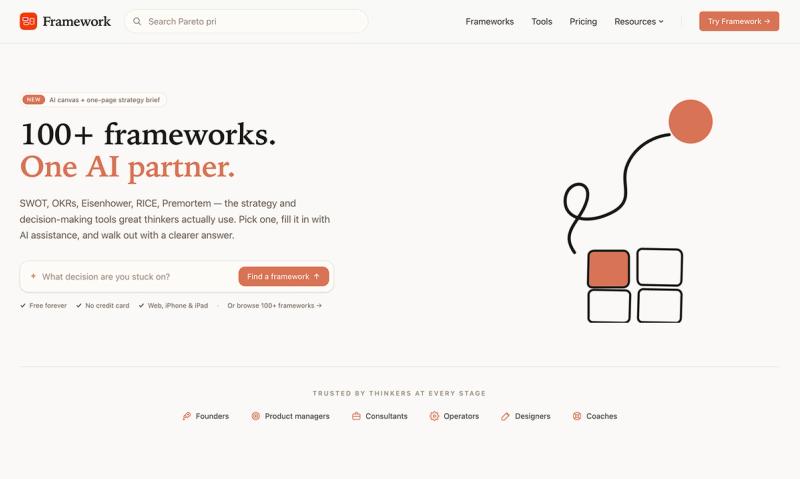
Framework is a thinking and decision-making workspace built around 100+ proven frameworks (SWOT, OKRs, RICE, Eisenhower, Premortem, and more) that combines each framework with an AI partner to fill in the canvas and turn it into a one-page strategy brief.
What is Framework?
Framework is a curated library of over 100 strategy, prioritization, and decision-making frameworks — SWOT, OKRs, Eisenhower Matrix, RICE, Premortem, MoSCoW, Lean Canvas, BCG Matrix, and more — each paired with an AI assistant. You input a one-line description of your situation, and the AI generates a complete first draft into a structured canvas (2×2 matrix, quadrant, scored table) in about four seconds. The output is a canvas that can be refined and exported as a shareable one-page PDF brief. It runs on the web, iPhone, and iPad, and is built by Framework (no parent company stated on the page).
Key Features
- 100+ curated frameworks — Strategy, prioritization, decision-making, mental models, root cause analysis, retros, and brainstorming tools, each with a worked example and plain-English description.
- AI canvas — Pick a framework, type one sentence about your situation, and the AI streams a complete first draft into the canvas in under five seconds. AI-authored items are visually marked so you always know what the AI added.
- Refine in plain language — Instead of re-prompting, tell the AI what to change (e.g., “push harder on distribution risks”) and it rewrites just that slice of the canvas.
- One-page strategy brief — Every canvas can be exported as a typeset, shareable PDF brief: context, top quick wins, one big bet, what to cut. Optionally create a public link for sharing.
- Brief wizard — A 3-to-6 question Q&A flow that picks the right framework and builds the brief end-to-end, for moments when you don’t know where to start.
- Cross-device sync — Same Supabase backend powers the iPhone, iPad, and web apps. Start on the train, finish at your desk.
- Multilingual interface — Full English, Japanese, and Traditional Chinese support across the marketing site and the in-app interface.
Who is it for?
- Founders — Pressure-test strategy decisions before committing. Run a premortem before a launch or a SWOT before a pivot.
- Product managers — Structure prioritization meetings, weekly briefs, and quarterly planning. Score backlog items with RICE in one sitting.
- Consultants & coaches — Run structured exercises with clients and walk away with a shareable PDF. Save and reuse canvases.
- Operators & designers — Triage weekly tasks with Eisenhower Matrix, set personal OKRs, or map out a decision tree.
What can you do with Framework?
- Run a SWOT analysis — Input a scenario (e.g., “Q2 launch readiness”) and get strengths, weaknesses, opportunities, threats drafted and ready to refine.
- Score backlog with RICE — Define reach, impact, confidence, and effort for each item; the AI suggests scores and ranks them.
- Triage weekly tasks — Use the Eisenhower Matrix to sort urgent vs. important tasks and decide what to do, defer, delegate, or delete.
- Set quarterly OKRs — Define objectives and key results with AI assistance; track progress toward goal percentages.
How does Framework work?
- Choose a framework from the library (or use the Brief wizard to get a recommendation). 2. Describe your situation in a single sentence (e.g., “We’re launching a new feature”). 3. The AI fills in the canvas with items in each quadrant or row. 4. Refine by typing natural language instructions to adjust specific sections. 5. Export as a one-page PDF brief with context, top quick wins, one big bet, and what to cut. The brief gets a public link if desired.
Pros and cons
Pros:
- Structured AI assistance avoids open-ended prompting; the framework gives the AI a shape.
- Free tier includes access to the full framework library and a small AI credit allowance with no credit card.
- Cross-device sync (web, iPhone, iPad).
- Multilingual support (English, Japanese, Traditional Chinese).
- Export to shareable PDF brief.
Cons:
- AI canvas usage is limited on the free tier (requires premium for unlimited briefs and more AI explorations).
- No desktop app for Windows or Android (web and iOS only).
- Some advanced frameworks may require premium to export full briefs.
Pricing
Framework is freemium. The entire library of 100+ frameworks is free to browse, and a small AI credit allowance lets you try the canvas before paying. Premium ($14.99/month or $143.99/year) unlocks unlimited briefs, 50 AI explorations per month, and PDF export. Ultra ($29.99/month or $289.99/year) upgrades the AI engine to Claude Opus and quadruples the AI credit allowance. No credit card required for the free tier.
Alternatives
- ChatGPT, Claude, Gemini — General-purpose AI chat tools that lack structured framework canvases. Framework gives the AI a shape (2×2 matrix, quadrant) rather than leaving you to prompt from scratch.
- Notion, Miro, FigJam — Template libraries that offer static framework templates but no AI assistance to fill or refine them. Framework’s canvases are interactive and AI-powered.
- Strategy software (e.g., Cascade, Aha!) — More heavyweight planning tools; Framework focuses on individual or small-team framework use.
FAQ
Is Framework free?
Yes, the free tier gives you access to all 100+ frameworks and a small AI credit allowance to try the canvas. No credit card is required.
What frameworks are included?
Framework includes over 100 frameworks: SWOT, OKRs, Eisenhower Matrix, RICE, Premortem, MoSCoW, Lean Canvas, BCG Matrix, North Star, ICE, Ansoff Matrix, Burn Multiple, Cash Runway, Five Forces, 5 Whys, Pros/Cons, Decision Tree, and more.
Can I export my work?
Yes. Every canvas can be exported as a one-page PDF brief. You can also generate a public link to share the brief with your team.
Is there a mobile app?
Yes, Framework has native apps for iPhone and iPad, synced via the same backend as the web app.
How does the AI work?
You pick a framework, describe your situation in one sentence, and the AI streams a complete first draft into the canvas. You can then refine specific quadrants or items using plain language instructions.