Newsletter
Join the Community
Subscribe to our newsletter for the latest news and updates
CC Image Hosting (ccimg.cc) is a free, no-login image hosting platform. Upload images instantly and generate permanent links in Markdown, HTML, and BBCode. Clean, ad-free, and ideal for forums, blogs, and e-commerce.
Traffic, search & AI signals for ccimg.cc.
Third-party traffic estimate · Updated Sep 9, 2026
Submit your own product to reach creators and founders looking for the next tool to try.
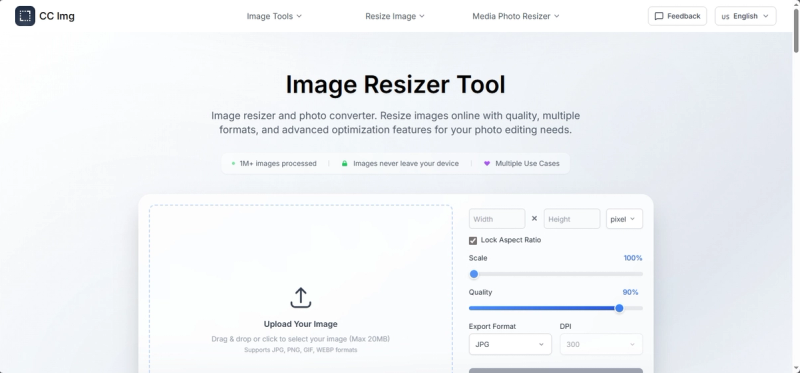
CC Img (ccimg.cc) is a free online image resizer and converter that processes images entirely in the browser, supporting JPG, PNG, GIF, and WebP formats with advanced dimension and quality controls.
CC Img is a browser-based image resizing and conversion tool that runs locally on your device—no uploads to a server. It accepts images up to 20 MB in JPG, PNG, GIF, or WebP format and outputs resized images in JPG, PNG, or WebP with customizable dimensions, DPI (72–1400), and quality (1–100%). Developed by the team behind ccimg.cc, it requires no registration or account.
Yes, CC Img is completely free with no hidden charges, watermarks, or limitations. You can resize unlimited images without creating an account.
CC Img uses smart algorithms to maintain quality. When enlarging, it applies upscaling techniques; when reducing, it optimizes compression. The quality slider (1–100%) lets you control the trade-off between file size and clarity.
Input: JPG, PNG, GIF, WebP. Output: JPG, PNG, WebP. PNG preserves transparency; JPG is best for photos; WebP offers high compression with minimal quality loss.
Images up to 20 MB are accepted. There are no pixel dimension limits, but very large files may take a few extra seconds to process.
Yes. All processing occurs locally in your browser; no data is uploaded to any server. Your images never leave your device.