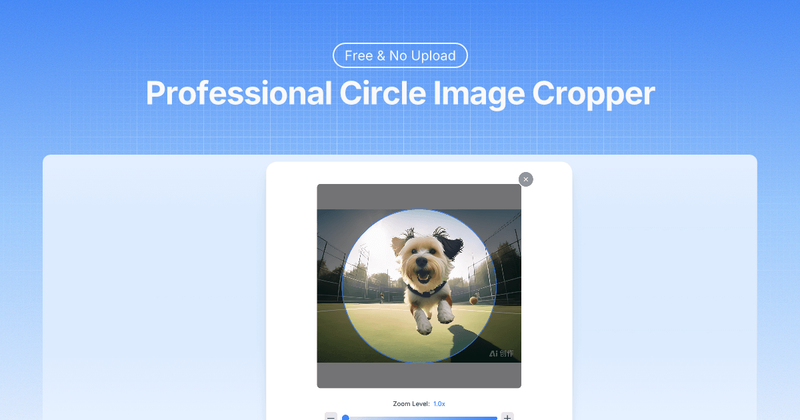
Circle Crop is a free online tool that instantly crops images into perfect circles with transparent backgrounds, processing over 1 million images entirely within your browser.
What is Circle Crop?
Circle Crop is a web-based image editor that takes square or rectangular images (JPG, PNG, WebP, GIF) and outputs circular PNGs with transparent backgrounds. All processing happens locally on your device — no files are uploaded to any server. The tool is available at circlecrop.org and requires no account or software installation.
Key Features
- Local Processing — Images never leave your device; all computation occurs in-browser, ensuring full privacy.
- Real-Time Preview — See your circular crop update instantly as you adjust position and zoom.
- High-Quality Output — Maintains original image resolution with crisp edges; downloads are PNG with transparent background.
- Format Support — Upload JPG, JPEG, PNG, WebP, and GIF files up to 20 MB.
- Drag and Zoom Controls — Drag the image to reposition and use a zoom slider or +/- buttons to resize within the circle.
- Mobile-Friendly — Full touch support on smartphones and tablets; works without any app download.
- No Signup or Limits — Completely free with unlimited crops; no account, email, or payment required.
Who is it for?
- Social media managers — Create consistent circular profile pictures for platforms like Twitter, LinkedIn, and Instagram.
- Designers — Generate circular logos, app icons, and avatars with transparent backgrounds for branding projects.
- Team administrators — Crop employee headshots into uniform circles for company websites or directories.
- Content creators — Prepare circular images for testimonials, website headers, and user interface elements.
What can you do with Circle Crop?
- Profile pictures — Crop any photo into a perfect circle with a transparent background, ready for social media or forums.
- Logos and icons — Transform square logos into circular versions that work seamlessly on any background.
- Team photos — Crop group or individual photos into uniform circular headshots for professional profiles.
- Design assets — Create circular image elements for websites, presentations, and digital products.
How does Circle Crop work?
- Upload your image by dragging and dropping or clicking the upload area (supports JPG, PNG, WebP, GIF up to 20 MB).
- Position the image within the circular frame by dragging, and adjust the zoom level using the slider or +/- buttons.
- Click "Crop & Download" to save the circular PNG with a transparent background. All processing stays on your device.
FAQ
How do I adjust the image position in the circle?
Simply drag the image within the circular frame to reposition it. The live preview updates in real time so you can see exactly where the subject will appear.
Can I make the image bigger or smaller within the circle?
Yes, use the zoom slider or the +/- buttons to resize the image while keeping it inside the circle. Start at 1x zoom for maximum flexibility.
What image formats can I upload and download?
You can upload JPG, JPEG, PNG, WebP, and GIF files up to 10 MB. The output is always a PNG file with a transparent background.
Will my cropped image have a transparent background?
Yes, every download is a PNG with a crystal-clear transparent background, perfect for overlaying on any website, social media, or design project.
Is there a limit on how many images I can crop?
No limits. You can crop as many images as you want, completely free, with no signup or account required.
Does this work on mobile phones?
Absolutely. The tool is fully responsive with touch drag and pinch-zoom support, so you can crop images directly from your smartphone or tablet browser.