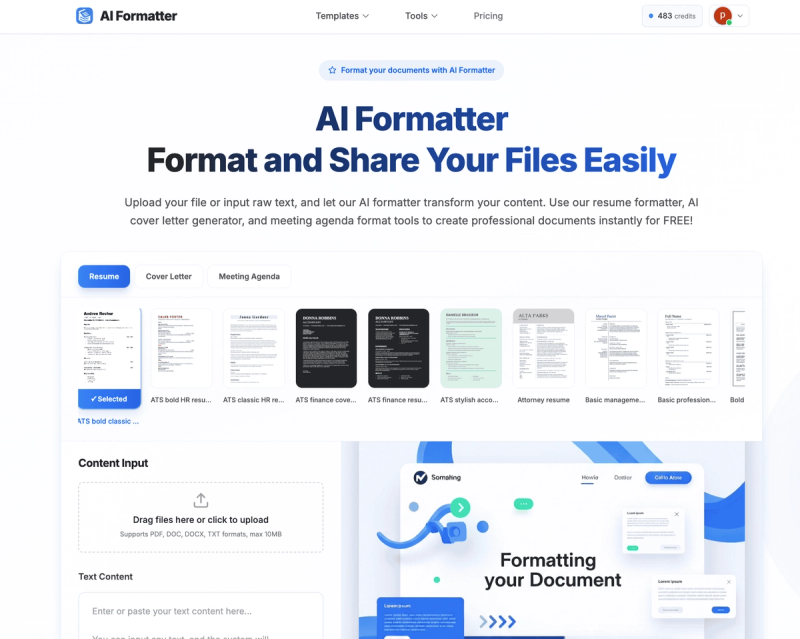
AI Formatter is a web-based AI platform that converts uploaded documents or raw text into professionally formatted outputs across resume, cover letter, meeting agenda, invoice, and dozens of other document types using over 100 customizable templates.
What is AI Formatter?
AI Formatter is an AI-powered document formatting SaaS platform that takes files (PDF, DOC, DOCX, TXT, up to 10 MB) or raw text input and produces polished, downloadable documents in PDF, Word, or HTML formats. The platform is developed by Sun Sky LLC and runs entirely in the browser with cloud-based processing.
Key Features
- 100+ Professional Templates — Curated templates for document types ranging from resumes and cover letters to meeting agendas, invoices, receipts, quotations, and over 100 other categories, each with multiple stylistic variants.
- ATS-Optimized Resume Formatting — The resume formatter applies formatting designed to pass applicant tracking systems while maintaining content integrity.
- AI Cover Letter Generator — Upload a draft or input raw text to automatically generate a polished, personalized cover letter ready for job applications.
- Meeting Agenda Formatter — Transform meeting notes or draft agendas into structured, professional meeting agendas using context-aware AI.
- Invoice, Receipt & Quotation Generators — Purpose-built tools for creating business-ready invoices, receipts, and quotations from uploaded data or manual input.
- Real-Time Editor & Sharing — After AI formatting, users can edit the rendered document in an intuitive editor and share via direct links or download in multiple formats.
- Multi-Format Support — Accepts PDF, DOC, DOCX, and TXT as input; exports to PDF, Word (DOCX), and HTML.
Who is it for?
- Job seekers — Use the resume formatter and cover letter generator to create ATS-optimized resumes and personalized cover letters from existing drafts or raw text.
- Business professionals — Format meeting agendas, minutes, and reports using the meeting agenda formatter and general document formatter.
- Freelancers and small business owners — Generate professional invoices, receipts, and quotations quickly from transaction data or manual entries.
- Students and academics — Apply formatting for papers, reports, and other academic documents using the general document formatter.
What can you do with AI Formatter?
- Create a resume from scratch or polish an existing one: Upload your current resume and select a template; the AI reformats it while preserving your content, then you can download or share.
- Generate a cover letter from a job posting description: Input raw text about your qualifications and the role; the cover letter generator produces a tailored draft ready for final edits.
- Turn meeting notes into a formatted agenda: Paste raw notes into the meeting agenda formatter to get a structured agenda with sections and timelines.
- Produce an invoice from a list of items: Enter billing details or upload a spreadsheet; the invoice generator outputs a professional invoice in PDF or Word.
How does AI Formatter work?
The workflow comprises three simple steps: 1) Upload a file (PDF, DOC, DOCX, TXT) or input raw text; 2) Choose a template from over 100 options across categories like resumes, cover letters, meeting agendas, and more; 3) Click "Generate" to have the AI apply formatting instantly. After generation, users can edit the result in a real-time editor, share a link, or download in PDF, Word, or HTML.
FAQ
Is AI Formatter free?
AI Formatter is offered as a free service — no credit card is required to start formatting. The platform indicates free usage for all core tools including the resume formatter and cover letter generator.
What file formats can I upload?
You can upload PDF, DOC, DOCX, and TXT files, each up to 10 MB in size. You can also input raw text directly.
What formats can I download?
Formatted documents can be downloaded as PDF, Word (DOCX), or HTML files, and shared via direct links.
Does the resume formatter optimize for ATS?
Yes. The resume formatter applies formatting specifically designed to be compatible with applicant tracking systems, using clean layouts and standard section headings.
Can I edit the document after AI formatting?
Yes. After AI processing, the rendered document opens in an intuitive editor where you can make manual adjustments, change templates, or fine-tune content before finalizing.
How are my documents handled?
According to the FAQ, all uploaded documents are encrypted during processing and not stored longer than necessary. Users can delete their data at any time.