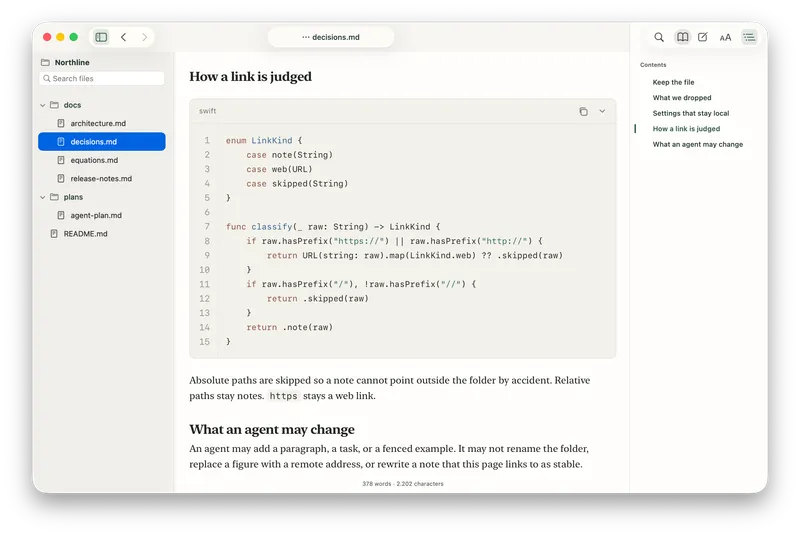
Aero Markdown is a native macOS Markdown reader that opens a single file or an entire folder of Markdown documents and renders them as one navigable, link-following page.
What is Aero Markdown?
Aero Markdown is a paid native macOS application for reading — not editing — Markdown files that already sit on your disk. Point it at a single file or a folder, and it renders the documents with a file tree on one side, the formatted page in the center, and a heading outline on the other. It requires macOS 14 or later, sells for $14.99 as a one-time purchase from aeromarkdown.app, and ships in English and Spanish.
What makes Aero Markdown stand out?
- Folder-first reading — open a whole directory and keep your existing structure, with no import step and no separate library to maintain.
- Relative link navigation — links between Markdown files inside the opened folder resolve in-app, with back and forward history so you can return to where you left off, plus next/previous document movement.
- Live reload for coding agents — when the open file changes on disk, the app reloads it and holds your current heading position; unsaved edits stay intact until you choose to reload.
- Agent hooks — an optional local setup command lets Claude Code, Cursor, and Windsurf open the Markdown they write in the existing window, in the background. Codex is not covered by these hooks.
- Local rendering only — tables, task lists, images, Mermaid diagrams, GitHub alerts, footnotes, math, and highlighted code blocks all render inside the app with nothing fetched from the network.
- No account, no cloud — the app works offline and uploads no document content; there is no cloud workspace and no sign-in.
- Heading utilities — copy a relative link to the current heading, and keep the document outline visible while reading.
- Free browser reader — the site offers an online Markdown viewer for testing a file without installing the app.
Who should use Aero Markdown?
- Developers working with coding agents: read implementation plans, reports, and READMEs written by Claude Code, Cursor, or Windsurf while those files are still being rewritten, without losing your scroll position.
- Writers and note-takers with plain-text folders: browse a directory of Markdown notes and jump between them through the relative links already in the documents.
- Technical authors reviewing docs trees: check a documentation folder rendered with diagrams, tables, footnotes, and math before publishing.
Use cases
- Agent-assisted development: keep a plan document open beside your editor; each agent write reloads the page at the heading you were reading.
- Personal knowledge folders: open a notes directory once and move through it with back/forward history instead of re-opening files.
- Offline documentation review: read Mermaid diagrams, math, and GitHub-style alerts with no network calls and no uploads.
How does Aero Markdown work?
Open a Markdown file or a folder, and the app keeps the existing structure in place. From there you follow relative links between documents, use back and forward to retrace steps, and move to the next or previous document inside the same window. If a coding agent rewrites the open file, the view reloads and stays on the current heading.
Pricing
Aero Markdown is a one-time paid app: $14.99 USD for a lifetime Aero 1.x license for one Mac, including app updates, with a 14-day refund on the license key. There is no subscription tier and no free tier of the Mac app, though the browser viewer is free to use.
FAQ
Does Aero Markdown need an account or internet connection?
No. There is no account, no cloud library, and no sign-in. The app works offline, renders everything locally, and does not send document content to any service.
Which platforms does Aero Markdown run on?
It is a native Mac app requiring macOS 14 or later. There is no Windows, Linux, iOS, or Android version of the desktop app; the only non-Mac option is the free browser-based Markdown viewer on the website.
Does Aero Markdown include AI chat or model calls?
No. The app has no AI chat and makes no model calls. The AI connection is limited to an optional local setup command that lets Claude Code, Cursor, and Windsurf open files they write in the existing window; Codex is not included in these hooks.
What happens to unsaved edits when a file changes on disk?
The app reloads the changed file and keeps your place at the same heading. If you have unsaved edits, they stay intact until you explicitly choose to reload.
How much does Aero Markdown cost?
It costs $14.99 USD as a one-time purchase for a lifetime Aero license on one Mac, including updates, with a 14-day refund on the license key.