
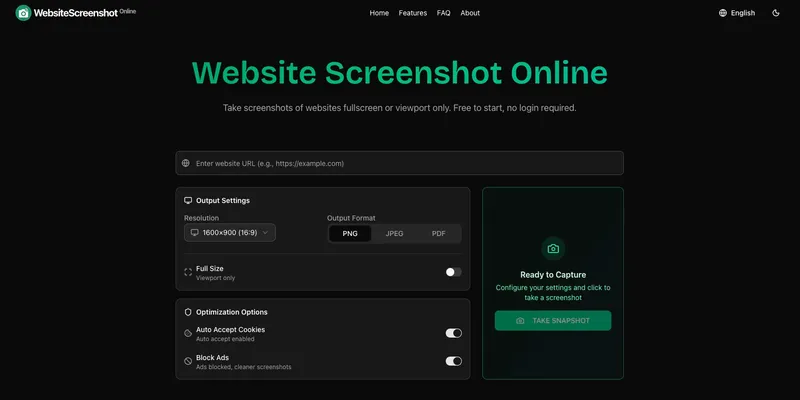
WebsiteScreenshot is a free online tool that captures website screenshots in PNG, JPEG, or PDF formats and records scrolling videos, requiring no registration.
What is WebsiteScreenshot?
WebsiteScreenshot is a free online service that takes a website URL as input and produces a screenshot image (PNG, JPEG, PDF) or a scrolling video as output. It runs entirely in the browser with no software installation, and processing happens on the server side. The tool is developed by an independent team and prioritizes user privacy by not storing any captured data.
Key Features
- Multiple output formats — Save screenshots as PNG (best for quality and transparency), JPEG (smaller file sizes), or PDF (document-style captures).
- Full page capture — Capture entire web pages up to 20,000 pixels long, not just the visible viewport, ideal for long articles or landing pages.
- Device simulation — Choose from 12 preset resolutions including desktop ratios (16:9, 16:10, 5:4) and mobile device sizes (Galaxy S10, iPhone 6/7/8/XR/X, etc.).
- Scrolling video recording — Record smooth scrolling walkthroughs suitable for demos, reviews, and shareable website previews.
- Smart automation — Automatic detection and acceptance of cookie/GDPR banners (multiple languages), and optional ad blocking for cleaner screenshots.
- Capture delay — Set a delay between 0 and 30 seconds (2s default) to allow dynamic content to load before capture.
- Privacy focused — No screenshots or website data are permanently stored; all processing is temporary and data is removed immediately after completion.
- Instant and free — No registration or watermark; screenshots are generated in seconds and ready to download directly.
Who is it for?
- Web developers and designers — Test responsive layouts across desktop, tablet, and mobile viewports without opening dev tools.
- Marketers — Capture clean, ad-free screenshots and scrolling videos for client presentations, landing page reviews, and social media content.
- Content creators — Record polished website walkthroughs for tutorials, demos, or product showcases.
- QA testers — Quickly capture full-page screenshots and scrolling videos to document website behavior without installing browser extensions.
What can you do with WebsiteScreenshot?
- Capture website screenshots — Use the Website Screenshots tool to take a standard screenshot of any publicly accessible webpage with custom resolution and format.
- Capture full page screenshots — Use the Full Page Screenshots tool to capture the entire page from top to bottom, up to 20,000 pixels.
- Record scrolling videos — Use the Website Scrolling Video tool to create smooth, shareable scrolling walkthroughs for demos or reviews.
How does WebsiteScreenshot work?
- Enter the website URL in the input field.
- Choose the desired resolution, output format (PNG, JPEG, PDF for images; video for screen recording), and any optional settings (delay, ad blocking, cookie handling).
- Click 'Take Snapshot' and wait a few seconds for processing.
- Download the resulting screenshot or video directly; no account or permanent storage is used.
FAQ
Is WebsiteScreenshot free?
Yes, the service is completely free with no registration required. Screenshots are generated without watermarks, logos, or backlinks, and you can download them immediately.
What formats are supported?
Screenshots can be saved as PNG (high quality with transparency), JPEG (smaller file size), or PDF (document-style captures). For videos, the tool outputs scrolling video files.
Do you store my screenshots?
No. We do not provide permanent storage. Screenshots are generated temporarily and must be downloaded immediately. All processing data is removed after completion to protect your privacy.
Can I capture pages that require login or authentication?
WebsiteScreenshot can only capture publicly accessible websites. Pages behind login forms, captchas, or special authentication cannot be captured.
How do you handle cookie popups and ads?
The tool automatically detects and accepts cookie consent popups in multiple languages. You can also enable the ad blocking option to remove advertisements from screenshots for cleaner results.
Pricing
WebsiteScreenshot is completely free to use with no registration, subscription, or payment required.


