Stamp Maker is a browser-based all-in-one tool for creating, repairing, extracting, and applying digital stamps with AI assistance. It runs entirely in the browser, requires no software installation, and is developed by the Stamp Maker team (stampmaker.io).
What is Stamp Maker?
Stamp Maker is a web application that takes inputs like a blank canvas, a template, a blurry image, a scan, or a screenshot and produces outputs such as transparent PNG stamps, SVG vectors, PDFs with applied stamps, and more. It combines creation, repair, extraction, and application in one online workflow, enabling users to move from draft to reusable output without switching tools.
Key Features
- Create stamps from templates — Build custom stamps using pre-designed templates, text, layers, and style controls. Start from a blank canvas or a template and add company seals, name stamps, or business stamps.
- Repair blurry images — AI-powered tools to sharpen, clean up, and enhance old or low-quality stamp images, turning washed-out or damaged assets into cleaner reusable stamps.
- Extract stamps from scans/screenshots — Isolate stamp artwork from noisy backgrounds, scans, photos, or screenshots and export a transparent PNG ready for reuse.
- Apply stamps to PDFs — Directly place finished stamps onto PDF documents with placement accuracy, ideal for contracts, invoices, and agreements.
- Export flexibility — Download stamps as PNG (transparent background), SVG, PDF, and other formats suited for documents, images, and production handoff.
- Template reuse — Save frequently used stamp styles as reusable templates to reduce repetitive setup and ensure consistency.
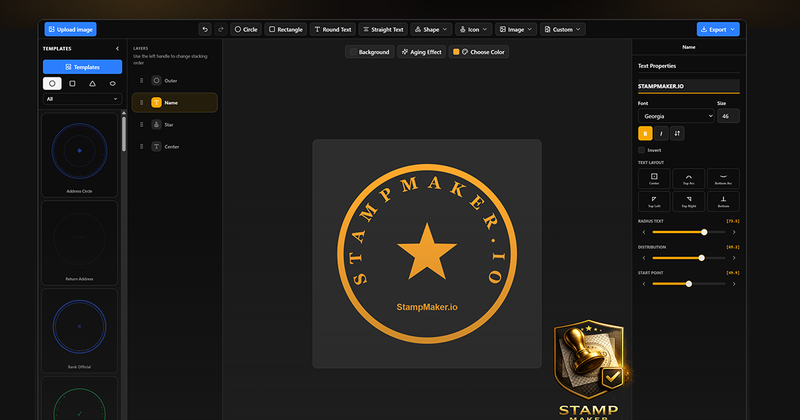
- Layer editing — Edit stamp structure using a layer list, canvas selection, and side properties panel for precise control over text, shapes, and effects.
- Visual adjustments — Tweak color, opacity, background, and add aging effects like a worn look to match document contexts.
Who is it for?
- Office and admin teams — Prepare company seals, department stamps, and confirmation stamps for contracts, letters, and internal documents without starting from scratch each time.
- Finance and invoicing teams — Clean up old stamp images and apply consistent stamps to invoices, receipts, and finance-related files.
- Legal and contract workflows — Add stamps to PDF agreements, confirmation files, and other document workflows with less manual assembly.
- E-commerce and operations teams — Apply brand seals, approval marks, and trust marks to product images, service notices, and campaign graphics.
- Independent professionals and small businesses — Create and export personal name stamps and business seals quickly, without needing professional design software.
What can you do with Stamp Maker?
- Create a company seal from scratch — Use templates and layers to build a professional seal with custom text, shapes, and borders.
- Repair a blurry legacy stamp — Upload a washed-out image and use AI tools to sharpen edges and produce a cleaner asset.
- Extract a transparent stamp from a scan — Isolate stamp artwork from scanned files, photos, or screenshots to create a transparent PNG.
- Apply a stamp to a PDF contract — Place a cleaned-up stamp into a document and export the stamped PDF for delivery.
- Prepare invoice stamp assets — Create consistent stamps for recurring financial documents, ensuring uniform appearance across receipts and invoices.
- Save reusable templates — Store common stamp designs (e.g., company seals, name stamps) as templates to speed up future jobs.
FAQ
Can I create a stamp from scratch?
Yes, Stamp Maker provides a blank canvas and a variety of templates to start from. You can add text, layers, and adjust style controls to build company seals, name stamps, and other stamp types.
What if I only have a blurry old stamp image?
Upload the blurry image and use the built-in repair tools to sharpen edges, remove noise, and enhance clarity. The result is a cleaner transparent stamp that can be reused.
Can the result be used in PDFs, contracts, and invoices?
Yes, the tool includes an apply step that lets you place the finished stamp directly onto PDF documents and images. You can export the stamped file for use in contracts, invoices, and more.
Which export formats are supported?
Stamp Maker supports PNG (with transparent background), SVG, PDF, and other formats depending on the workflow. Exports are designed to be reusable across documents, images, and design files.
Do I need design software installed?
No, everything runs in the browser. No Photoshop, Illustrator, or other software is required. You can create, repair, extract, and apply stamps from any modern web browser.