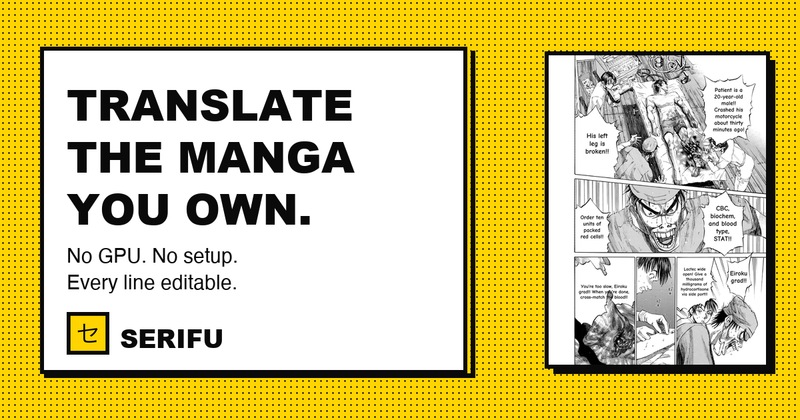
Serifu is a browser-based AI manga translator that takes raw manga, manhwa, manhua or comic pages — a folder of images, a CBZ or ZIP archive, a PDF, or PNG, JPEG and WebP files — and returns each page translated with the text lettered inside its original speech bubbles.
What is Serifu?
Serifu is an AI manga translator that runs in a browser tab rather than as a desktop-only program, translating a volume page after page in reading order instead of one image at a time. Input can be a folder of pages, a CBZ or ZIP, a PDF, or the loose images themselves; output is the same volume with each line set inside its bubble's own shape in a comic face, exportable as CBZ, PDF or images. It draws pages with WebGPU, so it runs in Chrome and Edge and in Safari on recent Macs, iPhones and iPads, with no graphics card, no models to download and no API keys. A separate Serifu app for macOS and Windows adds retouching, box-based OCR and line-level lettering controls, and uses the same credits as the browser.
What makes Serifu stand out?
- Whole volume at once — accepts a chapter or full volume as CBZ, ZIP, PDF or image files, sorts pages by file name and translates them in reading order, with a Pages X to Y range for long volumes.
- Lettered into the bubbles — each line is placed inside its own bubble shape, in a comic face, exactly where the original text was, instead of a plain box pasted over the art.
- Page-aware context — each page is read as a page together with the two pages before it, so speakers, names and numbers stay consistent across a volume.
- Export options — finished volumes leave the tool as CBZ, PDF or individual images, and switch per page between Original and Translated for checking.
- Retouch this page — effects, captions and signs drawn over the art are removed, the art behind them is filled back in, and the translation is set the way the original was drawn, at 2 credits per block.
- Manual line control — change a line's text, move or resize its box, set horizontal or vertical text, adjust line spacing, letter spacing, font, size, colour and outline; re-translate a whole page or single line with another model.
- Nothing to install — runs on any laptop with WebGPU in a browser tab, requiring no GPU, no model downloads and no API keys.
- Languages — reads Japanese (vertical columns as well as across), Korean, Chinese simplified and traditional, and English, covering manga, manhwa, manhua and comics.
Who should use Serifu?
- Raw-manga readers: translate a purchased or scanned volume they already own into English and read it in the browser without setting up OCR and typesetting software.
- Manhwa and manhua readers: work through Korean and Chinese page-based comics, including traditional and simplified Chinese text, with names kept consistent page to page.
- Scanlation and fan-translation teams: run a first pass over a chapter, then fix individual lines and re-letter them in the desktop app before export.
- Letterers and editors: use the Retouch tool to clear sound effects, captions and signage burned onto the art and set the translation in place of the original.
What can you do with Serifu?
- Read a whole volume in a browser: drop in a CBZ or PDF, let the tool translate pages in reading order, toggle Original/Translated per page, and export the result as CBZ, PDF or images.
- Clean text off the artwork: pick the blocks covering drawn-in signs, captions and sound effects, and the tool fills the art back in while lettering the translation the way the original was drawn.
- Catch what the model missed: draw a box around a background sign or untranslated sound effect and have it read, translated and lettered in place, with the price shown before it runs.
- Re-do a bad line or page: switch models and re-translate a single line or a whole page until the wording reads right.
How does Serifu work?
- Drop a volume into the translator — a folder of pages, a CBZ or ZIP, a PDF, or PNG, JPEG or WebP images; pages sort by file name.
- Check the price, shown before anything runs, then start; a page that needs more is set aside and asked about rather than charged unasked.
- Read and export — switch pages between Original and Translated, turn a line off or change its translation, then export as CBZ, PDF or images. The volume stays in the browser until you remove it.
Pricing
Serifu is freemium: 5 pages free on sign-up, then 1 credit per page whichever model is used, sold in packs of 100, 500 and 1,500 pages with the per-page rate dropping as the pack grows. There is no subscription, credits never expire, and the same balance covers the browser translator and the macOS/Windows app. Manual retouching is priced separately at 2 credits per block, and prices for box-based reading and re-translation are shown before each run.
FAQ
Which browsers and devices work?
Serifu needs a current browser with WebGPU: Chrome and Edge, plus Safari on recent Macs, iPhones and iPads. If the browser lacks WebGPU, the page tells you before you start rather than failing silently.
Which languages can it read?
It reads Japanese, Korean, Chinese simplified and traditional, and English, covering manga, manhwa, manhua and comics. Japanese is read in its vertical columns as well as across. Vertical-scrolling webtoon strips are not supported yet — only manhwa that arrives as pages.
Do I need an account, and what happens to my pages?
Yes, a free account is required so credits used per volume are counted and your balance follows you between devices. A page is sent for translation and is not kept on serifu.net; the translated volume stays in this browser on this device until you remove it.
What happens if I close the tab halfway?
Pages already finished are kept. Reopen the volume and choose Resume, and translation continues using the earlier pages as context. Pages that were not translated are not charged.
What if a page is refused?
Every page goes through a content check. A page refused before it is read gets its credit back; a page refused after it was read does not, because the read was already paid for. No person at Serifu reviews or edits your pages — what you read is the model's raw output.