
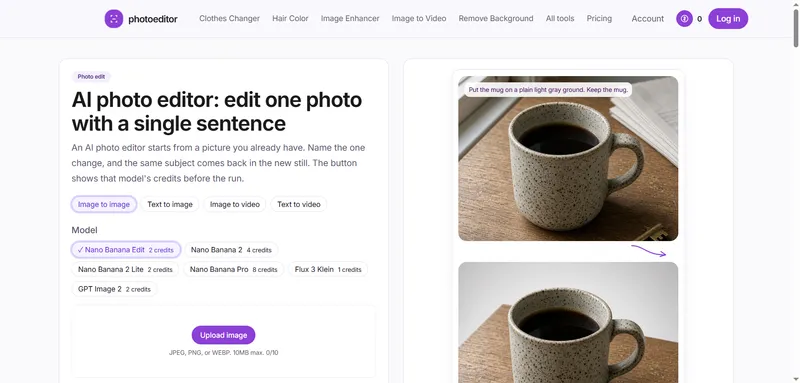
photoeditor is a browser-based AI photo editor that takes a photo you already have plus one sentence describing a single change, and returns the same subject in a new still. It is a credit-based tool: every model in its catalog carries its own credit cost, and the generate button prints that number before the run starts.
What is photoeditor?
photoeditor is a web AI photo editor built around image-to-image editing rather than blank-canvas generation. You upload a JPEG, PNG, or WEBP file (10 MB maximum), type the one change you want — a cleaner ground, a different hair color, a removed distraction, a quieter grade — and the person or product in the result should still be recognizable. The same home editor also hosts text-to-image, image-to-video, and text-to-video modes, each showing the selected model's credit cost on the button before it runs.
Key Features
- Sentence-driven edits — a single prompt field (1000-character limit) names one change; the upload stays the subject of the output rather than being replaced by a new scene.
- Multiple selectable models — the catalog includes Nano Banana Edit (2 credits), Nano Banana 2 (4), Nano Banana 2 Lite (2), Nano Banana Pro (8), Flux 3 Klein (1), and GPT Image 2 (2), with the cost shown on the button.
- Fixed upload formats — JPEG, PNG, or WEBP, 10 MB maximum, with a separate prompt box capped at 1000 characters.
- Aspect ratio choices — 1:1, 9:16, 16:9, 3:4, 4:3, 2:3, 3:5, 4:5, 21:9, and an Auto option.
- Four generation paths in one editor — image to image, text to image, image to video, and text to video share the same interface and the same pre-run credit display.
- Automatic credit refunds — a run that fails because the provider rejects the file, times out, or returns nothing usable returns its credits without a support ticket.
- Privacy terms stated on page — uploads are sent to the provider only to produce that edit, deleted within an hour after the run, never sold, and not used to train photoeditor's own models.
- Job-specific tool pages — separate pages cover clothes changer, hair color, image enhancer, image upscaler, old photo restore, background removal, and object remover, each with its own limits and credit explanation.
Who should use photoeditor?
- Small shop owners: clean up a product shot (a mug, a bowl, a coat) by naming a new ground, less clutter, or different light while keeping the item itself unchanged.
- Portrait photographers and creators: shift hair color or window light on a headshot without generating a different person.
- Social media publishers: remove a single distraction — a bicycle, a bag, a cable — from a frame while the surrounding room stays intact.
- Sellers needing motion: turn one approved still into a few seconds of 720p video, so the motion is a variation of a frame they already accepted.
What can you do with photoeditor?
- Product listing cleanup: upload a photo of a speckled mug on a scratched desk, ask for a plain light gray ground, and keep the mug itself identical.
- Portrait retouching: name a hair color or collar change on an uploaded portrait and get the same face back.
- Object removal: type the one item to delete — a bicycle leaning in a hallway — and leave the plaster walls untouched.
- Text-free stills: switch to text to image when there is no source file and start a still from a sentence instead.
How does photoeditor work?
Pick the job (photo edit, still, or short clip), choose a model, set the frame and — on video — the length and quality, read the credit number on the button, then generate. Results can be iterated with Keep editing or downloaded and re-uploaded as a new source; either path spends the selected model's credits again.
Pricing
photoeditor is paid with a one-time free allowance: a new account receives 4 credits once, and there is no daily credit grant. Three plans are sold monthly or yearly — Lite at $17, Plus at $33, and Pro at $72 — with four credit packs available alongside them. Monthly credits last one month and arrive on each charge; yearly credits arrive once and last a year; pack credits do not expire. Unused packs can be refunded within 14 days, while a renewal is not refunded. Results stay available for 7 days on signup credits, 30 days on Lite, 90 days on Plus, and 365 days on Pro. Visa, Mastercard, Apple Pay, and Google Pay are accepted worldwide; WeChat Pay appears only for buyers in mainland China and Hong Kong on a one-time pack, and Alipay is not offered.
FAQ
Can I see the credit cost before generating?
Yes. The generate button shows the credits for the model and settings currently on screen, and the number changes when you switch model, aspect ratio, or video length. If you lack enough credits, the button points to a credit pack instead of starting a run that would fail.
What happens if an edit fails?
A failed edit returns its credits automatically, with no support ticket required. Runs can fail when the provider rejects the file, times out, or returns nothing usable. You can retry the same photo, change the sentence, or switch to another model.
Do credits expire?
Monthly plan credits last one month and arrive on each charge. Yearly credits arrive once and last one year. Credit packs do not expire. There is no daily grant, and a new account receives 4 credits one time.
Can I use results commercially?
Commercial use follows the photo, not the button. If you already hold the rights to the picture you uploaded, you can use the result commercially. The editor does not grant rights to a face, a product, or a logo you did not own.
What does photoeditor not do?
There is no 8x or 16x upscale, no multi-image fusion, and no daily credit grant. It is not a blank-canvas drawing tool, and teams needing a monthly invoice, shared seat, or enterprise rate will not find one here.


