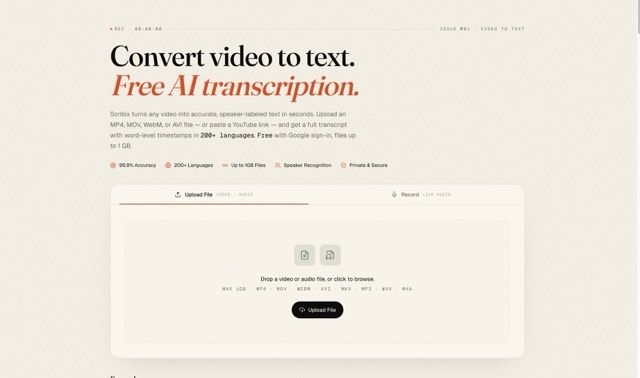
Scribix is an AI-powered transcription platform that converts video and audio files into accurate, speaker-labeled text with word-level timestamps using a drag-and-drop or paste-a-link workflow.
What is Scribix?
Scribix turns video and audio files (MP4, MOV, WebM, AVI, MKV, MP3, WAV, M4A up to 1 GB, plus YouTube links and paste URLs) into written transcripts with speaker labels and timestamps. It runs as a web app, requires no installation, and offers a free trial with Google sign-in.
Key Features
- Speaker diarization up to 8 voices — Automatically distinguishes and labels speakers via voice-fingerprinting; rename with one click.
- 200+ languages with auto-detection — Handles code-switching (e.g., English ↔ Spanish) without pre-selection.
- Word-level timestamps — Click any word to play that exact moment; exports with SRT and VTT subtitles.
- Five export formats — TXT, DOCX, SRT, VTT, and CSV for documents, captions, and spreadsheets.
- Studio-grade accuracy — 99.9% on clear audio in primary languages, benchmarked against 50 hours of TED talks, podcasts, and interviews.
- 1 GB file size limit — Supports MP4, MOV, WebM, AVI, MKV, MP3, WAV, M4A; up to 6 hours for YouTube links.
- Private and secure — TLS 1.3 in transit, AES-256 at rest, files deleted within 24 hours, SOC 2-aligned, GDPR-compliant, no training on user audio.
- Free trial — 45 minutes of transcription with Google sign-in, no credit card needed.
Who is it for?
- Video creators — Generate captions for accessibility, repurpose long videos into blog posts, extract clips using word-level timestamps.
- Podcasters & producers — Convert episodes into show notes, blog content, and SEO-indexed transcripts with speaker labels.
- Journalists & interviewers — Transcribe interviews verbatim with speaker labels for accurate quoting without re-listening.
- Researchers & students — Run qualitative coding on focus groups; turn lectures into searchable notes with AI summary.
- Legal teams — First-pass transcripts of depositions and meetings with time-coded transcripts and auditable processing chain.
Use cases
- Long-form to short-form: Creators generate captions and extracts from 90-minute footage for shorts and clips.
- Podcast episode repurposing: Convert episodes to show notes and blog posts with speaker labels.
- Investigative reporting: Pull quotes from 90-minute interviews using timestamps.
- Focus groups and fieldwork: Tag themes, export to Dovetail or Notion.
- Lecture notes: Searchable notes with AI summary from 2-hour lectures.
- Depositions and compliance: Time-coded transcripts for board meetings and hearings.
How does it work?
- Upload — Drag and drop a video or audio file (up to 1 GB) or paste a YouTube link.
- AI transcribes — Auto-detects language, separates up to 8 speakers, and attaches word-level timestamps. A one-hour video transcribes in about 90 seconds.
- Edit or export — Click any word to play that moment, edit inline, then download as TXT, DOCX, SRT, VTT, or CSV.
Pricing
Freemium: Free trial offers 45 minutes of transcription. Paid plans unlock longer files, priority queue, team libraries, and longer file retention (no dollar amounts listed).
Alternatives
- Otter — 300 free minutes per month, fewer languages, no word-level timestamps in free tier.
- Rev — Human-reviewed transcripts at $1.50/min, higher accuracy for noisy audio.
- Whisper.cpp — Self-hosted open-source model, unlimited but requires technical setup.
FAQ
Is Scribix really free?
Yes. The free trial gives 45 minutes of transcription with a Google sign-in, no credit card. Paid plans start after that.
What file formats are supported?
Video: MP4, MOV, AVI, MKV, WebM. Audio: MP3, WAV, M4A. All up to 1 GB.
How accurate is the transcription?
99.9% on clear audio in primary languages, measured on a 50-hour benchmark. Accuracy drops slightly with heavy accents or background music.
How many languages does it support?
200+ languages with automatic detection, including code-switching between languages in the same file.
Can it differentiate speakers?
Yes. Up to 8 speakers via voice-fingerprinting. After transcription, you can rename Speaker 1, Speaker 2, etc., to actual names.