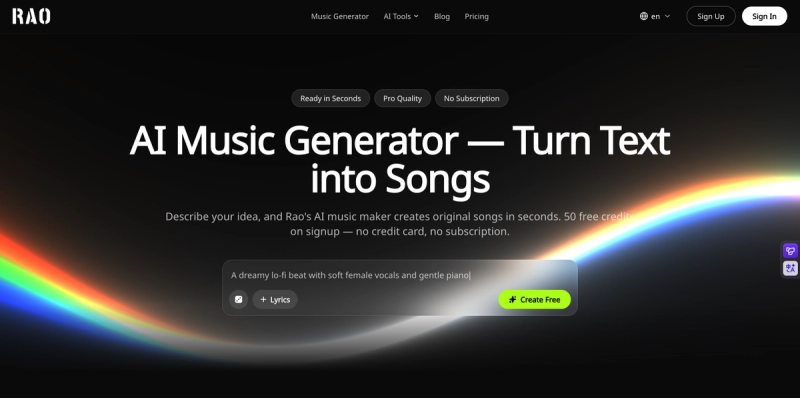
RaoMusic is a browser-based AI music generator that turns a text prompt or pasted lyrics into a complete original song — vocals, instruments, melody and mastering — delivered as royalty-free MP3 or WAV files.
What is RaoMusic?
RaoMusic is a web app that converts plain-language descriptions, lyrics, images or sound-effect requests into finished audio tracks in about a minute, with no install and no music theory required. Input can be a mood/genre/scene prompt, your own lyrics, an instrumental-only request, or a photo; output is a full mixed track with AI vocals plus mastering, generated as two variations per run. It runs entirely in the browser at raomusic.com and is made by RaoMusic. Songs come with a royalty-free commercial license, and every generation is original rather than drawn from a stock library shared with other buyers.
What makes RaoMusic stand out?
- Multiple AI engines in one place — the same prompt can be routed through engines including Suno v6, Google Lyria 3.5 and Mureka 9, so you switch engines instead of switching websites until the sound fits.
- 50 free credits on signup — no credit card required; one generation costs 20 credits and returns two track variations.
- No subscription required — credits are sold as one-time packs that stay valid for one year, and the commercial license does not depend on a subscription.
- Royalty-free commercial license — worldwide rights for YouTube, TikTok, ads, podcasts, games and client work, with a license certificate PDF available to subscribers.
- Four generation modes — text to music, lyrics to song, instrumental/background music, and text-to-sound-effect.
- Unlimited MP3 downloads — every generated song can be downloaded as many times as you like with no daily caps or per-song fees; WAV is a subscriber feature, and stems and MIDI have separate requirements.
- Music tools suite — AI Vocal Remover, AI Stem Separator (vocals, drums, bass and other, plus a 6-stem piano/guitar mode), AI Rap Generator, AI Cover Song Generator with custom RVC model URLs and MP3/WAV output, Image to Music, and a free browser MIDI editor for .mid files with SoundFont playback and DAW export.
- 20+ music styles and 10 languages for prompt-driven generation.
Who should use RaoMusic?
- YouTubers and streamers: create channel-ready intro, background and outro tracks that carry a consistent sound and can be published in monetized videos without rights claims.
- Podcasters: build a signature intro, outro and music bed, with two directions returned per generation so the voice sits cleanly on top.
- Brands and advertisers: produce original campaign music that can be reused across ads, product videos and social edits without per-version licensing fees.
- Filmmakers, editors and game developers: generate scene-specific cues and per-level moods, then regenerate in about a minute when the edit or build changes.
- Musicians and composers: turn a rough idea into a working demo to break writer's block before shaping it further.
What can you do with RaoMusic?
- Sound-effect designers: describe a sound in text (for example an epic game sound effect) and get a downloadable custom effect for games, videos or podcasts.
- Cover and remix creators: upload a song, pick a preview voice or supply a custom RVC model URL, and export an AI cover as MP3 or WAV.
- Karaoke and sample users: strip vocals or split a track into vocals, drums, bass, other, piano and guitar stems for remixing or practice.
- Songwriters starting from an image: upload a photo and let the AI read its mood, colour and atmosphere into a prompt you can edit before generating.
How does RaoMusic work?
- Describe the music — a text prompt, lyrics, mood, genre or use case.
- Generate: RaoMusic returns two original AI tracks, with vocals or instrumental, in under a minute.
- Preview, then download as MP3 (or WAV on a subscription) and publish or monetize the better of the two.
Pricing
Freemium: 50 free credits on signup with no credit card, one generation costing 20 credits and producing two variations. Additional credits are bought as one-time packs valid for one year, so no monthly fee is required; a subscription is optional and adds recurring monthly credits plus subscriber features such as WAV export. MP3 downloads are unlimited and free on any plan.
Alternatives
Suno — a standalone AI music generator whose models RaoMusic also routes to through its engine switcher. Udio.
FAQ
Is RaoMusic free to try?
Yes. New users receive 50 free credits on signup with no credit card, and a single generation costs 20 credits for two variations, so the free balance covers a couple of trial runs. MP3 downloads stay unlimited and free afterwards.
Can I use the generated music commercially?
Yes. Every generated track includes a worldwide, royalty-free commercial license covering videos, ads, podcasts, games, social media and client work, with no subscription needed for those rights. Subscribers can download a license certificate PDF as proof.
Do I need a subscription to download WAV files?
Yes. Lossless WAV export for mixing, mastering and commercial production is available with a subscription, while MP3 downloads are available without one and are unlimited. Stems and MIDI exports also have separate requirements.
How many songs can I make with the free credits?
The 50 free credits cover two generations at 20 credits each, and each generation returns two track variations — so four pieces of audio in total before you need to buy credits.
Can RaoMusic create music without vocals?
Yes. The instrumental mode produces background music without vocals for YouTube videos, games, podcasts, livestreams and ads, and there is a separate text-to-sound-effect mode for short effects and stingers.