
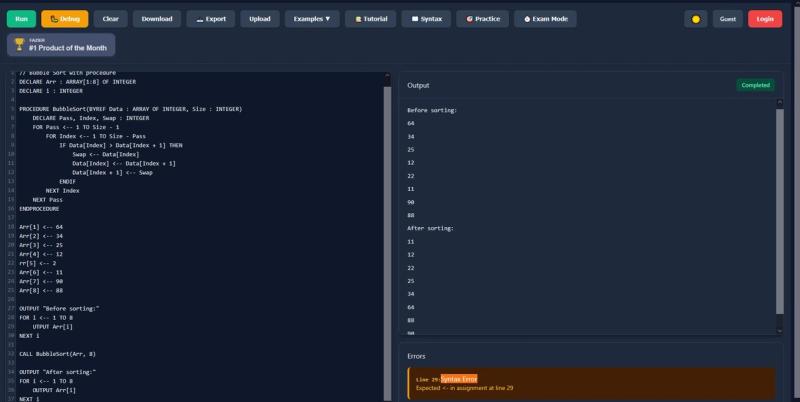
PseudoRun is a free, browser-based pseudocode interpreter built specifically for Cambridge IGCSE (and A-Level) pseudocode. It lets you write, run, and debug pseudocode instantly without downloads or sign-up.
What is PseudoRun?
PseudoRun is a web application that takes IGCSE-style pseudocode as input and produces live execution output in a built-in console. It runs entirely in the browser and was created as a free side project by an individual developer. No installation or account is required to get started. You can start using it at https://pseudorun.tech without signing up.
Key Features
- Syntax highlighting and error detection — The editor highlights IGCSE pseudocode keywords and catches syntax mistakes as you type, reducing guesswork.
- Line-by-line debugging — Step through code one line at a time, inspect variable values, and observe how loops and conditionals change state.
- Instant execution — Press run to see output immediately in the adjacent console panel, with no compilation delay.
- Cloud saves (optional) — Sign in with a free account to save your work and pick it up on any device.
- Built-in examples — The editor includes example programs (like the FOR loop demo on the homepage) to help you learn the syntax.
- 100% free — No ads, no paid tiers, no feature limits. The tool is funded by optional donations (buy me a coffee).
Who is it for?
- IGCSE Computer Science students — Practice writing and testing pseudocode for exam preparation without needing a full programming environment.
- Teachers — Demonstrate algorithm concepts live in class using a tool that follows the exact Cambridge specification.
- Self-taught learners — Experiment with control structures, arrays, and procedures in a safe sandbox before moving to languages like Python or Java.

- Anyone debugging logic — Quickly prototype an algorithm and step through it to find off-by-one errors or infinite loops.
What can you do with PseudoRun?
- Practice exam-style pseudocode tasks — Write a program that counts even numbers, then step through it to confirm your logic matches the expected output.
- Debug algorithm logic — Set breakpoints mentally (by stepping) and watch variables change line by line to isolate bugs.
- Prototype before coding — Draft a sorting or search algorithm in pseudocode, verify it works, then translate to your target language.
- Explore algorithmic thinking — Use the editor to visualize how nested loops or recursion behave without worrying about language syntax.
Pros and cons
- Pros: Free forever with no ads; follows exact IGCSE pseudocode spec; built-in step debugger; cloud saves optional; instant execution.
- Cons: Only supports Cambridge IGCSE pseudocode format (not other pseudocode styles); requires an internet connection; no mobile app (browser only).
Pricing
PseudoRun is completely free to use. There are no premium features or subscription plans. Optional donations via "buy me a coffee" support server costs.
FAQ
Is PseudoRun free?
Yes, PseudoRun is free forever with no ads and no account required. You can use all features including syntax highlighting, debugging, and cloud saves without paying.
What pseudocode standard does PseudoRun use?
PseudoRun follows the Cambridge IGCSE pseudocode specification exactly. It is not a general-purpose pseudocode editor — code must adhere to the IGCSE syntax.
Do I need to create an account?
No. You can write and run pseudocode immediately without signing up. Sign-in is optional and only needed for cloud saves across devices.
Can I use PseudoRun on my phone?
PseudoRun is a web application and works in mobile browsers, but the interface is optimized for desktop use.








