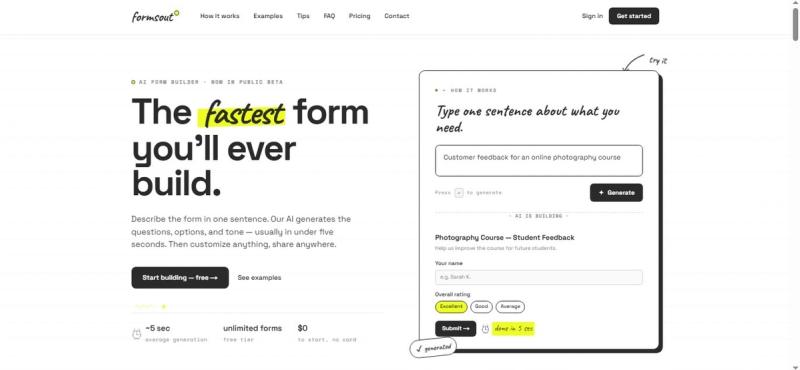
Formsout is an AI form builder that generates fully-structured forms from a single sentence of natural language input, producing a shareable form with a link and QR code in under five seconds.
What is Formsout?
Formsout is a web-based AI form builder that takes a plain-English sentence describing a form's purpose (e.g., "RSVP for my company retreat") and automatically generates the questions, answer options, field types, and tone. It outputs a complete, editable form ready to share via a link or QR code. The product is built by Formsout and runs entirely in the browser.
Key Features
- One-sentence generation — Type a single sentence describing what you need; the AI creates the form structure in about five seconds.
- Inline editing — Click any label, option, or button text to edit it directly on the form.
- Drag-and-drop reordering — Grab a field's handle and move it anywhere in the form.
- Themes and colors — Pick a palette and font in one tap; add a header image and custom background.
- Custom thank-you message — Write a personalized message displayed after submission.
- Shareable link and QR code — Every form gets a unique URL and QR code for distribution.
- Response dashboard — All responses appear instantly in your dashboard and can be exported.
Who is it for?
- Event organizers — Quickly build RSVPs for parties, retreats, or conferences without form-building experience.
- Small business owners — Create custom order forms, feedback surveys, or client intake forms in seconds.
- Educators and club leaders — Generate sign-up forms, quizzes, or polls for students or members.
- Content creators — Build brand collaboration inquiries, audience polls, or newsletter subscription forms.
What can you do with Formsout?
- RSVPs: Generate a beach birthday party RSVP with +1, dietary preferences, and song request fields.
- Feedback forms: Create a post-event feedback form for a spring formal with short, honest questions.
- Quizzes: Build a "Which roommate are you?" quiz with personality results.
- Custom orders: Design a sticker order form with shipping options and multiple field types.
- Application forms: Produce an internship application that screens for initiative and communication skills.
How does Formsout work?
- Describe your form — Type one sentence about what you need (e.g., "Feedback form for our design course").
- AI builds the draft — The AI generates all fields, validation, and options in about five seconds.
- Refine and share — Edit any field, reorder them, customize appearance, then publish with one tap.
Pros and cons
- Pros: Extremely fast (under 5 seconds generation); no learning curve; natural language input; free tier with unlimited forms.
- Cons: Free tier limited to 500 responses per month; some advanced customization (custom sub-domains, removing branding) requires a Pro plan.
Pricing
Formsout offers a free tier with unlimited forms and up to 500 responses per month. A Pro plan unlocks more responses, custom sub-domains, and removal of Formsout branding. Exact prices are not listed on the site.
FAQ
Is Formsout really free?
Yes. The free tier is free forever — unlimited forms and up to 500 responses per month. No credit card required.
Can I edit the AI-generated form?
Yes. Every field, label, option, and button is editable inline. You can also drag to reorder fields.
Where do form responses go?
Responses appear instantly in your dashboard, where you can view and export them.
What languages does Formsout support?
Write your prompt in any language (English, Spanish, French, Hindi, Japanese, etc.), and the AI generates the form in that same language.
Can I use my own brand colors?
Yes. Set a color palette and font in the appearance panel. The Pro plan also allows custom sub-domains and removes the Formsout footer.