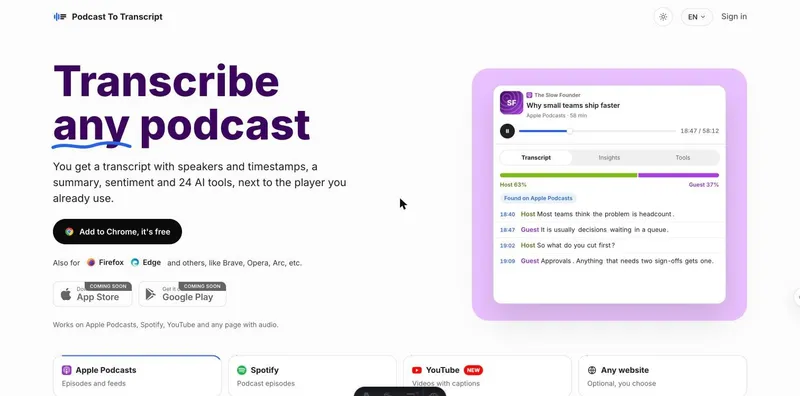
Podcast To Transcript turns a podcast episode into text, right next to the player you already use. It works on Apple Podcasts, Spotify, podcast websites and YouTube videos with captions.
What you get
- A transcript with each speaker labelled and every line timestamped. Click a time to jump to that moment.
- Insights: a summary, chapters, key quotes and the mood of the conversation.
- AI tools that create study notes, flashcards, a blog article, a LinkedIn post, a newsletter and more from the transcript.
- Chat with the episode: answers use only the transcript and link back to the moments they come from.
- Output in your language, whatever language the episode is in, and an interface in many languages.
- Export to TXT, Markdown, SRT or VTT, and a searchable history of your transcripts.
How it works
Install the extension for Chrome, Edge or Firefox, or use the web app. Open an episode, press the button, and the transcript appears next to the player. The extension never plays, downloads or hosts audio: the episode keeps streaming from its original feed.
Who it is for
People who listen a lot and want to search, quote, study or repurpose what they heard: students, researchers, writers, journalists and anyone who prefers reading to scrubbing through audio.
Pricing
Free for 30 minutes every 14 days. A Pro plan is available for heavy listeners, with extra time packs if you need a one-off top-up. Mobile apps for iOS and Android are coming soon.