Newsletter
Join the Community
Subscribe to our newsletter for the latest news and updates
AI-powered web tool that converts JPG, PNG, and WebP images into 3D printable STL or textured GLB models in minutes.
Submit your own product to reach creators and founders looking for the next tool to try.
PictoSTL is a browser-based AI converter that turns JPG, PNG, and WebP photos into 3D printable STL files and textured GLB models, with Basic, Pro, and Ultra quality tiers and a 3D preview before download.
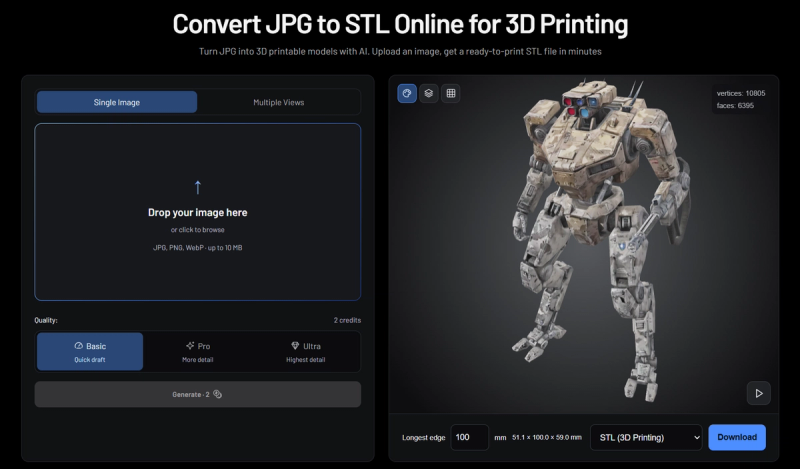
PictoSTL is an online tool that uses AI to reconstruct a three-dimensional mesh from a flat image, then exports that mesh as an STL file for 3D printing or a GLB file with color and textures. It accepts JPG, PNG, and WebP uploads, runs entirely in a web browser without installing modeling software, and is made by pictostl.com. Users can preview the model interactively, set a physical size in millimeters, and download the result.
PictoSTL runs a three-step workflow: upload an image, choose settings, then preview and download. Users upload a JPG, PNG, or WebP file (ideally a clear photo with bright lighting, and multiple angles for better results), select Basic, Pro, or Ultra quality, and check the credit cost before generating. The AI studies light and shadow to infer the object's shape and builds a mesh, making educated guesses for surfaces not visible in the photo. After generation, users rotate and zoom the 3D preview, set the longest side in millimeters, and download STL or GLB.
PictoSTL uses a freemium credit model. After account verification, users receive 2 credits, which the FAQ says are enough for one Basic generation and an STL download. Further generations require credits; the interface shows the credit cost (one example displays a Generate button showing 30 credits) before the user confirms generation. No dollar amounts are stated on the page.
PictoSTL offers 2 credits after account verification, which the FAQ says are enough for one Basic generation and an STL download. Further generations require credits, and the credit cost is shown before you generate.
No. STL exports geometry only, without color or textures. To keep available colors and materials, export GLB instead. Adding textures does not add color to the STL file.
The AI interprets light and shadow to infer shape and makes educated guesses for hidden or back surfaces. Multiple views can improve the result, but the output is not a dimensionally accurate scan. Review geometry and set the longest side in millimeters before printing.
STL files store coordinates without built-in measurement units. Setting the longest side in millimeters prepares the model for import at your intended size. The default is 100 mm, and changing it scales other dimensions proportionally; select millimeters in your slicer and confirm dimensions.
PictoSTL accepts JPG, PNG, and WebP images. Uploading multiple photos of the same object from different angles—front, back, left, and right—can give the AI more information about shape and details, though it still may not produce a dimensionally accurate scan.