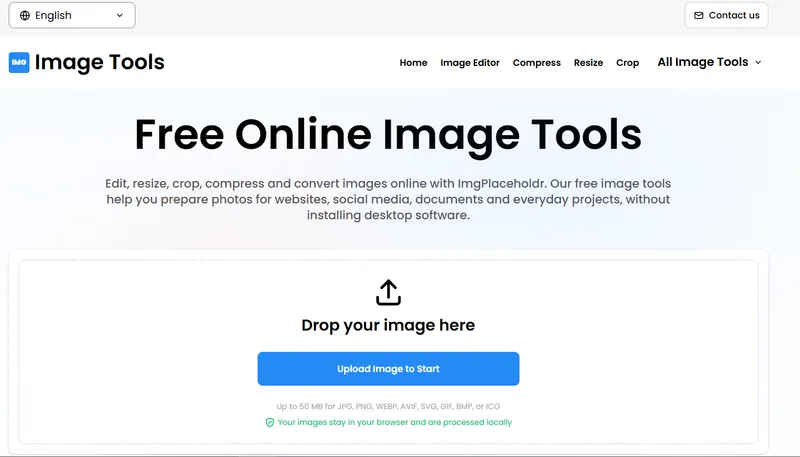
ImgPlaceholdr is a free, browser-based image toolkit at imgplaceholdr.info that edits, converts, compresses and inspects image files entirely on the user's own device, without uploading anything to a server.
What is ImgPlaceholdr?
ImgPlaceholdr (labelled "Image Tools" on its home page) is an online collection of more than 38 utilities for editing, converting, compressing, filtering and inspecting images. A user drops in a JPG, PNG, WEBP, AVIF, SVG, GIF, BMP or ICO file of up to 50 MB, applies a tool, and downloads the result. All processing runs client-side in the browser, so files never leave the machine, and no desktop software, browser extension or account is required. The site reports 2.4M+ images edited and 580k+ images converted, and its interface is available in English, German, Spanish and French.
What makes ImgPlaceholdr stand out?
- Local, client-side processing — images are handled in the browser, so private photos and client files are never uploaded to external servers.
- 31 MB-plus headroom — supported formats accept uploads of up to 50 MB each, covering JPG, PNG, WEBP, AVIF, SVG, GIF, BMP and ICO.
- Editing suite — the Image Editor adds text, resizes, crops, flips, rotates and applies filters, while dedicated tools handle resize by exact dimensions or percentage, crop with freeform or 1:1, 16:9 and 4:3 ratios, 90/180/270-degree or custom rotation, and one-click flips.
- Format conversion matrix — a general converter plus directed pairs such as JPG to PNG, JPG to WEBP, JPG to AVIF, PNG to JPG, WEBP to PNG, AVIF to JPG, JPG to BMP, WEBP to AVIF and AVIF to WEBP.
- EXIF tooling — an EXIF Remover strips camera details, GPS location and device tags, while an EXIF Data Viewer shows exposure settings, ISO, capture date and GPS coordinates.
- Creative filters — adjustable gaussian or soft blur, retro pixelation with configurable block sizes, edge-contrast sharpening, colour inversion and black-and-white or grayscale conversion.
- Favicon and vector tools — PNG to ICO, JPG to ICO, WEBP to ICO, ICO to PNG, ICO to JPG, ICO to WEBP, plus SVG to PNG, SVG to JPG, SVG to WEBP and PNG to SVG.
- Avatar helper — the Round Image tool produces circular profile pictures or custom corner radii with transparent backgrounds.
Who should use ImgPlaceholdr?
- Web developers: generating ICO favicons from PNG, JPG or WEBP logos and rendering SVG vectors into high-resolution PNG or WEBP assets for a site build.
- Social media and community managers: cropping photos to square 1:1 or 16:9 frames and resizing them to platform dimensions before publishing avatars and posts.
- Photographers and bloggers: compressing large JPG or PNG files for faster page loads, and checking or removing EXIF data such as GPS coordinates before sharing images publicly.
- Privacy-conscious users: stripping camera make, capture date and geolocation metadata from a photo in one pass without installing anything.
What can you do with ImgPlaceholdr?
- Prepare web assets: convert PNG logos to ICO favicons, render SVG icons to PNG at high resolution, and swap heavy JPG files to WebP or AVIF for lighter page weight.
- Clean up photos for sharing: remove GPS and device metadata with the EXIF Remover, or inspect exposure, ISO and capture date first with the EXIF Data Viewer.
- Build profile images: use Round Image to cut circular avatars, then resize or compress the result so it fits a forum or social profile limit.
- Apply quick visual effects: blur a background, pixelate a face for a screenshot, sharpen a soft photo, or convert a colour image to black and white.
How does ImgPlaceholdr work?
- Drop an image onto the upload area or browse for a file (up to 50 MB, in JPG, PNG, WEBP, AVIF, SVG, GIF, BMP or ICO).
- Pick a tool — an editor, converter, filter or metadata utility — and adjust its settings.
- Download the finished file. The processing happens in the browser, so the source image is never sent to a server.
Pricing
ImgPlaceholdr is free to use. Every editing and conversion utility is available without registration or payment, and no premium tier is described on the site.
FAQ
Is ImgPlaceholdr free to use?
Yes. All of the image editing and conversion utilities on ImgPlaceholdr are free, and the site states that no registration is required to use them.
Are my images uploaded to a server?
No. ImgPlaceholdr runs all editing and conversion inside the web browser, so files stay on the user's machine and are not uploaded to external servers.
Which image formats does ImgPlaceholdr support?
It accepts JPG, PNG, WEBP, AVIF, SVG, GIF, BMP and ICO files of up to 50 MB, and can convert among JPG, PNG, WEBP, AVIF, ICO, SVG, BMP and GIF.
Can I remove GPS and camera metadata?
Yes. The EXIF Remover strips camera details, capture date, GPS geolocation and device tags, and a separate EXIF Data Viewer lets you inspect that metadata before deciding to remove it.
Do I need to install any software?
No installation is needed. ImgPlaceholdr runs as a web app, so no desktop program or browser extension has to be downloaded.