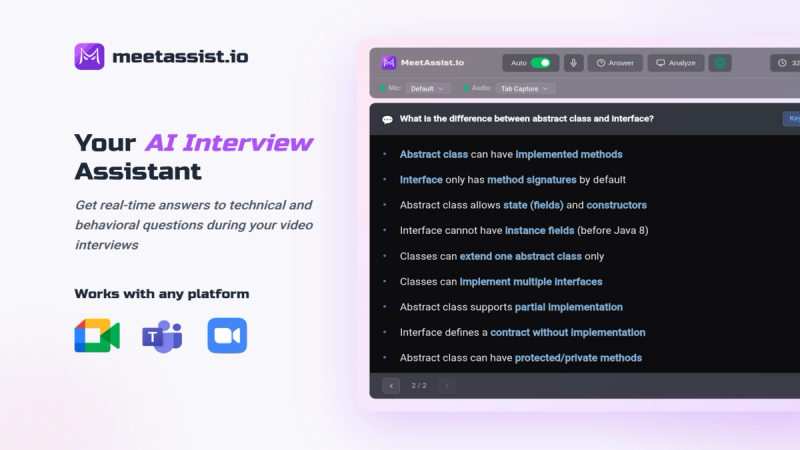
MeetAssist is an AI-powered interview assistant that delivers real-time, undetectable answer suggestions during live video interviews on Google Meet, Zoom, and Microsoft Teams.
What is MeetAssist?
MeetAssist is a Chrome extension and desktop app that listens to meeting captions and generates contextual answers for behavioral, technical, and coding questions. It takes live captions from the meeting platform and produces suggested responses in keywords, talking points, or full text, which can be displayed on your phone via Phone Mode. The product is developed by MeetAssist.io and has a 4.1 rating with over 10,000 users from the Chrome Web Store.
Key Features
- Real-time AI suggestions — Detects questions automatically and provides answers using multiple AI models including GPT-4.1, Claude, Llama, and Cerebras. Supports 41 languages.
- Phone Mode — Syncs transcripts and AI responses to your smartphone via QR code scan. Keeps your computer screen clean during screen sharing.
- Customizable answer formats — Choose between short keywords, a list of key points, or full-text answers. Adjust the depth from a quick one-liner to a detailed step-by-step explanation.
- Personal knowledge base — Upload your CV, job description, behavioral stories, and prepared answers. The AI pulls from these to generate responses in your own voice.
- Coding analysis — Helps solve technical challenges on coding platforms like LeetCode and HackerRank by analyzing your screen and providing solutions.
- Multi-platform support — Works with Google Meet, Zoom, Microsoft Teams, and other browser-based meeting and coding-interview platforms.
- Stealth companion — The Chrome extension can be hidden completely; control everything from your phone. Answers appear only on your phone, not on the shared screen.
- Custom prompts — Write your own prompts to tailor answers to your specific style and role.
Who is it for?
- Tech job seekers — Software engineers, data scientists, and other tech professionals can use MeetAssist to get real-time hints and answer suggestions during technical interviews, including coding challenges.
- Non-tech job seekers — Behavioral interview questions are automatically detected, and the AI draws from your uploaded stories and prepared answers to suggest responses.
- Students and recent graduates — Those new to job interviews can practice with the AI bot and get live assistance during actual interviews to build confidence.
- Freelancers and consultants — Professionals pitching their services can use MeetAssist to answer questions about their experience and projects with tailored responses.
What can you do with MeetAssist?
- Answer behavioral questions — Upload your past accomplishments and stories; MeetAssist will match them to common behavioral questions and suggest responses in your own words.
- Solve coding problems live — During a coding screen share, MeetAssist analyzes the problem and provides step-by-step solutions or code snippets on your phone.
- Practice interviews — Use the AI bot to conduct mock interviews with real-time feedback and answer suggestions.
How does MeetAssist work?
- Install the Chrome extension from the Web Store (free). Optionally download the desktop app for Windows or macOS for undetectable mode.
- Join any web meeting (Google Meet, Zoom, Teams) in Chrome.
- Click Start in the MeetAssist extension. The AI listens to captions and detects questions. In Phone Mode, scan the QR code to receive answers on your phone.
- Customize settings beforehand: select AI model, upload your CV and job description, choose answer format and depth.
Pricing
MeetAssist uses one-time payments (no subscriptions):
- Free Trial — $0, includes 20 minutes of real interview assistant usage, no card required.
- Pro Pass — $9 one-time for 180 minutes of real interview assistant.
- Unlimited Month — $29 one-time for unlimited usage for 30 days. All plans include full functionality: AI models, phone mode, coding analysis, and custom prompts.
FAQ
Is MeetAssist detectable by interviewers?
No. MeetAssist runs entirely in your browser and does not join the meeting or send notifications. When using Phone Mode, answers appear only on your phone, not on the shared screen.
Can I use MeetAssist in languages other than English?
Yes. MeetAssist supports 41 languages. You can switch transcription and AI response language at any time.
Does MeetAssist record my interview audio or video?
No. MeetAssist only captures real-time captions from the meeting platform through your browser. It does not record or store audio or video.
What platforms does MeetAssist work on?
It works on Google Meet, Zoom, Microsoft Teams, and other browser-based meeting and coding-interview platforms. It requires the Chrome browser, but desktop apps for Windows and macOS are also available for undetectable mode.
How much does MeetAssist cost?
MeetAssist offers a free 20-minute trial with no credit card. Paid options are one-time payments: Pro Pass ($9 for 180 minutes) and Unlimited Month ($29 for 30 days of unlimited use). No subscriptions or auto-renewal.