
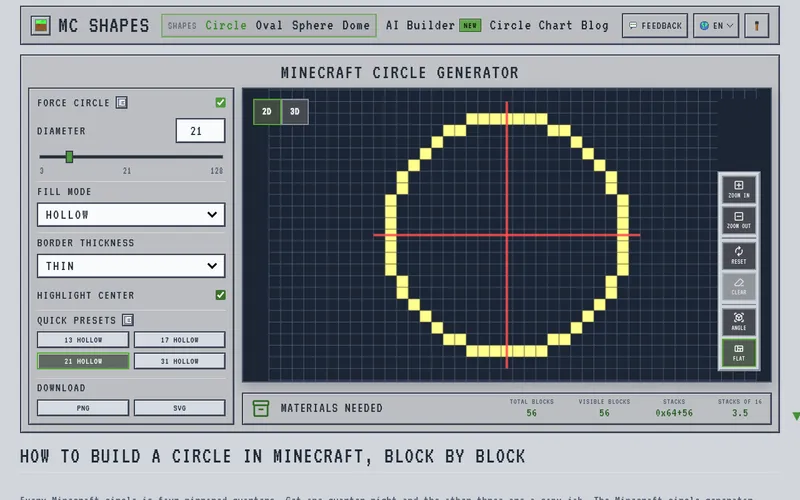
If you film Minecraft builds, the round parts are where viewers lose the thread. A circle or dome is really a staircase of square blocks, and the count changes with every diameter. Before you hit record, MC Shapes lays out the exact block grid for you.
Pick a width between 3 and 128 and you get a circle or oval with a running tally: every block, the ones you can actually see, and how many 64-stacks to mine. Switch to the sphere or dome tool and the shape comes apart into horizontal slices, each ring with its own count, so you can narrate the build one slice at a time. The circle chart page lists step patterns for common sizes if you want a reference card on screen.
It runs in the browser for free with no signup, covers Java and Bedrock, and blueprints export as PNG or print-ready SVG. Pages are also written in Spanish, German and French.
A one-person hobby project by Eden Su. Not connected to Mojang Studios or Microsoft.
For a series, plan the mining before the first episode. Oval presets such as 21 by 13 and 31 by 15 cover stadium floors and racetracks, and the dome tool fits observatories and greenhouses where every ring can get its own segment. Example counts from the planner: a hollow 21-wide circle is 56 blocks and a 31-wide one is 84, so you know the haul before the cameras roll.
There is no account to make and nothing to install, so a viewer who wants to follow along can open the same page and load the same diameter in seconds. The site's guides also explain how odd and even widths place the center block, which is worth a mention in your script.


