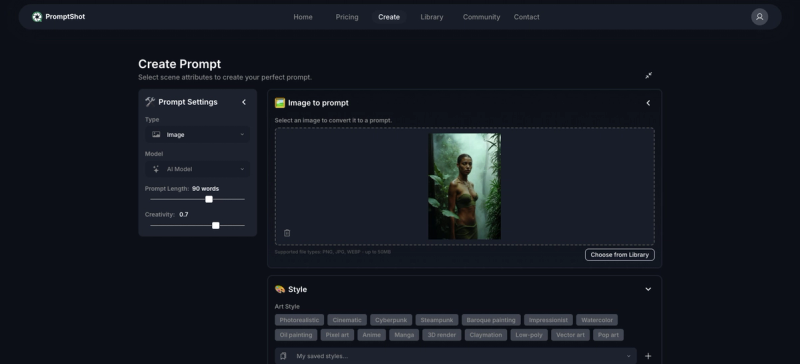
PromptShot is a visual prompt builder that transforms ideas and reference images into structured, reusable prompts for AI image generation, eliminating guesswork and ensuring consistent results across projects.
What is PromptShot?
PromptShot is a web-based tool that takes either a reference image or a conceptual idea as input and outputs a clean, repeatable prompt template organized by subject, medium, style, lighting, composition, mood, and quality settings. It is developed by the PromptShot team and operates on any modern browser, designed for AI artists, marketers, and designers who need reliable, on-brand visual outputs without manual tweaking.
Key Features
- Image to Prompt — Upload a reference image; PromptShot analyzes medium, style (e.g., photorealistic, painting, CGI), mood, lighting, composition, and key elements, then drafts a ready-to-use prompt.
- Structured Prompt Grammar — Assemble prompts with clear sections (subject, medium, style, lighting, lens/composition, mood, quality settings) ensuring no detail is missed.
- Consistency at Scale — Save reusable profiles for characters, brands, or projects to maintain uniform outputs across campaigns.
- Batch & Variations — Generate multiple prompt variations simultaneously for faster exploration and A/B testing.
- Export Anywhere — Copy prompts with one click or export in model-friendly formats compatible with popular AI image generators.
- Organize & Share — Keep prompts versioned and tagged by project for easy retrieval and team collaboration.
Who is it for?
- AI artists and creators who want high-quality, consistent visuals without wasting time or credits on trial-and-error prompting.
- Marketers and designers who need on-brand visuals across multiple campaigns and can reuse brand profiles.
- Content teams that require a quick, natural workflow insert for generating visual assets without dedicated tool training.
- Anyone tired of prompt guesswork and seeking a reliable, repeatable system for AI image generation.
What can you do with PromptShot?
- Create character consistency — Save a character profile with attributes like appearance and style, then reuse it across scenes for uniform character depictions.
- Generate campaign variations — Use batch variation to produce multiple marketing visuals from a single concept, then A/B test them in ads or social media.
- Rapid prototyping — Drop in a reference image to get an instant prompt draft, then refine using the structured grammar for faster iteration.
How does PromptShot work?
- Input — Upload a reference image or start from scratch.
- Analyze or Assemble — PromptShot analyzes the image for visual elements, or you manually define sections via the Prompt Grammar panel (subject, medium, style, lighting, composition, mood, quality).
- Save & Reuse — Save completed prompts as profiles for characters, brands, or projects.
- Batch Generate — Create multiple variations at once for exploration.
- Export — Copy the final prompt or export it in a format compatible with your AI image generator.
Pricing
PromptShot operates on a freemium model, offering free access with optional paid tiers for advanced features (e.g., unlimited saves, priority support). Specific pricing details are available on the official website.