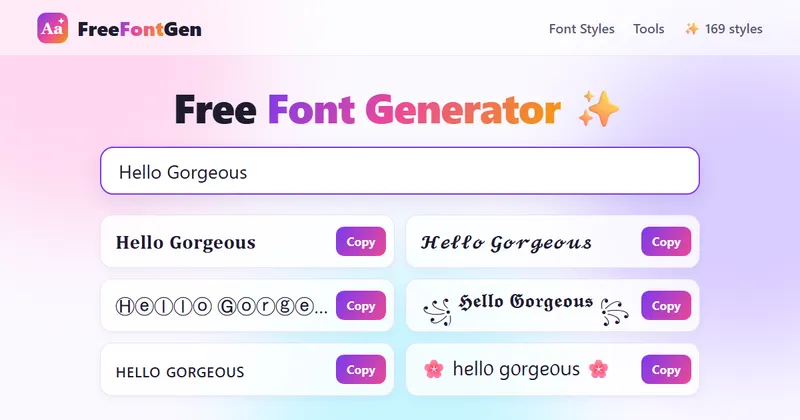
Letras Bonitas (letrasbonitas.top) is a browser-based text converter that turns plain text into decorative Unicode character styles — more than 280 of them across 12 categories — and lets you copy the result with one click or download it as a transparent PNG.
What is Letras Bonitas?
Letras Bonitas is a Spanish-language copy-and-paste font generator. You type or paste a phrase into the main input box and the page instantly renders it in every available style, from serif bold (𝐋𝐞𝐭𝐫𝐚𝐬) and cursive script (𝓛𝓮𝓽𝓻𝓪𝓼) to circled, boxed, strikethrough, underline, glitch/zalgo and mock-Katakana or Cherokee variants. The output is not a font file but standard Unicode text, so it can be pasted anywhere text is accepted: Instagram bios, TikTok usernames, WhatsApp status, Discord nicknames or Free Fire player names. It runs entirely in the browser on mobile, tablet and desktop, requires no installation or account, and the page states that text is processed locally and never sent to or stored on a server.
What makes Letras Bonitas stand out?
- 280+ styles in 12 sections — categories include Fancy, Bold, Cursive, Italic, Stylish Names, Stylish, Cool, Cute, Strikethrough, Underline, Cursed and Big; a live counter on the page shows the current running total (it read 263+ during review).
- Favorites (❤️) — save individual styles and reopen them later instead of hunting through categories again.
- PNG export — every style card has a PNG button that downloads the phrase as a transparent image for posters, covers or stories.
- Random button and quick decorators — the Aleatorio button proposes a new combination, and one-click decorators (
★彡,꧁༺༻꧂,【】,『』,亗,♥,⚡,🌸) wrap your text in symbols. - Procedural style generation — a "Cargar Más Estilos Únicos" button adds 12 further algorithmic designs per click for effectively unlimited variants.
- Character and word counters — a live tally under the input box tracks length while you test styles.
- Light and dark mode — a toggle switches the page theme.
- Invisible space and symbol tools — extras for bios and usernames that need padding characters.
Who should use Letras Bonitas?
- Social media users: styling an Instagram bio, TikTok username or Facebook description so the profile stands out in a follower list.
- Mobile gamers: testing a short Free Fire player name in several styles and checking that it stays legible in the lobby before confirming it.
- Students and teachers: setting titles and cover pages for notes, assignments and slide decks with slightly decorated lettering.
- Design hobbyists: pulling a decorative heading into a PNG for a poster, cover or story without opening design software.
What can you do with Letras Bonitas?
- Profile branding: type your handle once and compare it across cursive, bold, gothic and framed styles to pick a bio or username look.
- Occasion messages: generate birthday, holiday, wedding or condolence greetings in a tone-matched style; the page keeps formal messages in sober serif/cursive and festive ones in boxed or emoji-decorated styles.
- Titles and cover art: craft a three-to-five-word heading, verify readability on phone, tablet and desktop, then export it as a PNG for reuse.
How does Letras Bonitas work?
You type or paste text into the main field, and the generator renders every style simultaneously so you can compare them before copying. From there you either press the copy icon on a style card (the text lands in your clipboard), hit ❤️ to save it as a favorite, or use the PNG button to download an image. Finally you paste the result into the target app; the site also links to dedicated Instagram, WhatsApp, Free Fire, TikTok, Discord and Twitter pages with examples.
Pricing
Free. The page states there is no payment and no account registration required.
FAQ
Is Letras Bonitas free to use?
Yes. The converter is free, requires no account, and can be reused without a signup step. A live counter on the page reports the current number of available styles.
Why do some styles show up as empty boxes?
The styles are built from Unicode characters, not installed fonts. Older apps, games or devices may not render every character, so a style can appear as squares or strange symbols — the site recommends trying a different style in that case.
Can I use these letters on Instagram and WhatsApp?
Yes, results can be pasted into Instagram bios, comments and usernames, and into WhatsApp statuses and messages, where the app permits those characters. The site notes some styles may look different in older app versions.
Is my text stored anywhere?
No. The page states that text is converted locally in your browser via Unicode mapping and is never sent to or saved on a server.