
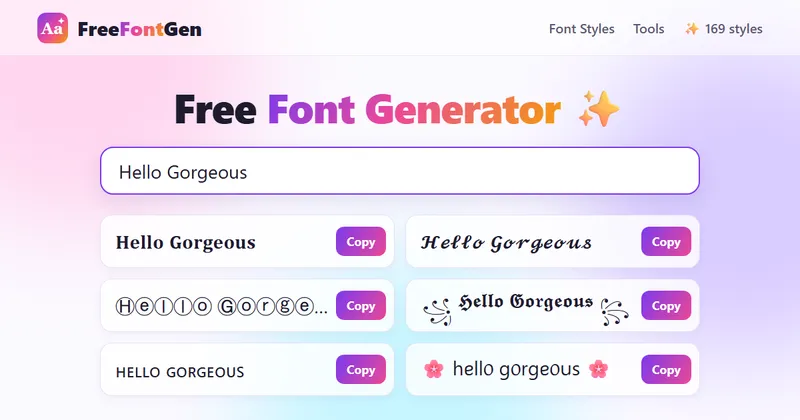
FreeFontGen is a browser-based font generator that converts plain typing into 169 Unicode text styles — bold, cursive, gothic, bubble, glitch, small caps and more — and copies any result to the clipboard in one tap.
What is FreeFontGen?
FreeFontGen is a free web tool that takes up to 500 characters of typed text and instantly renders it in 169 different Unicode character sets, from bold serif and cursive script to bubble, gothic, glitch, upside-down and symbol-framed styles. The output is ordinary text rather than an image or a font file, so it pastes into Instagram, TikTok, Discord, WhatsApp, X, a document or a game nickname field. It runs in any modern phone or desktop browser with no account, no install and no stated maker or company behind it.
What makes FreeFontGen stand out?
- 169 styles on a single page — every preview refreshes as you type, and filter buttons sort the grid into Bold, Cursive, Fancy, Italic, Stylish, Cool, Cute, Aesthetic, Bubble, Glitch, Cursed, Small, Big, Strike, Underline, Upside down and Case families.
- One-tap copy — tapping a card or its heart-labelled Copy button writes the styled string straight to the clipboard, with no download step, watermark or copy cap.
- Unicode substitution, not formatting — the letter A becomes the bold math character U+1D400, the script character U+1D49C or the circled character U+24B6, which is why the look survives in apps that strip rich text.
- Combining-mark effects — strikethrough, underline and zalgo/glitch styles stack combining diacritics over each letter, while frame styles wrap words in symbols such as ꧁ ꧂, ★彡 or 𓆩 𓆪.
- Upside-down and mirror styles — each letter maps to a flipped lookalike and the character order is reversed, with bold, small, hearts, strike and spaced variants.
- 12-format case converter — lowercase, UPPERCASE, Title Case, Sentence case, camelCase, PascalCase, snake_case, kebab-case, CONSTANT_CASE, dot.case, Alternating Caps and iNVERSE cASE.
- Family pages and favorites — dedicated pages at /bold, /cursive, /glitch and elsewhere list every variation in a family, and the heart on a card saves the exact styled text to a browser-stored Favorites page.
- Nothing leaves the device — conversion runs in JavaScript on the client, and typed words are never uploaded to a server.
Who should use FreeFontGen?
- Instagram and TikTok users: style a display name, bio line or caption hook, since handles after the @ only accept plain letters, numbers, periods and underscores.
- Discord server admins: name channels, roles and server nicknames so they stand out in a crowded sidebar.
- Gamers: give a nickname a bold outline or symbol frame (the Gamer Tag style pairs block letters with swords) for lobbies and profiles.
- Writers and note-takers: mark headings in plain-text notes and to-do lists, or test decorative headings in a design mockup before choosing a real typeface.
What can you do with FreeFontGen?
- Creators building a profile: type a name once and scan all 169 treatments side by side, then copy the cursive or bubble version into a bio in seconds.
- Community managers: convert a WhatsApp status or group name into small caps or bubble text so it is easier to spot in a list.
- Designers mocking up layouts: paste decorative headings into a plain-text mockup to check spacing and emphasis before licensing a font.
- Anyone formatting plain-text documents: use the case converter to switch a copied headline into snake_case, kebab-case or CONSTANT_CASE without retyping it.
How does FreeFontGen work?
Typing in the box at the top refreshes every preview immediately; you scroll or filter, tap a card to copy, then long-press and paste inside the target app. Underneath, the tool looks up each character's Unicode counterparts — plain A to bold U+1D400, script U+1D49C, circled U+24B6 and so on — so the receiving app simply displays ordinary characters instead of applying a font.
Pricing
Free. Every style, tool and copy button is usable without an account, a trial or a usage cap, and the site states there is no watermark and no limit on how many times you copy.
Alternatives
YayText, LingoJam.
FAQ
Do fancy fonts work in Instagram or TikTok usernames?
No. Handles after the @ on Instagram and TikTok accept only plain letters, numbers, periods and underscores. Styled text works in display names, bios, captions and comments, which is where most people use it.
Why do some styles render as empty boxes or question marks?
A few older devices and apps lack glyphs for rarer Unicode blocks. Bold, italic, cursive, bubble and small caps have the widest support; if a reader sees boxes, switch to one of those safer styles.
Is the text I type stored or uploaded?
No. Conversion happens on your device in JavaScript and words are never sent to a server. Only the favorites you save with the heart button persist, and those stay in your own browser storage.
Are these real font files?
No. A font file changes how the same letters are drawn on your screen; FreeFontGen changes the letters themselves into different Unicode characters, which is why the look survives when you paste into another app.
Do styled characters affect accessibility?
Yes, potentially. Screen readers may spell out math letters one at a time or skip decorative symbols, so the page advises keeping emails, links, prices and contact details in plain text and reserving styles for short accents like a name or heading.


