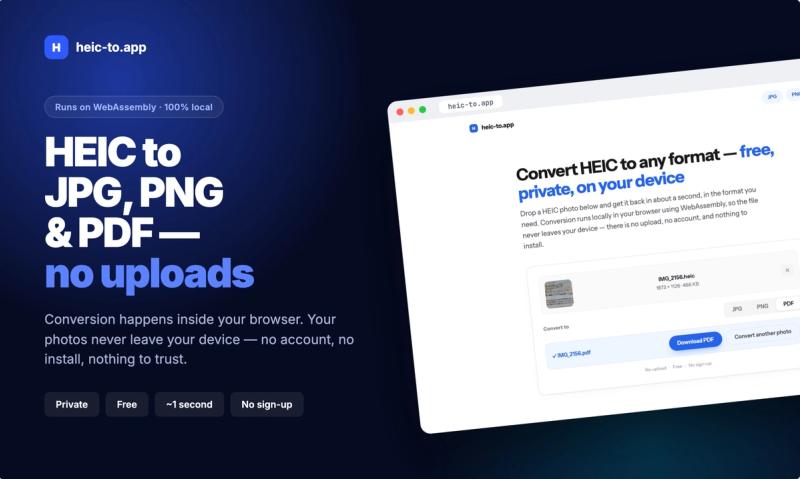
HEIC Converter is a free, browser-based tool that converts Apple's HEIC photos to JPG, PNG, or PDF entirely on your device using WebAssembly — no upload, account, or installation needed.
What is HEIC Converter?
HEIC Converter (heic-to.app) is a web app that turns HEIC images — the default photo format on iPhones and iPads since iOS 11 — into widely compatible JPG, PNG, or PDF files. It runs entirely in your browser, so your photos never leave your device. Drop a HEIC file, pick an output format, and get the converted file in about a second.
Key Features
- 100% local, private conversion — Files are processed in your browser via WebAssembly; nothing is uploaded to any server, and you can even switch on airplane mode after loading the page and conversions still work.
- Three output formats — Convert to JPG for small, universally openable images; PNG for lossless quality with larger files; or PDF for scans, receipts, IDs, and single-photo documents.
- No artificial file size limit — The only constraint is your device's memory, which comfortably handles typical iPhone photos.
- Works on iPhone and in Safari — Open the page on an iPhone, tap the drop zone, pick a photo from your library, and save the result back to Files or Photos.
- No account, no install — It is a plain web page: just drop a photo, get the result, and save it. Works on Mac, Windows, and Android browsers as well.
Who should use HEIC Converter?
- iPhone users on Windows — People who take photos on their iPhone and need to open, send, or print them on a Windows PC that lacks native HEIC support.
- Web form submitters — Anyone uploading to job portals, government forms, or e-commerce sites that reject HEIC because their extension allow-list only accepts .jpg, .jpeg, or .png.
- Email senders — Users who want to avoid blank thumbnails or unopenable attachments for recipients on Windows or older Android phones.
- Graphics and document editors — Creators who need lossless PNG for further editing or PDF for document submission.
How does HEIC Converter work?
The tool is a web page with a drop zone. Drop a HEIC file (or tap to browse on mobile), choose your target format — JPG, PNG, or PDF — and the converter processes the file locally using WebAssembly. The converted file is immediately offered for download; no server is involved.