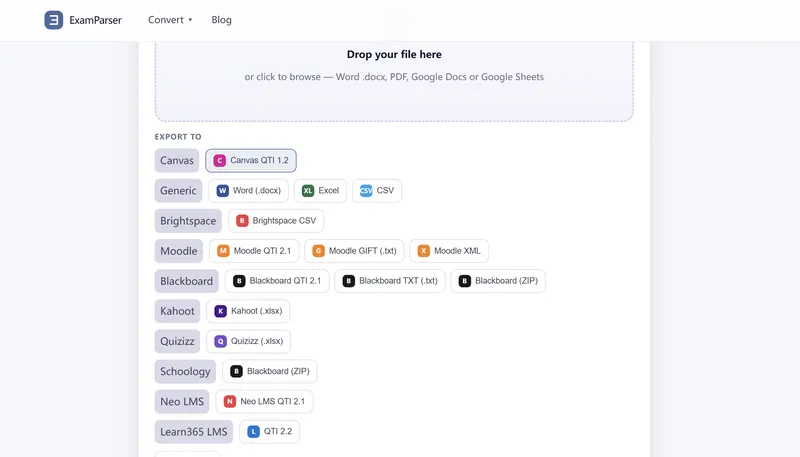
ExamParser is a web-based document-to-quiz converter that parses a Word, PDF, Google Docs or Google Sheets exam paper into one structured row per question — number, stem, options and answer key — and exports it as a Canvas QTI 1.2 zip or files for Moodle, Blackboard, Kahoot, Quizizz, Respondus, Brightspace, Schoology and Google Forms.
What is ExamParser?
ExamParser is a browser-run converter that takes a question paper as input and returns a structured question bank plus platform-ready export files. It reads Word .docx, PDF (including scanned pages via OCR), Google Docs and Google Sheets, then separates each question into number, stem, options A–E and the correct answer, keeping the answer inside the question row rather than dumping a key at the end of the file. Outputs include a Canvas QTI 1.2 .zip containing an imsmanifest.xml and per-question XML, plus Moodle Aiken/GIFT/XML, Blackboard QTI or tab-delimited text, Kahoot .xlsx, Quizizz .xlsx, Respondus .rtf and plain CSV/Excel. No login is required, and the maker is not named on the page.
What makes ExamParser stand out?
- Structure preserved per question — numbering, stem, options and answer key stay attached as one unit, so nothing is flattened into a single text block.
- Scanned paper support — photographs and scanned past papers pass through OCR before parsing.
- No question limit — a full paper is parsed in one pass, from dozens to thousands of questions, with preview showing progress such as "3 of 50 rows".
- Multiple question types — single choice, multiple response, true/false, matching, fill-in-the-blank, short answer, cloze and essay are recognized and labelled in the preview grid.
- Media retention where the format allows — images, tables and math formulas (as MathML or LaTeX) survive into Canvas QTI, Moodle GIFT/XML/QTI and Word .docx exports; CSV and plain Excel carry text only.
- Multilingual parsing — Chinese, English, Japanese, Korean, German and mixed-language files in one document are all handled.
- Editable parsed grid — corrections made in the preview flow into every export, and the CSV export ships alongside the QTI zip for spreadsheet editing before import.
- Up to three export formats per job — one parse can target several destinations at once.
Who should use ExamParser?
- Teachers and lecturers on Canvas: upload a Word paper and download a QTI zip to load through Settings → Import Course Content, avoiding hand-rebuilding each question.
- Moodle and Blackboard instructors: export GIFT, Aiken, Moodle XML or Blackboard tab-delimited files straight into a question bank.
- Tutoring companies and test-prep authors: convert printed past papers via OCR into an editable CSV question bank.
- Kahoot and Quizizz hosts: produce the .xlsx bulk-upload sheets those platforms accept, with answers and time limits filled in.
What can you do with ExamParser?
Exam preparation teams: turn a scanned past paper into a searchable, editable question set exported as CSV for review and cleanup. LMS administrators: batch-load a semester's worth of multiple-choice items into Canvas question banks as Canvas-ready XML. Google Forms users: convert a Word or PDF document into a spreadsheet plus Apps Script that builds the quiz items, since Forms has no native import. Publishers editing items: reorder, merge or fix questions in the CSV export before importing the corrected QTI zip.
How does ExamParser work?
Upload the file, check the parsed grid where each question becomes a row, then download the QTI .zip containing a manifest and Canvas-ready XML. In Canvas, go to Settings → Import Course Content → QTI .zip → choose a question bank or course. Question text maps to the item presentation material, options A–E to response_lid/response_label, the answer key to resprocessing/respcondition, and marks to max_score per item.
Pricing
Payment is one-time per file, based on question count, with upload and preview free. Tiers: up to 50 questions at $5.9, up to 1,000 at $19.9 (most popular), up to 5,000 at $59, and 5,000+ at $79. Every tier includes all export formats; no subscription and no login.
FAQ
Do I need an account to convert a file?
No. ExamParser runs without login — drop a file in, pick a destination, download. An account is optional and only stores past conversions in one place.
Are uploaded question papers stored or reused?
Uploads are used for the single conversion job only. The page states unpublished exam material is never reused, resold, or used to train models.
Which export formats cannot carry images or formulas?
CSV and plain Excel keep text only — numbers, stems, options and answers. Images, tables and MathML/LaTeX formulas survive only in Canvas QTI, Moodle GIFT/XML/QTI and Word .docx exports.
How is the price calculated?
A single one-time price based on how many questions the file contains, not per question. Upload and preview are free; payment happens only at download.
Can it convert a paper that exists only in print?
Yes. Scanned pages and photographs go through OCR before parsing, so printed past papers become an editable question bank.