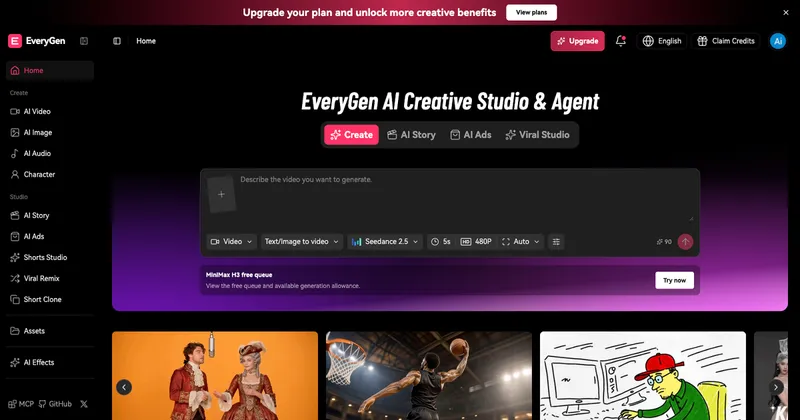
EveryGen AI is a browser-based AI creative studio that places third-party video, image and audio generation models behind a single workspace plus a conversational Video Agent.
What is EveryGen AI?
EveryGen AI is a web creative studio, operated by EveryGen LLC at everygen-ai.com, that generates video clips, still images, voiceovers, music and sound effects from prompts and reference files. You supply text descriptions, first frames, reference photos, reference video clips, audio or documents, and it returns generated clips, edited images, spoken lines, songs and an assembled video you download in the browser. No desktop install is required, and a separate MCP server exposes the same generator inside Claude, ChatGPT, Claude Code and Cursor.
What makes EveryGen AI stand out?
- Per-scene model routing — text-to-video, image-to-video, video-to-video and motion-control workflows connect to Seedance 2.5, Veo 3.1 Fast, Veo 3.1 Quality, Wan 3.0 and Kling 3.0 from one studio.
- Seedance 2.5 reference limits — up to 30 seconds per generation, up to 30 reference images, up to 10 reference videos and up to 10 reference audio clips, with native audio.
- Image models included — Nano Banana 2 for fast daily edits, GPT Image 2.5 with support for up to 16 reference images, Wan 2.7 Image Pro with multilingual text rendering, and Seedream 5.0 for posters, slides and product visuals.
- Conversational Video Agent — you describe purpose, audience and style, then review the scene plan and approve credit costs before paid media is generated.
- Motion transfer — Kling 3.0 Motion Control moves subject motion from a reference clip onto a new character or scene.
- Audio layers — narration and character dialogue, music and songs made from a prompt, style or your own lyrics, plus ambience and sound effects aligned to clips, with reusing of a character voice across scenes.
- Template catalogue — Hotel Lobby AI, Bullet Time Video, Sketch to Video, Day to Night, AI Panda Hug and Minecraft Video offer previews you replace with your own input.
- MCP integration — connect from Claude, ChatGPT, Claude Code or Cursor to create images, clips, voiceovers or music and manage an EveryGen project.
Who should use EveryGen AI?
- Marketers and agencies — produce ad variants, product demos and localized clips, swapping models per scene and keeping brand assets as reusable references.
- Ecommerce teams — generate product visuals and stills on models such as Seedream 5.0 or Wan 2.7 Image Pro, then animate the same images in an image-to-video workflow.
- Social media creators — build shorts, animated scenes and stories from a template or a reference short, adding narration and music before download.
- Production and studio teams — use the Video Agent to plan scenes, reuse voices and soundtrack across a project, and finish with Wan 3.0 video editing or motion-control revisions.
What can you do with EveryGen AI?
- Ad makers: describe the audience and length, approve a scene plan, then generate the clips, dialogue and music for a finished ad video.
- Character animators: create a character image, upload a motion reference clip, and have Kling 3.0 transfer the performance into a new scene.
- Illustrators and designers: turn a sketch into a moving scene, or run a portrait through the Bullet Time Video template for a cinematic camera move.
- Audio-first creators: make a song from lyrics or a mood prompt, then arrange narration, music and effects against saved clips in the studio.
How does EveryGen AI work?
- Describe the project purpose, audience and style, adding images, video, audio or documents as references.
- Shape the scene plan, timing and characters, adjusting it or generating a single scene first.
- Generate the media — clips from the video generator, plus images, dialogue, narration, music and scene effects.
- Review, revise and edit saved media through conversation, then download the assembled video.
Pricing
EveryGen AI uses a freemium model. The Free plan includes 10 one-time credits for trying video generation at 720p with a watermark; paid plans add monthly or annual credits, watermark removal and a commercial license. A separate free queue shows allowance for the MiniMax H3 model.
FAQ
Is EveryGen AI free?
There is a Free plan with 10 one-time credits that generates video at 720p with a watermark. Paid plans supply monthly or annual credits together with watermark removal and a commercial license; current plan and credit amounts are listed on the pricing page.
Which model should I pick for my scene?
Seedance 2.5 handles controlled motion with native audio and multimodal references, Veo 3.1 produces polished image-to-video with first-frame and last-frame control, and Kling 3.0 imitates motion from a reference clip. For still assets, choose Wan 2.7 Image Pro, GPT Image 2.5, Nano Banana 2 or Seedream 5.0.
Can EveryGen AI animate an image I upload?
Yes. Create or upload an image in EveryGen, then open an image-to-video workflow on Seedance, Veo or Wan 3.0. The generator uses that still to guide the moving scene, and Wan 3.0 reference-to-video accepts reference images, videos and audio together.
How do I connect the MCP?
Open the MCP page, sign in to your EveryGen account and authorise a supported client such as Claude, ChatGPT, Claude Code or Cursor. You then ask the assistant to create images, clips, voiceovers or music, and you review the credit quote before paid generation runs.
Should I review generated videos before publishing?
Yes. EveryGen states that outputs should be checked for visual artifacts, product accuracy, brand fit and usage rights before publishing, with consent confirmed for likenesses and voices and the finished video checked against platform requirements.
more to read
https://everygen-ai.blogspot.com/2026/10/everygen-ai-features-3-minute-videos.html