
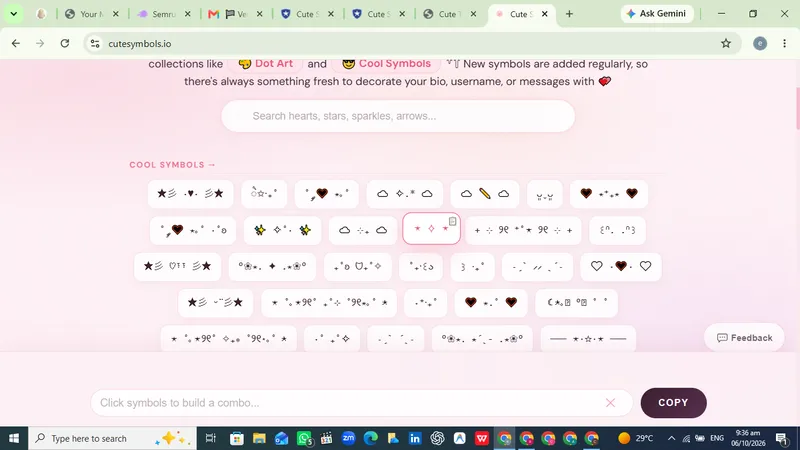
Cute Symbols is a free browser-based library of decorative Unicode characters that lets you browse or search more than 1,000 cute symbols and copy any of them to your clipboard with a single click.
What is Cute Symbols?
Cute Symbols (cutesymbols.io) is a copy-and-paste symbol catalog that runs entirely in the web browser with no download and no account. Visitors browse categories of decorative characters — hearts, stars, sparkles, dividers, bows, clouds, and emoji — or type into a search field, then click a symbol to copy it for pasting into a bio, username, server name, or chat message. Alongside the catalog, the site publishes step-by-step styling guides for Discord, Instagram, and kaomoji.
What makes Cute Symbols stand out?
- Click-to-copy catalog — 1000+ symbols across categories including hearts, stars, sparkles, emojis, and dividers, copied in one click rather than typed manually.
- Search with filtering — a search box narrows the catalog, with an empty state reading "No symbols found. Try a different search."
- Mixed symbol families in one place — decorative borders and dividers, emoji glyphs, and Japanese kaomoji such as (˶ᵔᵕᵔ˶) sit side by side instead of on separate sites.
- Discord Symbols Guide — covers aesthetic channel names, dividers, and server decorations.
- Instagram Bio Guide — covers cute bio text and line-break tricks for profile copy.
- Kaomoji Guide — a browsable set of 100+ Japanese emoticons sorted by mood.
- No-login feedback form — visitors can report a missing symbol, bug report, wrong result, or suggestion, with email optional.
Who should use Cute Symbols?
- Discord server owners and moderators: decorate channel names, category labels, and server rules with dividers and sparkles copied straight from the catalog.
- Instagram and social profile writers: assemble cute bios and captions using hearts, bows, and line-break formatting tricks from the Instagram Bio Guide.
- Chat and forum users: pull kaomoji text faces from the Kaomoji Guide to react in messages without sending emoji.
- Anyone styling a display name: copy a star, cloud, or heart glyph into a game handle or username.
What can you do with Cute Symbols?
- Discord community builders: find dividers and border symbols for channel headers, then paste them directly into server settings.
- Instagram users: grab heart and sparkle characters plus line-break tricks to format a bio that stacks neatly on mobile.
- Casual chatters: copy a kaomoji face by mood to use as a reaction in text conversations and forums.
- Writers and designers: collect ornamental dividers and flourish characters for titles, headers, or social captions.
How does Cute Symbols work?
- Open cutesymbols.io, which loads a grid of symbol cards under the categories offered on the page.
- Either browse the catalog or type into the search field; typing a term that matches nothing returns a "No symbols found" message.
- Click any symbol and it is copied to the clipboard, ready to paste wherever text is accepted. A dedicated symbol guide page is available for Discord, Instagram bios, and kaomoji if you need formatting instructions.
FAQ
Is Cute Symbols free to use?
The site presents no pricing, tiers, or subscription prompts anywhere on the page — browsing, searching, and copying symbols happens directly in the browser, so the catalog is free to use.
Do I need an account to use Cute Symbols?
No. There is no sign-up or login flow in the catalog, and the site's own feedback form states that no login is required to submit a missing-symbol report, bug report, wrong result, or suggestion.
How many symbols does Cute Symbols include?
The site advertises more than 1000 symbols spanning hearts, stars, sparkles, emojis, dividers, and kaomoji, browsable across categories with a search field for locating specific characters.
What kinds of decorative characters can I copy?
The catalog mixes emoji glyphs, ornamental dividers and borders, sparkle and star characters, hearts, bows, clouds, and Japanese kaomoji text faces such as (˶ᵔᵕᵔ˶).
Where can I find instructions for using the symbols?
Cute Symbols publishes three guides: a Discord guide for aesthetic channel names and dividers, an Instagram bio guide covering cute bios and line-break tricks, and a kaomoji guide listing 100+ Japanese emoticons grouped by mood.


