
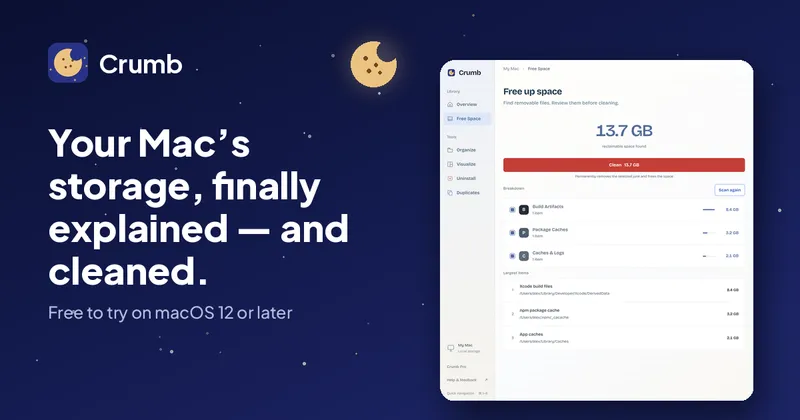
Crumb is a macOS menu-bar app that runs a read-only scan of your disk, names the caches, logs, build data and duplicates filling it, and removes only the items you approve.
What is Crumb?
Crumb is a disk-space cleaner for macOS that takes your drive as input, produces an itemized list of reclaimable files with sizes and plain-language explanations, and deletes only the items you tick. It runs from the menu bar on macOS 12 or later, with separate installers for Apple silicon (version 3.0.0, 4.5 MB) and Intel Macs (3.0.0, 4.8 MB), and is made by the team behind Everyday Mac Tools, which also publishes Shoji, Trill and Punchcard. It places files in six tool areas: Overview, Free Space, Organize, Visualize, Uninstall and Duplicates.
What makes Crumb stand out?
- Read-only scan — scanning never modifies a file; nothing is removed until you approve the cleanup plan, and every row shows its size and category first.
- Named System Data breakdown — where macOS Storage settings shows one grey "System Data" bar, Crumb lists the named parts (Xcode build data, developer caches, browser caches, app caches, Trash, old Claude Code versions) with a size for each.
- Safe? checks — point Crumb at any folder and it explains what the folder is, whether it regenerates, and what breaks if it is deleted.
- Developer-aware cleanup — it totals Xcode build data, build folders, package caches and toolchain leftovers that Storage settings does not show at all.
- Full uninstall — removes an app together with the support files, caches and preferences it leaves behind when you simply drag it to the Trash.
- Duplicates anywhere — finds identical files across the Mac, not just inside the Photos library, and keeps one copy of each.
- Organize — sorts a messy folder such as Downloads into folders by file type and shows the plan before a single file moves.
- Private and local — no account and no sign-in; the scan runs on your Mac, and the optional AI safety check sends only scrubbed file names and metadata, never file contents.
Who should use Crumb?
Mac developers: reclaim Xcode build data, derived data and package caches that grow to multiple gigabytes and that macOS never itemizes, while keeping the toolchain versions in use. Everyday Mac users hitting the full-disk alert: see what actually fills the drive instead of a single System Data bar, then clear caches, logs and Trash in one approved pass. People with years of app cruft: uninstall apps completely along with their leftover support files, login items and preferences. Anyone with duplicate-heavy storage: find and remove identical files anywhere on the Mac, choosing which copy survives.
Use cases
- Fixing a full disk: run the free read-only scan, review each item's size, untick anything to keep, and Crumb reports exactly how much space came back.
- Cleaning before a macOS upgrade or backup: clear rebuildable caches, browser caches and Trash so a Time Machine run or installer has room to work.
- Tidying a Downloads folder: let Organize propose folders by file type, approve the plan, and files move only after you agree.
- Freeing space without judgment calls: use the Safe? explanation on an unfamiliar folder to decide whether it regenerates or should stay.
How does Crumb work?
Crumb runs three steps and pauses for approval at each one. First a read-only scan maps where the space went across caches, logs, developer data, apps and duplicates. Next you review the list, untick anything to keep, and query Safe? on anything uncertain. Finally Crumb removes only the approved items and shows the amount of space recovered. The page also notes a free trial flow: run a full scan and one complete cleanup before paying.
Pricing
Crumb is free to try with a full scan and one cleanup included. Crumb Pro is a one-time purchase of $9 that unlocks unlimited cleanups, Uninstall, Duplicates and Organize, Safe? checks on any folder, and free updates, on up to 2 Macs, with no subscription. A 7-day money-back guarantee applies.
Alternatives
DaisyDisk, OmniDiskSweeper, and CleanMyMac X.
FAQ
Is Crumb free?
There is a free tier that includes a full read-only scan, a reclaimable-space breakdown by category, and one full cleanup. Everything else — unlimited cleanups, Uninstall, Duplicates, Organize and Safe? checks on any folder — requires the $9 one-time Crumb Pro purchase.
Does Crumb work on Apple Silicon?
Yes. Crumb runs natively on Apple silicon (M-series) Macs and on Intel Macs on macOS 12 or later, with a separate installer for each. The Apple silicon package is 4.5 MB and the Intel package is 4.8 MB, both version 3.0.0.
Is Crumb a subscription?
No. Crumb is a one-time $9 purchase with no recurring fees, covering up to 2 Macs and free updates. It sells a 7-day money-back guarantee: email [email protected] within 7 days of purchase for a full refund.
Will cleaning break anything?
Crumb only removes what you approve and targets data that rebuilds itself, such as caches, logs and build artifacts. The scan is read-only, each item shows its size beforehand, and the Safe? check explains whether a folder regenerates. The page's own advice: if unsure about an item, leave it unticked.
What is System Data on Mac?
System Data, formerly "Other," is the catch-all macOS shows in Settings under Storage, bundling caches, logs, swap files and temporary files that Apple does not itemize. Crumb locates the reclaimable portions of it — caches, logs and developer data — and shows their sizes so you can free space deliberately.


