
What is CrmLeaf?
CrmLeaf is a Professional Services Automation (PSA) platform for agencies, consultancies and IT services firms. It replaces disconnected spreadsheets and tools with one connected workspace that covers the full quote-to-cash cycle, from first lead to final payment.
Key features
- CRM & sales pipeline: track leads, deals and clients, with follow-up reminders
- Project management: Kanban boards, sprints, milestones and workload views
- Resource planning: see who is available or overloaded before staffing a project
- Time tracking: live start/pause/stop timers and manual entry on web and mobile, with manager approval before billing
- Expense management: capture receipts and tie them to the right project
- Invoicing & billing: hourly, fixed-price and retainer billing from approved time and expenses, with QuickBooks sync
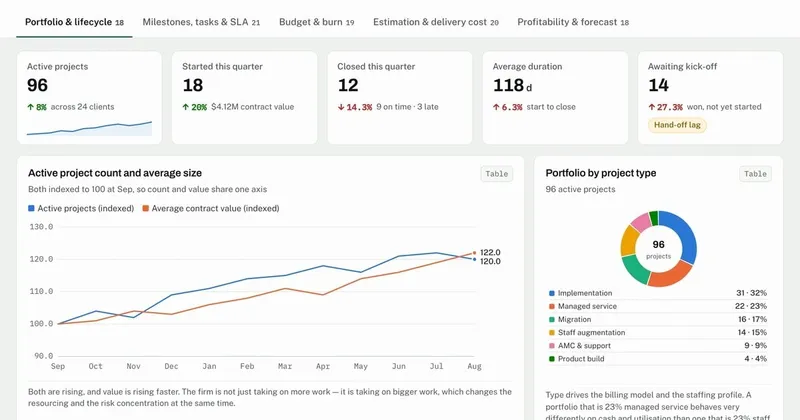
- Reporting & dashboards: live views of revenue, margin, utilization and project health
- AI assistant: ask for status updates, time summaries and client-ready reports in plain English; flags at-risk budgets, drafts emails and predicts lead scores
- Integrations: MCP server for Claude, Cursor and VS Code, plus REST API, webhooks and Zapier
Who is it for?
Professional services teams that bill for time or projects: digital and marketing agencies, consultancies, IT services firms, architecture, engineering and accounting practices.
How it works
- Win the work in the CRM and turn the deal into a project.
- Plan resources and run delivery with boards and milestones.
- Track time and expenses as work happens.
- Approve hours and turn them into invoices in a few clicks.
Pricing
- Free plan for 1 user
- Paid plans from $9 per user per month
- 15-day free trial of Premium, no credit card required
- Free data migration and onboarding included
Alternatives
CrmLeaf is often compared with Kantata, Rocketlane, Scoro and Accelo, and is used by teams replacing separate tools such as Jira, Trello or Asana plus a standalone CRM and billing app.
FAQ
Is there a free plan? Yes. CrmLeaf has a free plan for 1 user, and you can try Premium free for 15 days without a credit card.
Does CrmLeaf integrate with QuickBooks? Yes. Invoices sync with QuickBooks, so you don't re-enter numbers.
Can I bill both hourly and fixed-price work? Yes. CrmLeaf supports hourly, fixed-price and retainer billing models.
Is there a mobile app? Yes. CrmLeaf has iOS and Android apps, so your team can log time away from the desk.
Can I connect AI tools? Yes. CrmLeaf's MCP server lets you work with your CRM and project data from Claude, Cursor or VS Code.


