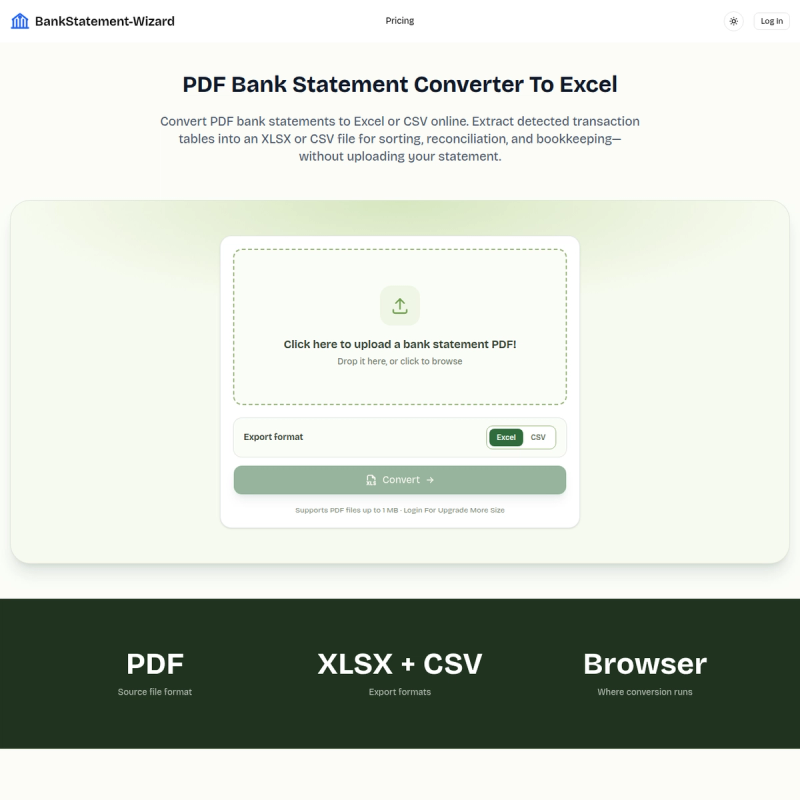
PDF Bank Statement Converter is a free browser-based tool that converts PDF bank statements and other table-based reports into editable Excel (XLSX) or CSV files entirely on your device, without uploading the document to a server.
What is PDF Bank Statement Converter?
PDF Bank Statement Converter is a web utility that detects tables in an uploaded PDF, extracts the rows and columns, and exports them as an Excel workbook or CSV file. It accepts PDF bank statements, transaction reports, and similar table-based documents, and runs client-side in a modern browser with JavaScript enabled. No account is needed for basic conversion, and the tool is hosted at bankstatement-wizard.net.
What makes PDF Bank Statement Converter stand out?
- Local processing – The PDF never leaves your device; conversion happens in the browser, keeping sensitive financial files private.
- Table extraction – Detects table rows and columns in your PDF and copies them into a structured spreadsheet, saving manual retyping.
- Page-by-page worksheets – Each PDF page with detected tables is saved as its own worksheet inside the Excel workbook.
- Dual export formats – Download the result as either XLSX or CSV, depending on your bookkeeping needs.
- No account required – Start converting immediately; an account (via login) is only needed to raise the file size limit.
- Free with size limit – Basic conversion supports PDF files up to 1 MB; logging in unlocks support for larger files (up to 50 MB per the FAQ).
- Works with clear digital PDFs – Best results come from documents with visible table borders and selectable text; scanned pages may not convert cleanly.
Who should use PDF Bank Statement Converter?
- Personal finance users – Convert monthly bank statements to Excel to sort and categorize spending without manual data entry.
- Bookkeepers and accountants – Create workable spreadsheet copies of statement PDFs before importing or reconciling transactions in accounting software.
- Business owners – Turn table-based financial reports from PDF into editable Excel files for expense review and records.
- Anyone handling sensitive financial PDFs – Use local processing to avoid uploading bank statements to a third-party server.
What can you do with PDF Bank Statement Converter?
- Expense review: Export transaction tables to a spreadsheet, then sort and categorize spending to track budgets.
- Account reconciliation: Create a workable Excel copy of a statement and compare transactions against your own records.
- Bookkeeping preparation: Convert table-based PDF reports into XLSX files before importing or organizing data in accounting tools.
How does PDF Bank Statement Converter work?
The converter runs a three-step workflow in the browser: upload a PDF statement or table-based report (the file is not uploaded to a server), the tool locally detects table rows and columns and builds an XLSX workbook, and you download the file and review the exported rows against the original PDF. JavaScript must be enabled, and the process works best with clear, digital PDFs.
Pros and cons
Pros:
- No upload means bank statements stay private.
- Free to use for PDFs up to 1 MB; account login raises the limit.
- No software installation required.
- Outputs both XLSX and CSV formats.
- Each page with tables becomes its own worksheet.
Cons:
- Free limit is only 1 MB, which is small for many real statements.
- Scanned or low-quality PDFs may not have tables detected, so the workbook may contain an information sheet instead of data.
- No direct guarantee of accuracy; you must review exported data against the original.