
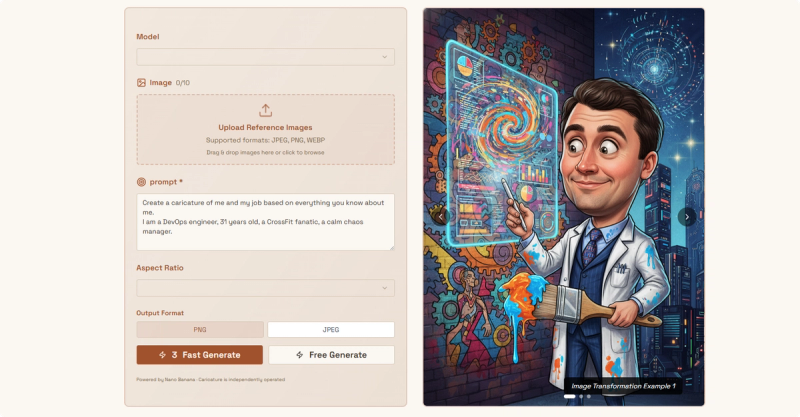
Caricature is an AI-powered web app that turns uploaded photos into funny exaggerated portraits while keeping the results flattering—free to try with no signup required.
What is Caricature?
Caricature is an AI caricature generator that takes a photo (JPEG, PNG, WEBP) and produces an exaggerated portrait in seconds. It runs entirely in the browser on the Caricature website and is independently operated (no company name stated). Users can choose from 9+ AI models including Nano Banana, Nano Banana Pro (4K HD), GPT-4o Image, and Flux, and output in PNG or JPEG format with a 1:1 aspect ratio. The service is free to start with free credits for new users, and a fast generation option is available.
Key Features
- 9+ AI Models — Choose from Nano Banana (fast), Nano Banana Pro (4K HD), GPT-4o Image, Flux, and more to control style and quality.
- Zero Signup Required — Upload a photo and generate a caricature immediately without creating an account.
- Free Credits for New Users — Start with free generate credits; fast generate available for quicker results.
- Commercial Rights — Generated images can be used for professional or commercial purposes without additional licensing.
- One-Click Social Sharing — Share directly to TikTok, Reddit, X, and Facebook to get attention.
- Batch Processing with Reference Images — Upload up to 10 reference images to influence the output style.
- Output Formats — Download as PNG or JPEG, both at 1:1 aspect ratio.
Who is it for?
- Social media users wanting to create viral, funny profile pictures or posts for platforms like TikTok, Reddit, and X.
- Content creators and marketers needing unique, attention-grabbing visuals for campaigns, avatars, or branded content.
- Individuals who want a free, quick way to see themselves or friends turned into exaggerated portraits without signing up.

What can you do with Caricature?
- Generate a funny portrait for social media — Upload a clear selfie, select a model like Nano Banana, and get an exaggerated image ready to share in seconds.
- Create a unique avatar — Use the generated caricature as a profile picture across platforms, with commercial rights if needed.
- Experiment with different styles — Try multiple AI models on the same photo to see which exaggeration style you like best.
How does Caricature work?
- Upload your photo — Drag and drop a JPEG, PNG, or WEBP image (clear portrait recommended).
- Pick a model — Choose from Nano Banana, Nano Banana Pro, GPT-4o Image, Flux, or others.
- Configure settings — Set aspect ratio to 1:1, choose output format (PNG or JPEG), optionally upload reference images.
- Generate — Click “Free Generate” or “Fast Generate” (faster processing).
- Download & share — Save the result or share it directly to TikTok, Reddit, X, or Facebook.
Pricing
Caricature is freemium. New users receive free generation credits for the “Free Generate” option. A “Fast Generate” option is available (likely paid), but no specific prices are listed on the page. No signup is required to start.
FAQ
Is Caricature free to use?
Yes, you can try it for free without signing up. New users get free credits for the “Free Generate” button. There is also a “Fast Generate” option that may require payment, but the free tier allows you to generate caricatures immediately.
Will the caricature make me look ugly?
No, the AI is designed to exaggerate features in a funny yet flattering way—the site emphasizes “funny not ugly.” Results are meant to be humorous but not distorting.
What image formats does Caricature support?
Uploads can be JPEG, PNG, or WEBP. Output can be downloaded as PNG or JPEG, both at a 1:1 aspect ratio.
Can I use the generated images commercially?
Yes, the site states that commercial rights are included, so you can use the caricatures for professional purposes without additional fees.
How long does it take to generate a caricature?
Results appear in seconds with the “Fast Generate” option; the “Free Generate” option may take slightly longer but still completes quickly.








