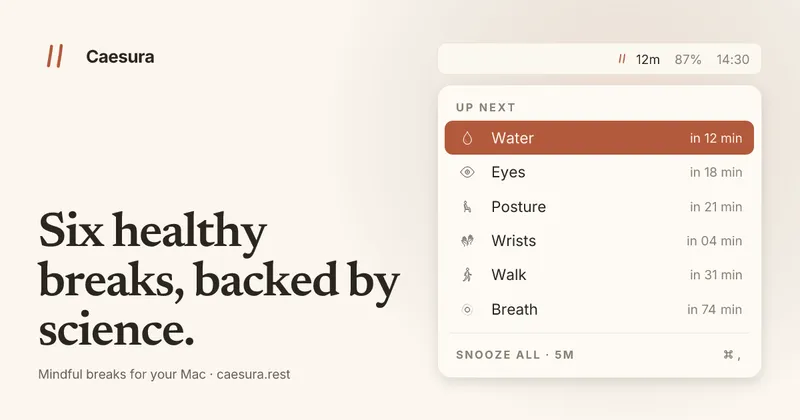
Caesura is a macOS menu-bar app that reminds you to take six types of healthy breaks—drink water, walk, stretch your wrists, rest your eyes, fix your posture, and breathe—each on an interval supported by scientific studies.
What is Caesura?
Caesura is a native Swift/SwiftUI app for macOS 14+ that runs in the menu bar and tracks six wellness habits. Each break has a default interval from peer-reviewed research (e.g., 20 minutes for eye breaks, 45 minutes for water), and you can turn any off or adjust the timer. The app pauses automatically during calls, screen sharing, fullscreen apps, Do Not Disturb, and calendar events, then resumes where it left off.
Key Features
- Six customizable break reminders: water (45 min), walk (60 min), wrist stretches (30 min), eyes (20 min), posture (30 min), breathing (90 min).
- Auto-pause: timers freeze during video calls, screen sharing, fullscreen, Focus modes, and local calendar events.
- Break coalescing: if two breaks come due within a minute, they merge into one prompt.
- Three display styles per break: full-screen overlay, menu-bar banner, or notification.
- Breathing guide with an animated orb and progress bar (4-second inhale, 6-second exhale, 3 cycles).
- Easy snooze and per-break toggle from the menu-bar dropdown.
- Universal binary (Apple Silicon & Intel), 8 MB, signed and notarized.
- Global hotkeys (rebindable) and 30+ language localizations.
- One-time purchase, no account, no telemetry, no subscription.
Who is it for?
Caesura is designed for macOS users who spend long hours at a computer and want evidence-based reminders to move, hydrate, and rest. It suits developers, designers, writers, and anyone who works in deep focus and tends to ignore basic self-care. The auto-pause features make it especially useful for people with frequent video calls or meetings.
What can you do with Caesura?
- Stay hydrated without tracking: Set the water reminder to fire every 45 minutes based on a 2011 study by Ganio et al. The overlay forces you to acknowledge it before returning to work.
- Avoid interrupting meetings: Caesura detects camera usage, screen sharing, and calendar events and pauses all timers automatically. After the call, each timer picks up with the exact remaining time.
- Customize break styles per habit: Assign eye breaks a gentle banner (auto-dismisses in 30 seconds) and wrist stretches a full overlay with illustrated moves, all from the same menu-bar app.
Pricing
Caesura costs $15 as a one-time purchase. A 14-day free trial is available with no credit card required, and a 30-day refund policy applies. The purchase includes all current and future updates.
Alternatives
- Time Out: Free and open-source Mac break reminder with micro-breaks and long breaks.
- Stretchly: Cross-platform (Electron) break reminder with customizable intervals.
- LookAway: Mac app that reminds you to look away from the screen every 20 minutes.
- DeskRest: Mac app for break reminders with a similar feature set.
FAQ
Does Caesura automatically pause during meetings?
Yes. Caesura monitors your camera, screen sharing, fullscreen apps, Do Not Disturb, and optionally your local calendar. When any is active, every timer freezes and resumes exactly where it left off.
Can I customize the break intervals?
Yes. Every break has its own interval, on/off switch, and presentation style (overlay, banner, or notification). Defaults come from research but are fully adjustable.
Is Caesura based on real science?
Yes. Each default interval is taken from a specific study, listed on the Evidence page. The app does not claim to prevent carpal tunnel or other conditions—it simply reminds you at intervals that research suggests are beneficial.
What are the system requirements?
macOS 14 Sonoma or later. Universal binary works on both Apple Silicon and Intel Macs. The app is 8 MB and launches in under a second.