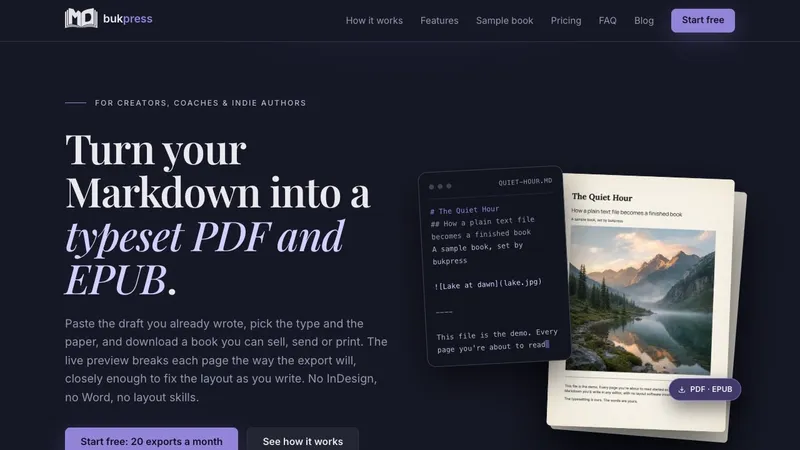
bukpress is a browser-based typesetting app that turns one Markdown manuscript into a paginated A4 PDF and, on Pro, a reflowable EPUB 3, handling pagination, page breaks, page numbers, margins and font embedding so you never fix a broken page by hand.
What is bukpress?
bukpress is a web app that takes a single Markdown file as input and produces a typeset A4 PDF and a reflowable EPUB 3 export. The pagination, page breaks, page numbers, margins and font embedding are done for you, and exports render server-side in seconds. It sits between a writing tool and a page-layout application: you are not laying out pages by hand in Word, Canva or InDesign, and you are not configuring a Pandoc and LaTeX toolchain before you can see a page. Type is set with three faces, their own sizes and colours, one of eight bundled paper textures, margins measured in points, and front and back covers. Exports carry no watermark on any plan, including the free one, and you keep every right to what you make, including the right to sell it.
What makes bukpress stand out?
- Live paginated preview — the browser preview uses the same page rules as the server-side renderer, so a break you see on page 7 should land on page 7 in the PDF; if the two engines disagree by a line, the exported PDF is the final word.
- Markdown that behaves — headings, lists, tables and code, plus a line of three dashes for a hard page break and four for a printed divider; a single Enter is a real line break.
- Separate title, subtitle and body type — three font pickers, three size sliders and three colours, with each dropdown rendering families in their own typeface.
- Paper, colours and margins — eight bundled paper textures (Ink, Cream, Midnight, Paper and four more), plus text colours, margins in points and line height.
- Brand Kits — save a finished design as a named kit with a live specimen card, apply it to any book in one click, or duplicate one to spin a variant (one kit on Essentials, multiple on Pro).
- Front and back covers — uploaded artwork becomes PDF page one, the EPUB's native cover and the last page of the print file; uploads go straight to storage from the browser.
- Google Fonts and your own typefaces — search 1,500+ Google Fonts families with no API key, or upload licensed .ttf / .otf files that get embedded in the PDF and packaged into the EPUB (Pro).
- No watermark, ever — not on Pro, not on Free; whatever you export is yours to sell, ship or print.
- A shelf, not a folder — every book is a project with its own text, design and artwork; rename it, duplicate the look, and return a month later.
Who should use bukpress?
Indie authors and self-publishers: set a manuscript as A4 pages with embedded fonts and page numbers, then export the print-ready PDF or the EPUB for Kindle and Apple Books.
Course creators and consultants: produce workbooks, handouts and lead magnets from plain Markdown and reuse a saved Brand Kit so every handout matches the last.
Studios and publishers on a schedule: use multiple Brand Kits on Pro for recurring series, with 300 pages per book, EPUB export and 1,500+ Google Fonts available for client work.
What can you do with bukpress?
- Lead magnets: write a 20-40 page Markdown document, export a clean, unwatermarked A4 PDF on the free plan and hand it out as a download.
- Workbooks and course handouts: paste existing Markdown, apply a Brand Kit, and export a workbook whose pages match your course branding, with tables that repeat their header row across page breaks.
- Whitepapers: typeset a long-form document with separate title, subtitle and body fonts, margins in points and a repeating footer page number.
- Ebooks: on Pro, export a reflowable EPUB that carries your fonts, colours and heading rules for Kindle and Apple Books.
How does bukpress work?
- Write straight into the editor or drop in a Markdown file you already have; it autosaves as you go and the page on the right repaginates while you type.
- Set title, subtitle and body fonts, sizes, colours, margins, page background and covers, then save the look as a Brand Kit that later books start from.
- Queue an export; the render runs on the server and the finished PDF or EPUB lands in your downloads, laid out the way the preview showed it.
Pricing
bukpress is freemium. Free costs nothing and requires no card: 20 exports a month, books up to 40 pages, the four bundled font families and PDF export, with no watermark. Essentials is $9 a month (or $90 a year) for unlimited exports, 80 pages, one Brand Kit, custom covers, your own page background and Google Fonts import. Pro is $24 a month (or $240 a year) for multiple Brand Kits, 300 pages, PDF plus EPUB export and uploaded .ttf / .otf fonts. A one-time Foundation offer of $149 grants Pro permanently and is capped at 250 slots. Paid plans carry a 14-day money-back guarantee.
Alternatives
Microsoft Word, Canva and Adobe InDesign are the hand-layout route the product positions itself against. Pandoc with a LaTeX toolchain is the command-line alternative, which requires configuration before you can see a page. bukpress exports A4 only, so a 6 x 9 novel trim needs a different tool.
FAQ
Is there a watermark on the free plan?
No. Free exports come out clean, exactly like Pro exports. The free plan is limited by 20 exports a month and 40 pages per book, never by branding stamped onto your work, and no card is required to start.
Do I need to know Markdown?
No. If you can write a heading with a # and a bold word with two asterisks, you already know enough. Page breaks, dividers, page numbers and spacing are handled by the editor or by a design setting, with no syntax to memorise.
Will the PDF look exactly like the preview?
Very closely, because the browser preview paginates with the same page rules the server-side renderer uses, so breaks, margins and page numbers line up. They are still two engines, so if they disagree by a line, the exported PDF has the final word.
Can I print it or sell it on Amazon?
The PDF is a print file with A4 pages and every font embedded, ready for a home printer or print shop, and you own the rights on every plan. For Kindle, KDP takes the EPUB, which is on Pro. Since bukpress exports A4 only, a 6 x 9 paperback trim is a job for a different tool.
What is the difference between the PDF and the EPUB?
The PDF is fixed A4 pages, the file you would send to print or give away as a lead magnet. The EPUB reflows to whatever screen it is read on, carrying your fonts, colours and heading styles, and EPUB export requires the Pro plan.