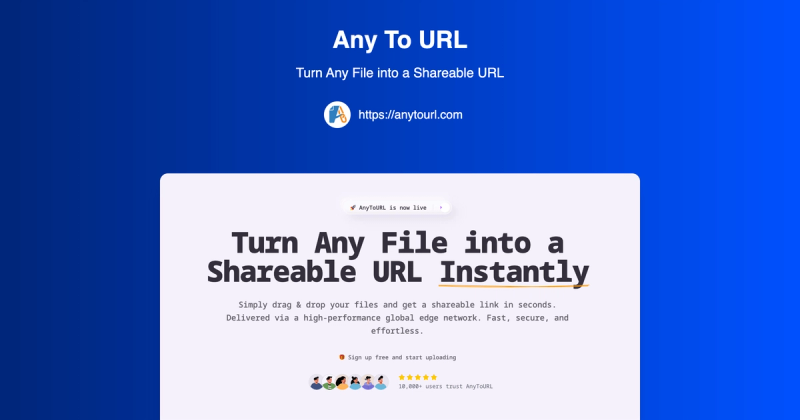
AnyToURL is a file hosting service that instantly turns any file into a shareable URL, delivered via a global edge network for fast access.
What is AnyToURL?
AnyToURL is a web-based file sharing platform that allows users to upload any file (up to 50MB for free users) and receive an instant, short, shareable URL. Files are delivered via Cloudflare's global edge network for fast worldwide access. The service is provided by AnyToURL.com and requires no account for basic uploads.
Key Features
- Drag & Drop Upload — Upload files by simply dragging them onto the page; supports files up to 5MB for free users and up to 10GB for paid plans.
- Smart File Preview — Images, PDFs, and documents preview directly in the browser without requiring downloads.
- Global Edge Network — Files are delivered via Cloudflare's CDN, providing lightning-fast access worldwide.
- Password Protection — Add a password to sensitive files so only authorized recipients can access them.
- Temporary Storage — Free files expire after 24 hours; paid plans offer permanent storage options.
- API Access — Pro and Ultra plans include API access (1,000 calls/month for Pro, 20,000 for Ultra) for programmatic uploads.
- CLI Upload Support — Pro and Ultra users can upload files directly from the command line.
- Custom Domain & Branding — Ultra plan allows custom CNAME domains and custom branding/logo.
Who is it for?
- UX Designers: Share design mockups, wireframes, and prototypes with clients; recipients can preview images and PDFs instantly in the browser.
- Marketing Teams: Distribute campaign assets, brand materials, and media files across teams without requiring accounts.
- Photographers: Deliver high-resolution photos to clients with instant previews, no slow galleries.
- Educators: Distribute lesson materials, assignments, and resources to students via simple shareable links.
- Content Creators: Share videos, images, and media with audiences using clean, professional links.
Use Cases
- Instant File Sharing: Drag and drop a file, get a URL in seconds, and share it anywhere — email, chat, social media.
- Secure Document Distribution: Upload sensitive documents and password-protect them; only those with the password can view or download.
- Collaborative Feedback: Share design assets with clients who can preview them directly in the browser, speeding up feedback loops.
How does AnyToURL work?
- Drag and drop a file onto the upload area or click to browse. 2. Once uploaded, receive a short shareable URL instantly. 3. Copy the URL and share it with anyone. 4. Optionally, add a password for extra security on sensitive files. Files are automatically delivered via Cloudflare's edge network.
Pros and Cons
Pros:
- No account required for basic uploads
- Fast uploads and global delivery via CDN
- Built-in file preview for common formats
- Optional password protection
Cons:
- Free tier limited to files under 5MB, 24h expiration, and 1GB/day bandwidth
- Larger files and longer storage require paid plans
Pricing
AnyToURL uses a freemium model with three tiers: Starter (free), Pro ($99/year), and Ultra ($299/year). The free Starter tier includes temporary hosting with a 5MB max file size and 1GB monthly uploads. Paid plans offer increased storage, file size limits, API access, and custom domains.
FAQ
Is AnyToURL free to use?
Yes, AnyToURL offers a free Starter plan that includes temporary file hosting (24-hour retention), a 5MB max file size, 1GB monthly uploads, and 1GB daily bandwidth. No credit card is required to start.
How do I upload a file?
Drag and drop a file onto the upload area, click to browse your device, or paste from clipboard (Ctrl+V). Once uploaded, a shareable URL is generated instantly.
What file types can I upload?
AnyToURL supports over 50 file types, including images, PDFs, documents, videos, and more. The service automatically handles previews for images and PDFs.
Can I password-protect my files?
Yes, after uploading, you can add a password to your file. Recipients must enter the password to access the file, adding a layer of security for sensitive content.
How long are files stored?
Files uploaded by free users expire and are deleted after 24 hours. Paid plans offer permanent storage options with no automatic expiration.
Can I use a custom domain?
Yes, the Ultra plan includes the ability to use a custom CNAME domain, allowing you to host files under your own domain name.