
Introduction
1Capture is a native screenshot and screen recorder for Mac, built for people who frequently share visual feedback. It combines fast screen capture, beautiful annotations, screen recording, and AI image editing to help users communicate clearly, report bugs, review designs, and collaborate with AI tools.
What is 1Capture?
1Capture is a screenshot, screen recording, and annotation app designed for macOS. Built for designers, developers, product managers, and anyone who regularly communicates through screen content, it makes capturing and explaining ideas faster and easier.
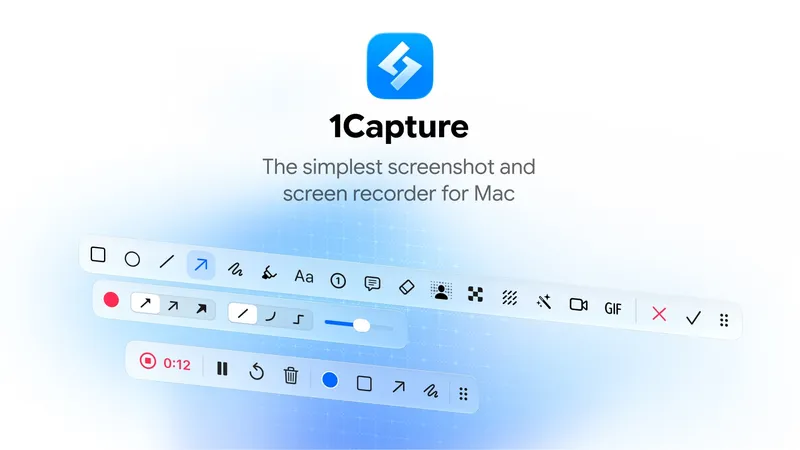
Users can capture selected areas, windows, entire screens, or scrolling content. Screenshots can be enhanced with arrows, text, shapes, highlights, blur, spotlights, and other visual annotations.
Beyond screenshots, 1Capture offers video and GIF recording, AI object removal, background removal, screenshot beautification, OCR, screen pinning, and productivity tools.
Its goal is simple: fewer steps, clearer communication, and better visual feedback.
What makes 1Capture stand out?
-
Built for visual feedback — Designed around capturing, annotating, and communicating. Quickly point out issues and explain changes without lengthy descriptions.
-
Beautiful annotations — Add arrows, text, shapes, highlights, blur, pixelation, spotlights, and magnified details. Quick Remarks combine visual pointers with written explanations.
-
Flexible screen capture — Capture regions, windows, multiple windows, full screens, and scrolling content, including long webpages and wide interfaces.
-
Screen and GIF recording — Record interactions, demonstrate workflows, reproduce bugs, and create tutorials with screen annotations and mouse-click effects.
-
AI image editing — Remove unwanted objects with AI Eraser or isolate subjects using background removal, without switching applications.
-
Screenshot beautification — Add backgrounds, spacing, rounded corners, and shadows to create polished images for presentations, documentation, and social media.
-
Visual partner for AI workflows — Capture an interface, annotate what needs to change, and drag the result into Claude, ChatGPT, or other AI tools. Communicate visually instead of relying entirely on text prompts.
-
Built-in productivity tools — OCR, screen pinning, color picking, watermarks, and Quick Notes simplify everyday tasks.
-
Customizable workflows — Flexible keyboard shortcuts, customizable annotation tools, and capture settings reduce repetitive steps.
-
Native Mac experience — Lightweight performance, responsive interactions, smooth drag-and-drop, and an interface designed specifically for macOS.
Who should use 1Capture?
- Designers — Highlight visual inconsistencies, annotate layouts, and communicate design changes.
- Developers — Report bugs, document UI issues, and provide visual context to AI coding assistants.
- Product managers — Review interfaces, explain requirements, and share clear feedback with teams.
- QA testers — Capture bugs and record steps to reproduce issues.
- Customer support teams — Create annotated screenshots and tutorials to guide users.
- Content creators — Produce polished screenshots, GIFs, and screen recordings.
- AI creators — Communicate visual changes when building websites, designing interfaces, or editing images with AI.
What can you do with 1Capture?
- Report bugs — Capture an issue, add an arrow and explanation, then send it to a developer or AI assistant.
- Review designs — Highlight spacing, alignment, color, and layout problems in screenshots.
- Guide AI edits — Annotate exactly what should change and drag the screenshot into Claude or ChatGPT.
- Record interactions — Create videos or GIFs demonstrating workflows, animations, or unexpected behavior.
- Create polished screenshots — Add backgrounds, shadows, and rounded corners for professional presentations.
- Extract text — Use OCR to copy text directly from screenshots or images.
- Pin references — Keep screenshots floating above other windows for easy comparison.
- Edit images — Remove unwanted objects, erase backgrounds, or hide sensitive information.
How does 1Capture work?
1. Capture
Use a keyboard shortcut to capture a region, window, full screen, or scrolling content. Record video or GIF when motion matters.
2. Annotate
Add arrows, text, shapes, highlights, and other annotations. Refine screenshots with AI editing or background beautification.
3. Share
Copy, save, or drag the result into other applications. Share feedback with teammates, include it in documentation, or send it to AI tools.
1Capture minimizes the steps between capturing something and communicating it.
Pricing
1Capture is available through the Mac App Store, with a free trial and a one-time purchase option for a lifetime license. No recurring subscription is required for the Mac app.
Prices and available offers may vary by region. Final pricing is displayed in the App Store.
Website: https://1capture.com
Download: https://apps.apple.com/app/id6742318274
Alternatives
- CleanShot X — Mac screenshot and screen recording tool with annotations, scrolling capture, and cloud sharing.
- Shottr — Lightweight screenshot utility with OCR, annotations, and pixel-level tools.
- Snagit — Screenshot and screen recording software focused on editing and documentation.
- Screen Studio — Mac screen recorder for polished demonstrations with animated zoom effects.
- Loom — Video communication platform for asynchronous screen recording and sharing.
1Capture focuses on fast capture, beautiful annotations, native Mac interactions, and efficient visual feedback workflows.
FAQ
Is 1Capture free?
1Capture is free to download and offers a trial. A one-time purchase unlocks a lifetime license. Pricing and availability may vary by region.
Is 1Capture available for Windows?
No. 1Capture is designed exclusively for macOS and requires macOS 13.0 or later.
Can 1Capture record videos and GIFs?
Yes. It supports screen and GIF recording for tutorials, product demonstrations, and bug reports.
Does 1Capture support scrolling screenshots?
Yes. It supports both vertical and horizontal scrolling screenshots.
Can I annotate screenshots?
Yes. 1Capture includes arrows, text, shapes, highlights, blur, pixelation, spotlights, magnification, and Quick Remarks.
Does 1Capture have AI features?
Yes. AI Eraser removes unwanted objects, while background removal isolates subjects. AI Eraser requires an Apple Silicon Mac.
Can I use 1Capture with Claude or ChatGPT?
Yes. Capture and annotate screenshots, then drag or upload them into AI tools to communicate visual feedback and requested changes.
Can I pin screenshots on my screen?
Yes. Screen pinning keeps images floating above other windows for easy reference.
Can 1Capture extract text from images?
Yes. Its built-in OCR tool recognizes text in screenshots and images for easy copying.
Does 1Capture require a subscription?
No. The Mac app offers a one-time lifetime purchase option.


