VibrantSnap is an AI-powered screen recording and video editing platform that automatically polishes raw recordings into high-converting product demos and tutorials.
What is VibrantSnap?
VibrantSnap is a web-based tool that takes a screen recording (with or without audio) and produces a polished, editable video with AI-removed silences, auto-generated captions, and interactive call-to-action buttons. It is developed by Healsha and trusted by over 1,827 founders. The output video can be shared via a trackable link that captures views, clicks, and engagement metrics.
Key Features
- AI Auto-Edit — Automatically removes dead air, silences, and filler words from recordings for a cleaner, tighter video.
- Captions & Translations — AI-generated captions are added automatically, with support for multiple languages.
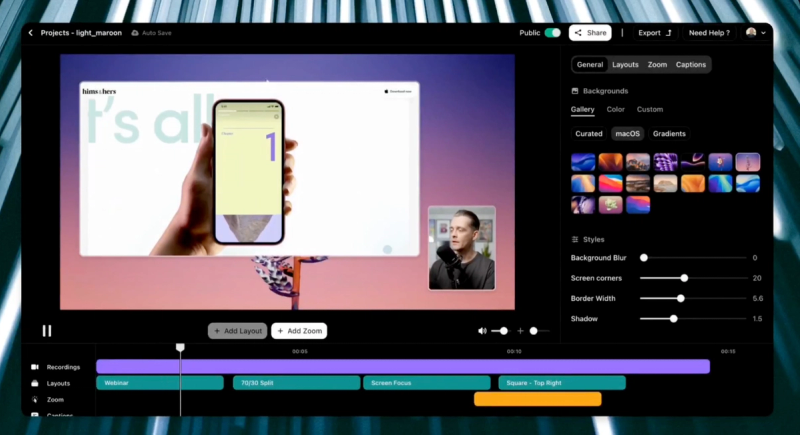
- Automatic Layouts — The tool applies professional layouts, zoom effects, and branded frames without manual editing.
- Call-to-Action Buttons — Add action buttons like "Book a call" or "Buy now" directly into the video to drive conversions.
- Video Analytics — Track real-time views, clicks, and engagement metrics for each shared video.
- 4K Recording at 120 FPS — Capture high-resolution, smooth screen recordings with system audio.
- Unlimited Recording Duration — No time limits on how long you can record.
- No Watermark — Exported videos are free of any branding watermark.
Who is it for?
- SaaS founders — Create polished product demos that convert viewers into customers without hiring a video editor.
- Content creators — Produce tutorial videos with AI-zooms and captions in minutes, not hours.
- Marketing teams — Generate high-engagement social clips and landing page videos with built-in analytics.
- Educators — Record online course lessons with clean audio and professional layouts.
What can you do with VibrantSnap?
- Indie founders — Record a screen walkthrough of your product, apply AI edits, add a "Book a call" button, and share a trackable link to your LinkedIn prospect.
- Sales teams — Create personalized demo videos with auto-captions and CTAs; track who watched and clicked to prioritize follow-ups.
- Support teams — Quickly record a solution to a customer issue, polish it with AI, and embed it in your knowledge base.
How does it work?
- Record — Capture your screen and voice directly from the browser. No software installation required.
- Apply Magic — Click one button to let AI auto-edit: remove silences, add clean layouts, and enhance voice to studio quality.
- Share & Convert — Add call-to-action buttons, copy the shareable link, and monitor views and clicks in real time.
Alternatives
- Loom — Also offers screen recording and sharing, but lacks AI auto-editing, layout automation, and detailed video analytics.
FAQ
Is VibrantSnap free?
Yes, VibrantSnap offers a free tier that lets you start recording and editing immediately. No credit card is required to begin.
Does VibrantSnap have a watermark on exported videos?
No, exported videos are completely free of any VibrantSnap watermark, even on the free plan.
What platforms does VibrantSnap support?
VibrantSnap runs entirely in the web browser, so it works on any operating system (Windows, macOS, Linux) with a modern browser. It also supports recording at up to 4K 120 FPS.
Can I track who views my video?
Yes, VibrantSnap provides analytics that show the number of views, clicks on CTAs, and engagement metrics for each shared video.
Does VibrantSnap translate captions?
Yes, the AI can generate captions in multiple languages, making your videos accessible to a global audience.