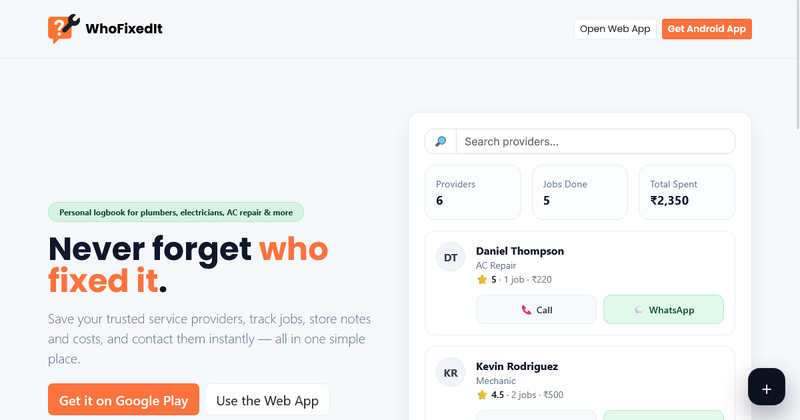
WhoFixedIt is a lightweight logbook app that helps homeowners store service provider contacts and track repair jobs, available on Android and Web. It is designed to simplify household maintenance by keeping provider details, job logs, and costs in one clean interface.
What is WhoFixedIt?
WhoFixedIt is a practical logbook application for managing home service providers and repairs. It takes as input provider names, categories, notes, and job details (date, cost, description) and produces a searchable history of repairs with quick access to contact information. The app runs on Android and as a web app at https://app.whofixedit.com/. It is developed by an independent team focused on home management tools.
Key Features
- Save providers — Store names, categories, and notes so you always remember who to call. Categories include AC Repair, Electrician, Plumber, and more.
- Track jobs & costs — Log what was fixed, when, and how much you paid in a clean history.
- Instant contact — One tap to call or WhatsApp the provider directly from the app.
- Smart categories — Filter providers by category (e.g., AC Repair, Electrician, Plumber) for quick retrieval.
- Lightweight & fast — The interface is designed to stay out of your way and load quickly, even on older devices.
- Family-friendly — Anyone at home can quickly find the right person for the right job, making it useful for households with multiple members.
Who is it for?
- Homeowners managing recurring maintenance tasks such as AC servicing or plumbing repairs.
- Renters who need to keep track of who fixed what in their rental unit.
- Families who want a shared contact log so any member can reach the right service provider.
What can you do with WhoFixedIt?
- Track a repair history: Log the date, cost, and description of each job performed by a provider, building a reference for future maintenance.
- Quickly contact a provider: With one tap, call or send a WhatsApp message to a saved provider, ideal for repeat maintenance and follow-ups.
- Organize providers by category: Filter your list by category such as Electrician or Plumber to find the right specialist instantly.
How does it work?
The app follows a simple workflow: first, add a provider with their name, category, and notes. Then, log a job whenever service is performed, recording the date and cost. When you need the same provider again, tap to contact them instantly.