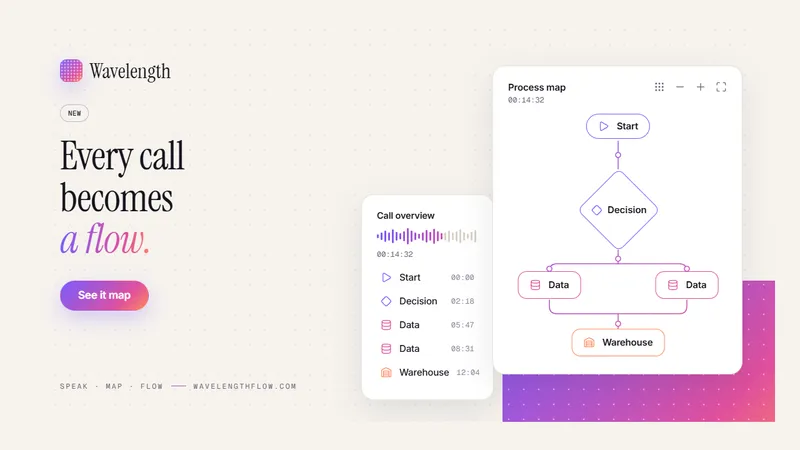
Wavelength turns a spoken conversation or a call transcript into an editable process flow diagram. You talk through a process, and the diagram builds as you speak.
What it does
- Live mic: speak the steps of a process and watch the flow build in real time.
- Paste or upload a call transcript and get a process map with steps, decisions and hand-offs.
- Chrome side panel: map a process beside a Microsoft Teams, Google Meet or Zoom call.
- Edit the flow on a canvas, then export to PNG, PDF, PowerPoint, draw.io, Mermaid or BPMN.
How it works
- Open Wavelength in the browser, or open the Chrome side panel beside your meeting.
- Hold the mic and describe the process, or paste the transcript of a recorded call.
- Wavelength builds the flow: steps, decisions and the hand-offs between teams.
- Fix any step on the canvas. Drag nodes, rename them, or ask the AI to change the flow.
- Share a link to the flow, or export it into the tool that your team already uses.
Why teams use it
Process mapping usually happens after the meeting, from memory, in a diagram tool. Wavelength captures the process while the people who run it are still talking. The result is a first draft of the current state that everyone on the call can check before the call ends.
Who uses it
Sales engineers, solution architects, consultants and business analysts who run discovery calls and process mapping workshops.
Integrations
Wavelength works inside Claude and ChatGPT through its MCP connector. See all integrations.
Pricing
Free for 10 flows with no card. Pro is $7 a month for unlimited flows. See pricing.