
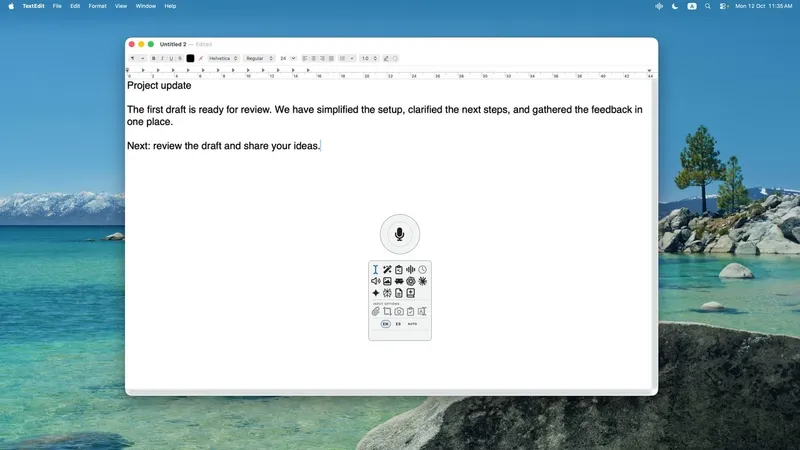
VoiceVibe lets you talk to your computer, in any app or website. Press a key and say what you need; while you speak, choose what happens: type it, transform text, ask about what's on your screen, or launch an AI chat or agent with the task. Do more without losing your train of thought.
How it works: optionally select text or files, press your key, say what you need, pick a mode, and VoiceVibe handles the rest.
Voice modes
- Voice Typing (Free): fast, accurate dictation in any app. Runs on your device and works 100% offline, no account needed.
- Voice Typing Pro: AI-enhanced transcription that cleans up what you say.
- Magic Typing: create or transform text in any app.
- Magic Clipboard: create or transform text to your clipboard.
- Voice Assistant: ask questions, chat and search the web, with your screen, selected text, clipboard or files as context, and hear the answer aloud.
- Text-to-Speech: read any selected text aloud in your chosen voice.
- AI Images: create new images or edit existing ones.
- Chat Launcher: send your words and context to any AI chat.
- Agent Launcher: speak a task, review it and hand it to an AI agent.
- Dictionary and About You: teach VoiceVibe your vocabulary and how you like things written.
Add context to any request: a partial or full screenshot, selected text, clipboard content or files.
Platforms: Windows 10 or later, macOS 14 or later on Apple Silicon, and Linux (X11; DEB and AppImage).
Pricing: Free. Pro $14.99/month or $143.90/year; Pro Max $29.99/month with four times the usage. Try Pro modes without a credit card.


