
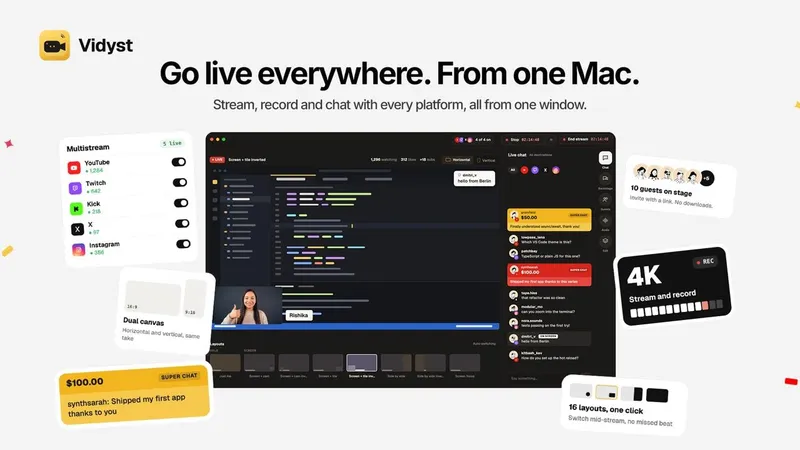
Vidyst is a macOS live streaming, multistreaming and recording app that takes one camera, screen and audio session and pushes it to YouTube, Twitch, Kick, X, Instagram, Facebook or any RTMP/RTMPS stream key. It runs on Apple silicon Macs (M1 or later) with macOS 14.2 Sonoma or later; the page lists Piyush Garg as founder. Output is a live broadcast plus a local recording up to 4K, with landscape 16:9 and portrait 9:16 canvases running from the same take.
What is Vidyst?
Vidyst is a Mac studio app for going live and recording in one session. You feed it a camera, a screen share and audio, and it produces a stream to several platforms at once plus a saved file on your Mac. Two canvases render simultaneously: a wide 16:9 frame for YouTube, Twitch and X, and a tall 9:16 frame for Shorts, Reels and TikTok. Guests join from a browser link, and the app is distributed as a direct macOS download from vidyst.com.
What makes Vidyst stand out?
- Wide and tall in one take — a single session renders landscape 16:9 and portrait 9:16 at the same time, so there is nothing to crop afterwards.
- Multistream limits by plan — Basic streams to 2 destinations simultaneously; Creator streams to 7, all from one session.
- Browser-link guests — invite by link or email; guests join from any browser with no app or account, up to 2 on Basic and 10 on Creator, with echo cancellation when a guest plays the show through speakers.
- One chat for every platform — comments from YouTube, Twitch, X and Instagram land in a single feed with a platform badge per message; you can reply, pin, or push a comment on screen.
- 16 layouts, one click — solo, screen plus cam, screen plus tile, side by side, screen focus, each with an inverted variant, switchable mid-show.
- 4K recording with crash recovery — record while live or without going live; if the Mac restarts mid-show, the recording is saved up to the moment it stopped.
- Status light — a single indicator shows live, recording, reconnecting or ready.
- On-device processing — camera, screen and audio are processed on the Mac and only leave for the destinations you stream to.
Who should use Vidyst?
- Multistreaming creators: run one show to YouTube and Twitch while the vertical cut lands on Shorts and Reels, without a second app.
- Podcasters and interview hosts: bring up to 10 remote guests on stage through a browser link and keep backstage chat hidden from viewers.
- Teachers and course creators: share a code editor or slides with a face cam and record the lesson at 4K for later editing.
- Live coders and gaming streamers: switch between screen focus and side-by-side layouts mid-session with Stream Deck control.
What can you do with Vidyst?
- Live coding sessions: put your editor full-frame with a camera corner, stream wide to YouTube and tall to Shorts, and pull a viewer question on screen from the unified chat.
- Music streams: perform live with instruments and route the same mix to every destination; the tall canvas reframes the shot rather than re-encoding a separate performance.
- Product launches: go live to several platforms at once and answer questions from every channel in one reply box.
- Tutorial recording: capture screen and audio with no stream running, and let the autosaving file survive an app crash.
How does Vidyst work?
Download the DMG, start the 14-day trial inside the app, and sign in with Apple or Google. Connect your channels, pick a layout, and press one button to start — guests arrive later via an invite link you send, and you admit them from the app when you are ready.
Pricing
Every plan starts with a 14-day free trial, no card required. Basic is $10 a month or $100 a year for solo shows: 2 streaming destinations, 2 guests, wide and tall, 4K recording and the cross-platform chat. Creator is $35 a month or $350 a year, adding 7 destinations and up to 10 guests.
FAQ
Which Macs does Vidyst run on?
Any Mac with Apple silicon (M1 or later) running macOS 14.2 Sonoma or later. It is a Mac-only app; there is no Windows or Linux build listed, and guests do not need any install because they join in a browser.
Can I stream wide and tall at the same time?
Yes. One setup goes out as landscape 16:9 for YouTube and Twitch and as portrait 9:16 for Shorts, Reels and TikTok, both live from the same take, with a side-by-side preview of both frames in the app.
Do guests need to install anything?
No. Guests open an invite link in their browser and wait to be let in; no app or account is needed. Basic allows 2 guests on stage, Creator allows 10, and echo cancellation handles guests monitoring the show on speakers.
Can I record while live streaming?
Yes. Vidyst records to your Mac while streaming, or records with no stream at all, capturing up to 4K. If the app or Mac stops mid-show, the recording is saved up to the moment it stopped.
Is Vidyst free?
It is free to download and free for 14 days with no card required, and the trial starts inside the Mac app. After that it is paid: Basic at $10 a month and Creator at $35 a month, with yearly options.


