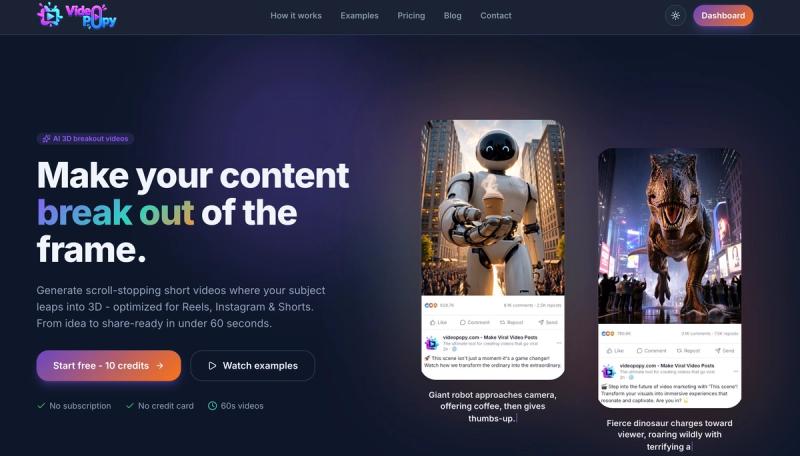
VideoPopy is an AI 3D breakout video generator that turns a text idea or product photo into short vertical clips where the subject appears to move out of the frame toward the viewer.
What is VideoPopy?
VideoPopy is a browser-based AI video generator focused on a single visual effect: the 3D breakout, where a subject — a product, character or object — appears to step out of the video frame toward the camera. It takes text prompts or an uploaded product photo as input and outputs short platform-formatted clips in 5-second and 10-second lengths, with auto aspect ratios, captions and hashtags for each destination platform. There is no software install and no subscription; accounts run on a credit balance.
What makes VideoPopy stand out?
- Signature 3D breakout effect — the tool is built around one pop-out motion style rather than general-purpose video generation, aimed at product reveals, campaign hooks and frame-breaking motion tests.
- Prompt-to-video workflow — type an idea or drop in a product photo, and the AI enhances it into a 3D-ready prompt before generation.
- Auto platform framing and feed preview — clips are auto-framed and previewed in a simulated feed for Reels, Instagram, Shorts, LinkedIn and Facebook.
- Two generation modes — Auto mode for quick results and Director mode for more manual control over the breakout.
- Export bundle — downloads include platform-optimized exports plus ready-to-paste captions and hashtags.
- Fast turnaround — the site states typically under 60 seconds for a 5s 720p clip and under 2 minutes for a 10s 1080p clip, though timing varies by model and service load.
- Pay-as-you-go credits — no subscription; $1 equals 10 credits with a $5 minimum, and every new account starts with 10 free credits.
- Full ownership of output — generated videos can be downloaded as original plus platform-optimized exports, and the user retains ownership.
Who should use VideoPopy?
- Social media marketers and community managers: produce hook-driven short clips and test aspect ratios across Instagram Reels, YouTube Shorts, X, LinkedIn and Facebook without a shoot.
- Product and ecommerce teams: turn a single product benefit into a 3D reveal, comparison or offer-led clip for launches.
- Content and SEO teams: convert FAQ answers, search questions and blog sections into short-form social assets that support organic discovery.
- Solo creators and advertisers: build prompt families for hooks, camera motion and product proof before committing budget to a full production.
What can you do with VideoPopy?
- Product launch clips: turn one product benefit into a focused 3D reveal, comparison or offer-led short video.
- Short-form SEO assets: convert search questions, FAQ answers and blog sections into social clips that support organic discovery.
- Prompt testing workflow: create prompt families for hooks, camera motion, product proof and platform-specific variants, then compare results before scaling.
- Platform-format testing: generate one concept and see it auto-framed for Reels, Shorts, Instagram, LinkedIn and Facebook with matching captions.
How does VideoPopy work?
- Describe an idea in text or upload a product photo; the AI enhances it into a 3D-ready prompt.
- Pick the target platform and layout — the clip is auto-framed and previewed in a real feed.
- Choose Auto or Director mode to craft the breakout effect.
- Download platform-optimized exports along with captions and hashtags.
Pricing
VideoPopy uses pay-as-you-go credits rather than a subscription. $1 buys 10 credits with a $5 minimum purchase, and new accounts get 10 free credits. A typical 5-second clip costs about 4 credits. Tiers are Starter ($5, 50 credits, roughly 12 videos), Creator ($10, 100 credits, roughly 25 videos), Pro ($25, 250 credits, roughly 62 videos) and Studio ($50, 500 credits, roughly 125 videos). No credit card is required to start.
Alternatives
Other tools in the AI video space include Runway, Pika, Canva AI Video and Creatify, as well as broader product-video workflows. VideoPopy narrows its focus to the 3D breakout effect and platform-ready short-form exports rather than general video editing or template libraries.
FAQ
Is VideoPopy free?
Every new account starts with 10 free credits and no credit card is required. After that it is pay-as-you-go: $1 equals 10 credits with a $5 minimum purchase, and there is no recurring subscription. A typical 5-second clip costs about 4 credits.
Which platforms does VideoPopy support?
Clips can be auto-framed and previewed for Instagram Reels and Feed, X, YouTube Shorts, LinkedIn and Facebook. Each export comes with captions and hashtags tailored to the chosen platform, so you can post without reformatting the file yourself.
How long does it take to generate a clip?
The site states typically under 60 seconds for a 5-second clip at 720p and under 2 minutes for a 10-second clip at 1080p. Actual timing varies by model and service load.
Do I own the videos I create?
Yes — you retain ownership of everything you generate and can download both the original and platform-optimized exports at any time.
What exactly is the 3D breakout effect?
It is a visual technique where the subject appears to move out of the video frame toward the viewer, creating depth and motion parallax. VideoPopy produces it through advanced prompting and smart model routing rather than a traditional 3D render pipeline.