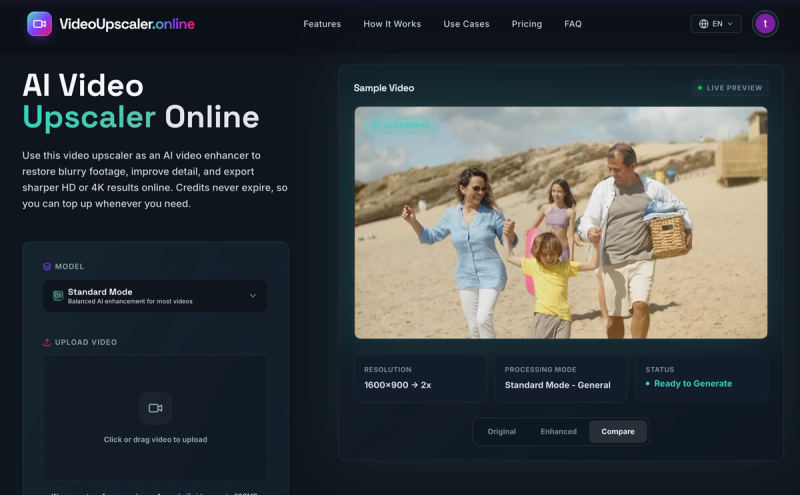
Video Upscaler is an AI-powered online tool that enhances blurry or low-resolution videos and upscales them to HD or 4K output, using credits that never expire.
What is Video Upscaler?
Video Upscaler is a browser-based AI video enhancer that restores detail, reduces noise, and sharpens compressed or low-resolution footage. It accepts video files in mp4, mov, webm, m4v, and gif formats up to 200MB and produces enhanced exports in HD, 2K, or 4K resolution. The tool runs entirely online, with no maker name explicitly stated on the page.
Key Features
- AI Video Enhancement — Uses AI to clean blurry, noisy, or compressed clips while keeping footage natural instead of over-smoothed. Processing mode includes Standard Mode - General for most real-world videos.
- HD and 4K Output — Upscale videos to 2x, 4x, HD, 2K, or 4K resolution. HD and 2K/4K options use Bytedance target resolution.
- Multiple Format and Size Support — Accepts mp4, mov, webm, m4v, and gif files up to 200MB.
- Credits Never Expire — Credits are used based on selected settings and never expire, allowing flexible usage over time.
- Fast Online Workflow — Upload a video, choose output settings, and generate enhanced results directly in the browser without software installation.
- Sample Video — A built-in sample video allows users to preview enhancement before uploading their own content.
- Live Preview and AI Compare — Original vs. enhanced comparison with live preview for side-by-side evaluation.
Who is it for?
- Content Creators — Enhance social media videos for TikTok, YouTube, and Instagram with sharper HD output that withstands platform compression.
- Restoration Projects — Bring old family tapes, archived clips, and low-resolution recordings back to life with improved clarity and detail.
- Everyday Users — Fix low-quality videos from messenger apps or downloads by reducing noise and blur instantly.
What can you do with Video Upscaler?
- Restore Old Footage — Improve clarity in vintage or blurry memories, making faces, clothing, signs, and background textures easier to recognize.
- Enhance Social Media Videos — Upscale vertical clips, reels, and shorts before reposting to look cleaner on platforms like TikTok, YouTube, and Instagram.
- Improve Creator Content — Polish tutorials, interviews, product shots, gameplay, and b-roll with sharper edges and better texture without rebuilding the edit.
- Fix Low-Quality Videos — Use noise reduction and sharpening together on compressed or downloaded clips for a balanced, natural result.
How does Video Upscaler work?
- Upload Your Video — Drag and drop or click to upload a source clip (mp4, mov, webm, m4v, or gif under 200MB).
- Choose Output Settings — Select resolution (2x, 4x, HD, 2K, 4K) and processing mode (Standard Mode - General). Credits required are displayed based on settings.
- Process and Export — Run the enhancement job and download the sharper result with cleaner edges, reduced artifacts, and higher resolution.
FAQ
What is a video upscaler?
A video upscaler uses AI to increase resolution, clean compression damage, and recover detail so low-quality footage looks sharper and more readable on modern screens.
How does an AI video upscaler work?
It analyzes each frame, improves edges and texture, reduces artifacts, and applies enhancement so the final export looks cleaner than the original source.
Can I use this video upscaler online to upscale video to 4K?
Yes. The browser-based workflow can process clips for HD or 4K output while improving clarity, texture, and overall detail.
What video formats are supported?
The tool supports mp4, mov, webm, m4v, and gif files up to 200MB.
Is a video enhancer different from a video upscaler?
A video enhancer focuses on quality improvements like noise reduction and sharpening, while a video upscaler increases resolution. This tool combines both functions.