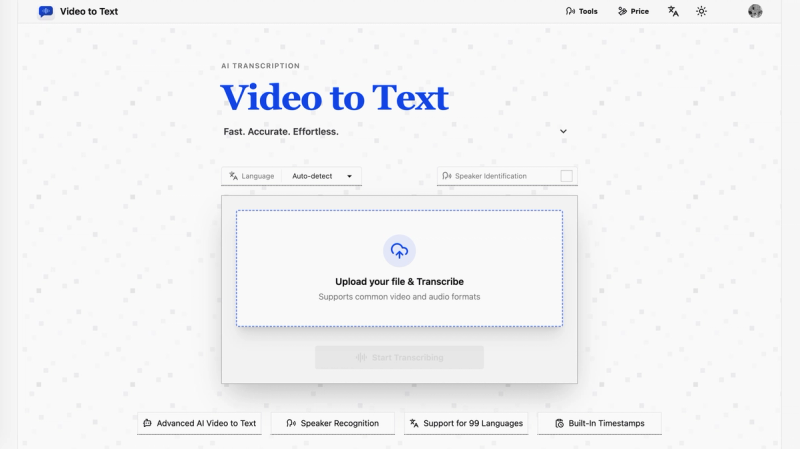
Video to Text is an AI-powered web tool that converts video and audio files into accurate, timestamped text transcripts with speaker labels, supporting 99 languages.
What is Video to Text?
Video to Text is an online AI transcription service that takes video files (MP4, MOV, MKV, WEBM, M4V) and audio files (MP3, WAV, M4A, FLAC, OGG, AAC, OPUS) as input and produces text transcripts in multiple formats. It runs entirely in the browser via a web application, with no software installation required. The tool is developed by the team behind video2text.net.
Key Features
- 99-Language Support — Automatically detects or manually selects from 99 languages, including English, Spanish, Portuguese, French, German, Italian, Chinese, Japanese, and many more. It also handles multi-language recordings (mixed languages in one file).
- Speaker Diarization — Automatically labels different speakers in conversations, interviews, and meetings, making it easy to follow who said what.
- Timestamped Transcripts — Every transcript includes timestamps, allowing users to jump to exact moments in the media, ideal for subtitle creation and content review.
- Multiple Export Formats — Export transcripts as TXT, CSV, SRT, or VTT. SRT and VTT are standard subtitle formats; CSV works with spreadsheet tools; TXT is plain text for any editor.
- Fast Processing — A one-hour audio file is typically transcribed in under one minute, depending on file size and network conditions.
- Large File Support — Upload files up to 5 GB in size with a maximum media length of 10 hours.
- Pay-As-You-Go Pricing — No subscription required. Buy minutes in bundles (200, 600, or 6000 minutes) and pay only for what you use. New users get 30 free minutes after sign-up.
Who is it for?
- Content creators and YouTubers — Generate subtitles, blog posts, and social media captions from raw footage quickly.
- Journalists and researchers — Transcribe interviews with speaker labels and export to TXT for quoting and analysis.
- Students and educators — Convert lecture recordings into searchable notes and study materials, or add captions to educational videos.
- Business professionals — Turn meeting recordings and calls into searchable notes with action items, saving hours of manual note-taking.
- Language learners — Practice listening by reading transcripts alongside audio, using timestamps to replay tricky phrases.
What can you do with Video to Text?
- Create subtitles for YouTube videos — Upload your raw footage and export as SRT or VTT to add captions that improve accessibility and watch time.
- Document meetings and calls — Record team calls, upload the audio, and get a clean transcript with speaker labels. Export CSV to pull action items directly into project trackers.
- Transcribe interviews for journalism — Convert recorded conversations into editable text. Speaker diarization saves hours of manually labeling who said what.
- Convert lectures into study materials — Record classes, get timestamped transcripts, and share written notes with students who need accessibility support.
- Practice language listening — Download podcasts or videos in a target language, use multi-language recognition to get transcripts, and read along to improve comprehension.
How does Video to Text work?
- Upload — Select a video or audio file from your device (supports all common formats). The file can be up to 5 GB and 10 hours long.
- Transcribe — The AI processes the content automatically. Processing typically takes under one minute for a one-hour file. You can choose language settings (auto-detect or manual) before starting.
- Export — Once transcription is complete, download the result in your preferred format: TXT, SRT, VTT, or CSV. The transcript includes timestamps and speaker labels.
Pricing
Video to Text uses a pay-as-you-go model with three bundles:
- Starter — $9.9 for 200 minutes ($1 per 20 minutes)
- Most Popular — $19.9 for 600 minutes ($1 per 30 minutes)
- Best Value — $99 for 6000 minutes ($1 for 60 minutes)
New users receive 30 free minutes after signing up. There is no subscription requirement; you add minutes as needed.
FAQ
What is Video to Text?
Video to Text is an AI transcription tool that converts video and audio files into text, subtitles, and timestamped transcripts. It supports 99 languages, speaker identification, and multiple export formats.
Can I use Video to Text for free?
Yes. New users receive 30 free minutes after sign-up to test the full workflow before purchasing.
How fast is Video to Text transcription?
Transcription is very fast. A one-hour audio file can often be processed in under one minute, though final speed depends on file size, upload time, and network conditions.
What file formats are supported?
Video: MP4, MOV, MKV, WEBM, M4V. Audio: MP3, WAV, M4A, FLAC, OGG, AAC, OPUS. Maximum file size is 5 GB with a maximum duration of 10 hours.
Does it support multiple speakers and languages?
Yes. Video to Text includes automatic speaker diarization, automatic language detection, and multi-language recognition for recordings that mix languages. It supports 99 languages overall.
What happens after I upload my file?
Uploaded files are stored temporarily. To keep your transcript, you must export the result after processing. The system charges your balance only after successful transcription completion.