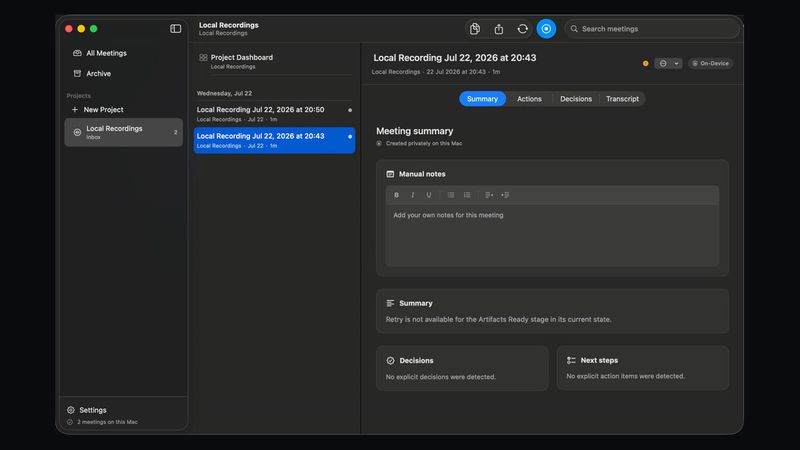
Vemoir is a native macOS meeting recorder and transcription app that captures microphone and system audio, transcribes locally, and turns each call into minutes, decisions, action items, and follow-up drafts. It runs on Apple silicon Macs, keeps recordings and transcripts on the Mac by default, and can export or share the summarized record when the user chooses.
What is Vemoir?
Vemoir is a native macOS application that records meetings from the menu bar, captures both microphone and system audio, and transcribes speech on the Mac. It accepts live calls or imported audio files in MP3, M4A, WAV, AIFF, CAF, and FLAC formats, then produces a timestamped transcript, structured minutes, decisions, action items with owners, and a follow-up draft. The app runs only on Apple silicon Macs with macOS Sonoma 14.2 or later, and it is local by default, with optional cloud provider models available through the user's own API key.
What makes Vemoir stand out?
- Local-first processing — Audio, transcripts, and meeting records stay on the Mac until the user explicitly exports or chooses a cloud model; local models download only when requested.
- Menu-bar capture — Recording starts from the menu bar without switching tools or interrupting the call, with a live recording indicator and explicit input/model selection before a call begins.
- On-device model library — Transcription options include Parakeet TDT 0.6B v3, Parakeet TDT 0.6B v2, Whisper Small, and Whisper Large v3; meeting-note models include GPT-OSS 20B and Qwen3 4B.
- Speaker separation and profiles — Vemoir separates anonymous speaker turns and can optionally identify the same people across meetings with local voice profiles that never leave the Mac.
- Project glossaries — Teams can add project terms, names, and acronyms so summaries use the expected language.
- Manual notes as first-class context — Notes typed during a meeting are folded into the AI-enhanced minutes, decisions, action items, and searchable transcript.
- Chat with the record — Users can ask questions across the transcript, manual notes, decisions, and project context; Vemoir answers from the meeting record and can draft artifacts without exposing raw audio.
- One-time purchase — The app costs CHF 20 once and includes every feature, with no subscription, per-meeting charge, or seat count.
Who should use Vemoir?
Team leads running recurring syncs: capture minutes, blockers, decisions, and owners after each standup without assigning a note-taker. Sales representatives on customer calls: record objections, next steps, follow-up language, and account context, then share the summarized record through macOS sharing options. Product managers in reviews: turn feedback loops into decisions, open questions, and release actions that stay linked to the meeting transcript. Recruiters and hiring managers in interviews: preserve candidate notes, scorecard evidence, and debrief action items in one local record. Customer researchers: extract themes, quotes, and pain points from interviews, then roll insights up across project meetings.
What can you do with Vemoir?
- Team syncs: record a recurring call, get minutes with decisions and owners, and keep blockers visible across meetings.
- Sales calls: capture objections and next steps, then export action items and follow-up drafts via AirDrop, Mail, Messages, Slack, or Copy Link.
- Product reviews: convert feedback sessions into decisions, open questions, and release actions tied to the transcript.
- Hiring interviews: keep candidate notes, scorecard evidence, and debrief tasks together without forwarding raw recordings around the company.
- Customer research: extract themes, quotes, and pain points, and roll project-level insights up across meetings.
- Leadership updates: share crisp summaries instead of raw recordings, using generated artifacts such as emails and updates.
How does Vemoir work?
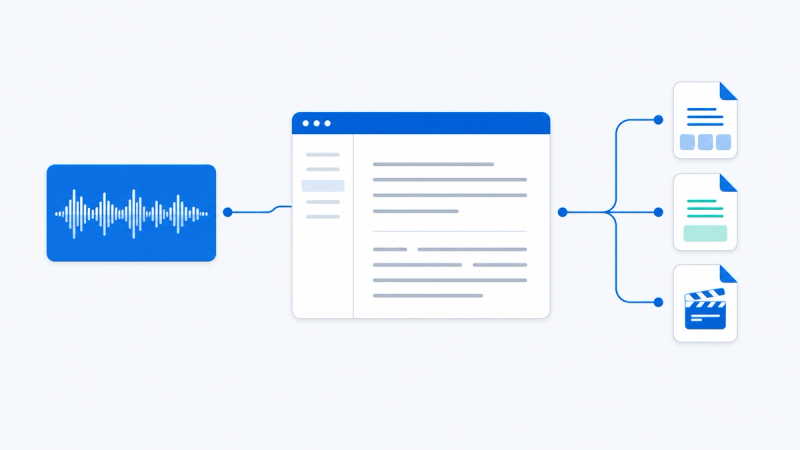
- Start recording from the Vemoir menu bar; Vemoir captures microphone and system audio and shows a live recording indicator. 2. Speech becomes a timestamped local transcript while the meeting continues, and the user can add manual notes. 3. Vemoir separates speakers, decisions, actions, and follow-up context on the Mac. 4. When the recording stops, the summary, decisions, action items, and searchable transcript stay local. 5. The user can keep the record on the Mac or share the summarized layer through native macOS actions.
Which platforms and meeting apps does Vemoir support?
Vemoir works anywhere the Mac can hear the meeting because it captures mic and system audio rather than relying on a bot or calendar integration. It supports Microsoft Teams, Slack Huddles, Zoom, Google Meet, Discord, and any other audio app on the machine. The Mac app requires Apple silicon (M1 or newer) and macOS Sonoma 14.2 or later; Intel-based Macs are not supported. Minimum requirements include 8 GB unified memory and 10 GB available storage, with 16 GB or more memory and 20 GB or more storage recommended for longer meetings or additional AI models. An internet connection is needed for initial setup and model downloads, but once selected models are installed the complete meeting workflow can run offline. Vemoir uses Screen Recording permission only to capture meeting audio from other apps; it never records screen contents. A free in-browser tool can transcribe an existing file on the device without uploading it, while live capture and stronger models stay in Vemoir for Mac.
Pricing
Vemoir costs CHF 20 as a one-time purchase with no subscription. Every feature is included; there are no tiers, no monthly fee, no charge per meeting, and no seat count. The app requires an Apple silicon Mac running macOS 14.2 or later, and optional cloud provider models require the user's own API key.
FAQ
Can Vemoir transcribe existing audio files?
Yes. Vemoir can import MP3, M4A, WAV, AIFF, CAF, and FLAC files and turn them into transcripts, minutes, decisions, and follow-up actions. A free in-browser tool can also transcribe a recording on the device without uploading it, but live capture and stronger models remain in the Mac app.
Does Vemoir upload my meeting audio?
No, not by default. Audio, transcript, and the meeting record stay on the Mac until the user explicitly exports or chooses a cloud provider model with their own API key. Local models download only when requested, and Screen Recording permission is used only for meeting audio, never for screen contents.
What Mac do I need to run Vemoir?
Vemoir requires an Apple silicon Mac with M1 or newer and macOS Sonoma 14.2 or later. Minimum specifications are 8 GB unified memory and 10 GB available storage; 16 GB or more memory and 20 GB or more storage are recommended. Intel-based Macs are not supported.
Which languages does Vemoir support?
The app interface is available in English, German, Italian, French, and Dutch. Parakeet v3 supports 25 European languages, and coverage for every other transcription model follows the selected model, with automatic language options where supported.
Can I add my own notes during a meeting?
Yes. Manual notes are treated as first-class context and are included when Vemoir creates the AI-enhanced minutes, decisions, action items, and searchable transcript. The final record carries notes, decisions, actions, and transcript context together.