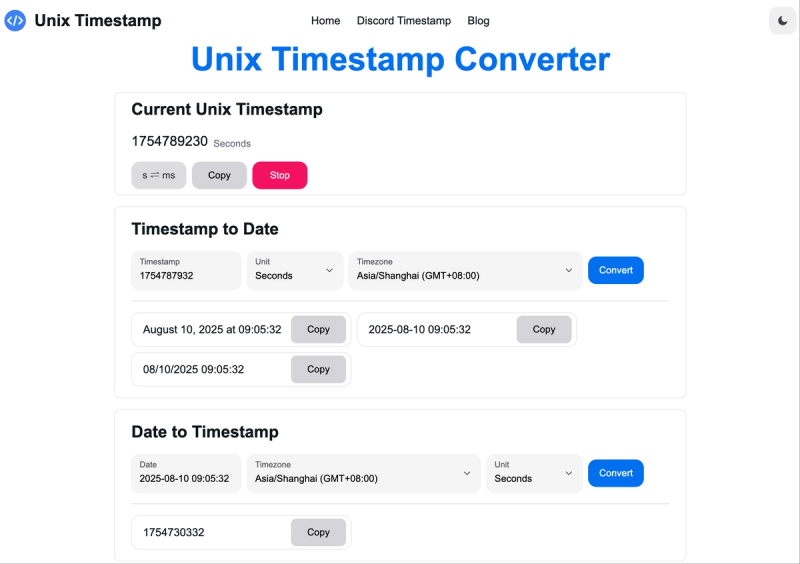
Unix Timestamp Converter is a free web tool that instantly converts between Unix timestamps and human-readable dates with timezone support and multiple format options. It serves developers and data analysts by providing bidirectional conversion, real-time current timestamp display, and code snippets for over 15 programming languages.
What is Unix Timestamp Converter?
Unix Timestamp Converter is a browser-based tool that translates Unix timestamps (seconds or milliseconds since January 1, 1970) into human-readable dates and vice versa. Input a timestamp to get a date in formats like YYYY-MM-DD hh:mm:ss or MM/DD/YYYY hh:mm:ss, or input a date to get the corresponding Unix timestamp. The tool is developed by Crazy Kids Tech (contact: [email protected]) and requires no registration.
Key Features
- Real-time Current Timestamp — Displays the current Unix timestamp in seconds or milliseconds with the ability to pause and resume refresh, plus a one-click copy button.
- Bidirectional Conversion — Convert timestamp to date or date to timestamp with support for both seconds and milliseconds units.
- Timezone Support — Choose from over a dozen timezones (e.g., America/New_York, UTC) to ensure accurate conversions worldwide.
- Multiple Date Formats — Output dates in default format, YYYY-MM-DD hh:mm:ss, or MM/DD/YYYY hh:mm:ss for flexibility.
- One-Click Copy — Copy any conversion result (timestamp or date) directly to your clipboard with a single click.
- Comprehensive Code Examples — Includes ready-to-use code snippets for 17 programming languages: Swift, Go, Java, C, JavaScript, Objective-C, MySQL, SQLite, Erlang, PHP, Python, Ruby, Shell, Groovy, Lua, .NET/C#, and Dart.
- Free and Unlimited — No usage limits, no account required, fully accessible from any modern web browser.
Who is it for?
- Backend Developers — Debug timestamp-based server logs and parse API responses with accurate timezone conversions.
- Data Analysts — Convert timestamps in database exports to readable dates for reporting and analysis.
- Frontend Developers — Display timestamps from APIs in user-friendly date formats across different timezones.
- System Administrators — Schedule tasks and analyze system logs by converting between timestamps and dates.
What can you do with it?
- Debug logs — Convert Unix timestamps from error logs into human-readable dates to pinpoint issues.
- API integration — Convert dates to timestamps for API request parameters and parse timestamp responses.
- Cross-timezone collaboration — Ensure date consistency when team members are in different timezones by converting timestamps to local time.
- Educational purposes — Learn how Unix timestamps work by experimenting with conversions and viewing the current timestamp.
How does it work?
- Select conversion direction: timestamp-to-date or date-to-timestamp.
- Input the value (timestamp or date) and choose the unit (seconds or milliseconds) for timestamps.
- Pick the desired timezone for the output.
- Click "Convert" — the result appears instantly with a copy button. The tool also displays the current timestamp in real-time with a pause option.
Pros and cons
- Pros: Completely free with no sign-up; supports both seconds and milliseconds; includes timezone selection and multiple date formats; provides code examples for 17 languages; handles the 2038 problem on 64-bit systems.
- Cons: No offline mode or mobile app; no API for programmatic access; limited to browser-only usage.
Pricing
Unix Timestamp Converter is entirely free. There are no premium tiers, ads, or usage limits.
Alternatives
- EpochConverter — Similar web tool but with fewer timezone options and no real-time pause feature.
- TimestampConvert.com — Offers more date formats but lacks code examples and timezone support.
FAQ
Is Unix Timestamp Converter free?
Yes, it is completely free to use with no limits on conversions. No registration or payment required.
What timezones does it support?
It supports a range of timezones including America/New_York, UTC, and many others. The exact list is not enumerated, but the tool allows selection from a dropdown.
Can I convert milliseconds?
Yes, you can choose between seconds and milliseconds for both timestamp-to-date and date-to-timestamp conversions.
How do I get the current Unix timestamp?
The tool automatically displays the current Unix timestamp in seconds at the top of the page. You can also pause the refresh and copy it instantly.
What is the 2038 problem?
The 2038 problem refers to the overflow of 32-bit signed timestamps on January 19, 2038. This tool uses 64-bit systems and handles timestamps beyond that date seamlessly.