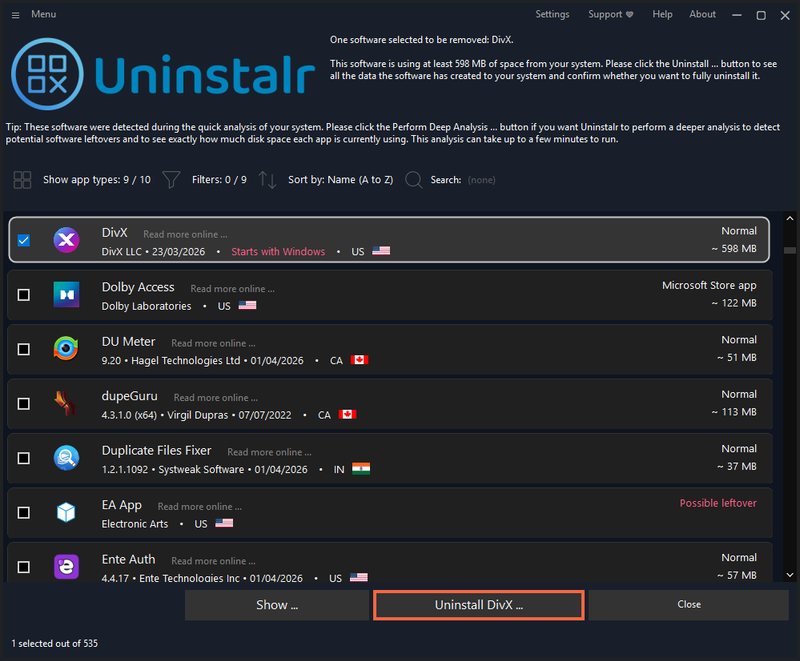
Uninstalr is a lightweight, freeware Windows application that uninstalls software in batch with unattended support and accurate disk space reporting.
What is Uninstalr?
Uninstalr is a Windows software uninstaller that scans all installed applications and allows batch removal with minimal user interaction. It supports 15 types of apps, from standard Windows programs to games from Steam, EA App, Epic Games Store, and more. The tool runs on Windows 7, 8, 10, and 11 and is developed by Great Software Company OÜ.
Key Features
- Batch uninstallation — Uninstall multiple applications at once, even if they do not support silent uninstallation.
- Unattended removal — Once started, the process completes without any user interaction.
- Custom uninstallation engine — Detects and removes 15 app types: normal Windows apps, Microsoft Store apps, portable apps, Chocolatey, Ninite, PortableApps.com, Steam, EA App, Epic Games Store, Riot, GOG Galaxy, WarGaming.net, Battle.net, itch.io, and Big Fish platform games.
- Real-time disk space display — Shows accurate, calculated size data instead of relying on Windows' built-in (often inaccurate) listing.
- Search, sort, and filter — Quickly locate specific applications in a clean, organized list.
Who is it for?
- Windows users with many apps to clean — Batch uninstall unwanted programs without clicking through each uninstaller.
- Gamers — Manage and uninstall games from multiple platforms (Steam, EA App, Epic Games Store, etc.) in one go.
- IT pros — Use unattended mode to automate uninstallation across multiple machines.
What can you do with Uninstalr?
- Free up disk space — See exactly how much space each app uses and remove large, unused programs in batch.
- Remove leftover game installations — Uninstall games from different launchers (Steam, Battle.net, etc.) with a single action.
- Clean up after software trials — Uninstall multiple trial apps simultaneously, even if they do not support silent removal.