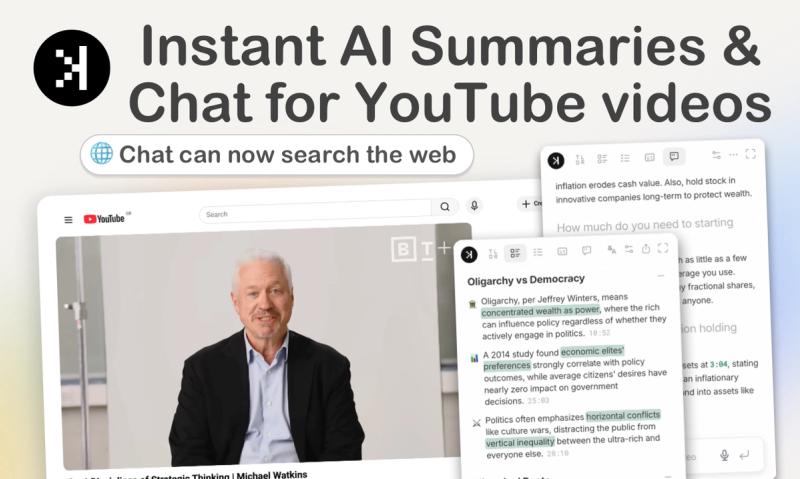
SkipBait is a Chrome extension that uses AI to generate timestamped summaries of YouTube videos and lets users chat with video content using web search, all without leaving YouTube.
What is SkipBait?
SkipBait is a free Chrome extension for YouTube that provides AI-generated summaries with timestamps, honest titles, transcripts, and a chat feature that answers questions using both the video transcript and live web searches. It runs on any Chromium-based browser.
Key Features
- Honest title + TLDR: Rewrites clickbait titles to reflect actual video content with a one-sentence summary.
- Timestamped AI summary: Breaks long videos into sections with bullet points and timestamps.
- Actionable insights: Extracts specific recommendations and to-dos from the video.
- AI chat with web search: Ask questions; answers are grounded in the video transcript and online sources.
- Instant transcripts: View and download full transcripts; supports translation into 50+ languages.
- Expanded mode: Open the extension in a larger panel for focused reading.
- View history: Quickly revisit previously summarized videos.
Who is it for?
Anyone who watches YouTube and wants to save time—students reviewing lectures, professionals catching up on conference talks, researchers extracting key points from long-form content, or casual viewers who want honest summaries before committing to a video.
Pricing
Free tier: 2 AI summary bundles per day, unlimited transcripts, and a monthly quota for chat messages and translations.
FAQ
Is SkipBait free?
Yes, the free tier includes 2 AI summary bundles daily, unlimited transcripts, and a monthly quota of chat messages and translations.
What does each SkipBait summary include?
Each summary includes an honest title, a TLDR, a timestamped outline, and actionable takeaways. See the demo on the site.
How do I start using SkipBait?
Install the extension from the Chrome Web Store, then visit any YouTube video page to generate summaries and view transcripts.
Does SkipBait work on long YouTube videos?
Yes, as long as the video has usable transcript data. Live streams or videos without transcripts may not be supported.