
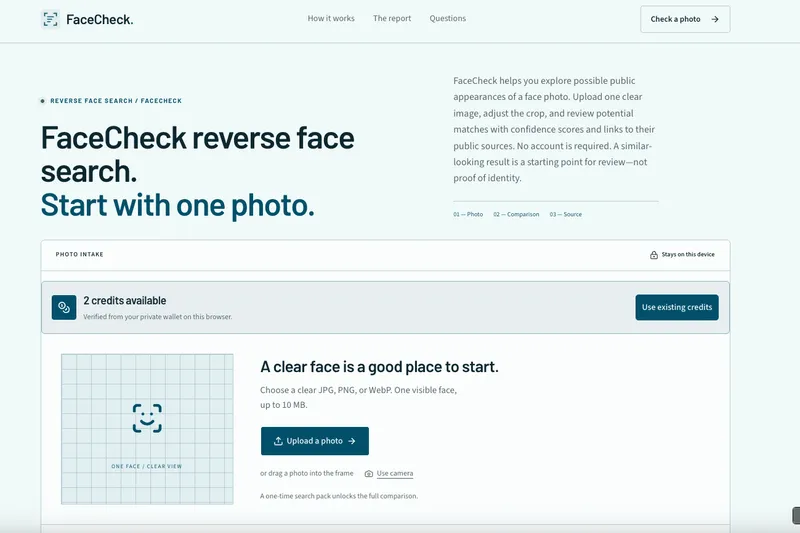
Sherlock Search is a browser-based public photo identity check: upload one face photo (JPG, PNG, or WebP, up to 10 MB) and it returns possible visual matches linked back to the original public pages where those images appear.
What is Sherlock Search?
Sherlock Search is a reverse face search service that compares a single uploaded photo against publicly available web indexing and returns a private report of possible public appearances, each with a confidence band and a route back to its source page. The input is one clear face photo — JPG, PNG, or WebP, up to 10 MB, supplied by file picker, drag-and-drop, paste, camera, or photo library — and the output is a report grouping leads as Strong Match, Likely Match, or Unlikely Match. Everything runs in a web browser: photo framing and preparation stay on the device, no account or payment card is required, and the site identifies itself as an independent commercial search service that is not affiliated with the social platforms named as possible coverage areas.
What makes Sherlock Search stand out?
- Source-linked leads instead of thumbnails — every match points back to the public page where the image appeared, so you can inspect when, where, and how it was posted.
- Confidence bands, not verdicts — leads are labeled Strong Match, Likely Match, or Unlikely Match, and the site states that a high score means shared visible facial characteristics rather than legal identity, ownership, intent, or wrongdoing.
- In-browser photo preparation — you drag and zoom to frame one face before any comparison begins; the preparation step is explicitly not presented as a completed web search.
- No registration required — free access is confirmed through a readiness check rather than an account, card, subscription, or automatic renewal.
- Up to 24-hour media retention — uploaded search media is kept for no more than 24 hours, and an emailed recovery link is provided for reviewing the private report.
- Stated format and size limits — accepts JPG, PNG, and WebP files up to 10 MB, with camera and photo library options for mobile uploads.
- Named coverage areas with an explicit caveat — the page lists X (Twitter), Instagram, TikTok, YouTube, Facebook, Threads, Pinterest, LinkedIn, Telegram, OnlyFans, Tinder, and Hinge, while stating plainly that coverage is not a platform guarantee.
How does Sherlock Search work?
The check is split into four separate stages. First, frame the face: choose a clear image and drag or zoom until one face is easy to inspect. Second, confirm free access without a card or account. Third, confirm the final photo — the provider comparison starts only at this point. Fourth, inspect the source: open the relevant public pages and compare names, dates, captions, and history.
Who should use Sherlock Search?
- People vetting a new online contact — check whether a dating or social profile photo also appears under a different name, account history, or posting date.
- People whose own photo is circulating — search an image they own, preserve the public URLs, and separate credited publication from misleading impersonation before filing a report.
- Anyone running a manual identity review — use the confidence bands to order which leads are worth opening and corroborating first.
- Users who need evidence before acting — the workflow is built around opening the original page before reporting or accusing anyone.
What can you do with Sherlock Search?
- Verify a dating profile: upload the profile picture from a Tinder or Hinge match and review whether the same face appears on other public pages under different names.
- Catch photo reuse: search a photo you own and collect the public pages where it appears so you can document a case of reuse rather than relying on a crop.
- Triage a report: when several matches come back, use Strong, Likely, and Unlikely bands to decide the review order.
- Build a report trail: gather source links, posting dates, and captions from the original pages before submitting a platform report.
Pros and cons
- Pros: no account or card needed during free access; leads link to verifiable public pages; existing paid searches stay saved; media retention is capped at 24 hours.
- Cons: private, removed, blocked, or unindexed pages never appear; a zero-match report does not prove the face is absent online; similarity scores reflect visible facial characteristics only and cannot confirm identity or intent.
Pricing
Search access is currently free and requires no card, account, subscription, or automatic renewal. The site notes that previously purchased paid searches remain saved and are not consumed while free access is active.
Alternatives
- PimEyes
- Google Lens
FAQ
Is Sherlock Search free?
Yes — search access is currently free and does not require a card, account, subscription, or automatic renewal. Previously purchased paid searches remain saved and are not consumed while free access is active.
How long does Sherlock Search keep my uploaded photo?
Uploaded search media is retained for up to 24 hours. Keep the emailed recovery link until you have finished reviewing the private report, because the media itself is not kept long term.
Can Sherlock Search open private, deleted, or blocked profiles?
No. It checks possible matches connected to publicly available web pages only, and cannot open private profiles, deleted pages, or content blocked from the search provider. A platform named in the coverage list is not a guarantee of coverage.
What does a high similarity score mean?
A high score means the images share visible facial characteristics. It does not establish a legal identity, ownership, intent, or wrongdoing, so the original page should be opened and compared on name, date, and caption first.
What happens if no match appears?
A zero-match report does not prove the face is absent online. Public indexing, privacy settings, image quality, and removed pages all affect coverage, so an empty report reflects those limits rather than a conclusion.


